

CC Digital 14 Watch Face
CC Digital 14 Watch Face is made and published by Cave Club. AppBrain is an independent app data site and isn't affiliated with Cave Club. The app name, icon, screenshots and description belong to Cave Club and are shown as published on Google Play.
AppBrain's verdict
Niche- Total installs
- 190
- Last updated
- July 25, 2025
CC Digital 14 Watch Face is a niche app, with 190 installs. It doesn't have enough ratings yet to judge what users think.
Installs
Tracked by AppBrain- Last 30 days
- 5
- Play install range
- 100+
- Launched
- June 2024
Installs over time
CC Digital 14 Watch Face has been installed 190 times. Over the past 30 days, it has been installed 5 times.
Rankings
Google Play top chartsGoogle Play Rankings for CC Digital 14 Watch Face
Competitors
Similar apps and more from Cave ClubAlternatives to CC Digital 14 Watch Face


More from Cave Club


Releases
Updates seen on Google Play- Version
- 50
- Launched
- June 2024
User feedback
Ratings and reviews on Google PlayComments on CC Digital 14 Watch Face for Android
Technology
Found in the app by AppBrain- Ads
- No ads
- Price
- $0.49
- Libraries
- ?
- App size
- 1.63 MB
- Content rating
- Everyone
Technologies used by CC Digital 14 Watch Face
About the app and developer
About CC Digital 14 Watch Face
CC Digital 14 Watch Face is a personalization app developed by Cave Club.
How many times has CC Digital 14 Watch Face been installed?
CC Digital 14 Watch Face has been installed 190 times. In the last 30 days, the app was installed 5 times.
What is the rating of CC Digital 14 Watch Face?
CC Digital 14 Watch Face has no ratings yet.
Is CC Digital 14 Watch Face free?
CC Digital 14 Watch Face costs $0.49. The app size is 1.63 MB. The latest version available is 50. The last update was on July 25, 2025.
What are the requirements for CC Digital 14 Watch Face?
The app has a content rating of Everyone. The app has been available on Google Play since June 2024.
App Performance Report
Get a detailed PDF report for CC Digital 14 Watch Face with download trends, rating history, and key performance statistics — useful for competitive research or tracking your own app. Learn more
Get PDF Report — $29Developer information for Cave Club
Store listing
By Cave Club, from Google Play“Modern minimal Digital Watch Face for Wear OS”


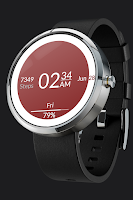
Description by Cave Club Written by the developer, not by AppBrain. Click to read.
Minimal Digital Watch Face.
★ Features:
• Time (Auto 12/24h)
• Date
• Steps *
• Battery status
• Heart Rate (BPM) *
• Weather *
• Total 5 Complications (Free to edit)
+ AOD
+ 10 color style options
// LOOP Note //
If you're stuck at the payment loop (Play Store asks you to pay again), this could be a sync problem between your watch and Google Play server. You can try disconnecting / reconnecting the watch from your phone and try again. To do this quickly, set the "Airplane mode" on watch for 10 seconds. Please see "Note before purchasing" and "Installation Notes".
Note before purchasing:
You don't have to worry , Google can charge you only one time for the content purchased from the same Google (Play Store) Account.
Sometimes the Play Store takes a little longer to confirm that you already bought the face watch app. Any additional order will be automatically refunded by Google, you will receive the money back.
There is no way to pay twice for the same watch face.
★ INSTALLATION NOTES:
You have to select your watch device from the install drop-down menu.
Select the target device in the Play Store app from the drop-down and tap on install. Download status will appear on watch, install and then select (activate) watch face. This way is preferred, if you have a problem, you can install it in two other ways, listed under, via phone companion app or web browser.
1. Make sure the watch is properly connected to the phone, open the Phone App on the phone and tap on "Tap to continue" and follow instructions on watch.
After a few minutes, the watch face will be installed. You can choose the installed watch face.
App downloaded to your phone serves only as a placeholder to make it easier to install & find the watch face on your Wear OS watch.
or
2. Alternatively, try installing the watch face from a web browser on your PC.
- Open watch face link in a web browser (Chrome, Firefox, Safari...)
on PC or Mac.
This Link:
https://play.google.com/store/apps/details?id=com.caveclub.digital14
You can search for the watch face in
play.google.com or share a link from the Play Store app.
- Click 'Install on more devices' and select your watch. You must be logged with the same Google Account.
All Watch Faces:
https://play.google.com/store/apps/dev?id=8299637161404814943
Cave Club