

CELEST5437 Military Watch
CELEST5437 Military Watch is made and published by CELEST Watches. AppBrain is an independent app data site and isn't affiliated with CELEST Watches. The app name, icon, screenshots and description belong to CELEST Watches and are shown as published on Google Play.
AppBrain's verdict
Niche- Total installs
- 270
- Last updated
- July 31, 2026
CELEST5437 Military Watch is a niche app, with 270 installs. It doesn't have enough ratings yet to judge what users think.
Installs
Tracked by AppBrain- Last 30 days
- 0
- Play install range
- 100+
- Launched
- August 2023
Installs over time
CELEST5437 Military Watch has been installed 270 times. Over the past 30 days, it has been installed 0 times.
Rankings
Google Play top chartsGoogle Play Rankings for CELEST5437 Military Watch
Competitors
Similar apps and more from CELEST WatchesAlternatives to CELEST5437 Military Watch


![[69D] AOD Watch 2 - Minimal icon](https://lh3.googleusercontent.com/ERiVsPnVtT9PQaNWjie1lwUjZcIP1m9pCDnJlnrKpldLAxC-Ffch2YSTemrnDwU4rznuL1RIgD-XC4OP09CJt95LyG7fakl3rFQ=s96)


More from CELEST Watches


Releases
Updates seen on Google Play- Version
- 44.0
- Launched
- August 2023
User feedback
Ratings and reviews on Google PlayComments on CELEST5437 Military Watch for Android
We don't have enough comments to show example comments. Please check back later.
Technology
Found in the app by AppBrain- Ads
- Contains ads
- Price
- $1.00
- Libraries
- ?
- App size
- 2.20 MB
- Content rating
- Everyone
Technologies used by CELEST5437 Military Watch
About the app and developer
About CELEST5437 Military Watch
CELEST5437 Military Watch is a personalization app developed by CELEST Watches.
How many times has CELEST5437 Military Watch been installed?
CELEST5437 Military Watch has been installed 270 times. In the last 30 days, the app was installed 0 times.
What is the rating of CELEST5437 Military Watch?
CELEST5437 Military Watch has no ratings yet.
Is CELEST5437 Military Watch free?
CELEST5437 Military Watch costs $1.00. The app size is 2.20 MB. The latest version available is 44.0. The last update was on July 31, 2026.
What are the requirements for CELEST5437 Military Watch?
The app has a content rating of Everyone. The app has been available on Google Play since August 2023.
App Performance Report
Get a detailed PDF report for CELEST5437 Military Watch with download trends, rating history, and key performance statistics — useful for competitive research or tracking your own app. Learn more
Get PDF Report — $29Developer information for CELEST Watches
Store listing
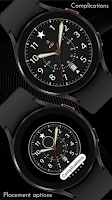
By CELEST Watches, from Google Play“Military watch face with star motif, 24-hour track, date & 9 dial colors.”



Description by CELEST Watches Written by the developer, not by AppBrain. Click to read.
Large luminous numerals ring the dial with a 24-hour track set inside them, marked by small triangles rather than a second set of numerals so it stays quiet until you look for it. The date has a labeled window at six o'clock. Bold hands come in gold or silver, and the seconds hand has six colors of its own. Nine background colors are included, the dial text can be set white, black, or hidden entirely, and hiding it opens the space for a circular complication.
🎖️ Features
- Analog military dial with a star motif at twelve
- Large luminous hour numerals
- Inner 24-hour track with triangle markers
- Labeled date window at 6 o'clock
- One optional circular complication
🎨 Customization
- 9 background colors
- Hour and minute hands in gold or silver
- 6 seconds hand colors
- Dial text in white, black, or hidden
- 1 optional circular complication, best on a dark background
- To use the complication, hide the dial text first
✅ Compatible Devices
- Google Pixel Watch/2/3/4/5
- OnePlus Watch 2/2R/3/4
- Oppo Watch X2/X3
- Samsung Galaxy Watch 4/4 Classic/5/5 Pro/6/6 Classic/7/8/8 Classic/9/FE/Ultra (2024)/(2025)/Ultra 2
- Xiaomi Watch 2/2 Pro/5
🎁 BOGO Promotion: https://celest-watches.com/bogo/
✨ Explore the complete CELEST collection in one place — including all Wear OS, HUAWEI, and Apple Watch faces, along with our apps and tools — with the CELEST Catalog app: https://play.google.com/store/apps/details?id=com.celestwatches.catalog
🔧 Installation Help
Having trouble? We've got you covered:
- Use the dropdown menu next to "Install" on your phone to select your watch model or install directly from your watch's Play Store app.
- Updating weather data (if the watch face shows weather) may take time after installation but switching to another watch face and switching back or restarting both the watch and phone usually helps.
- Check out our installation and troubleshooting guide: https://celest-watches.com/installation-troubleshooting/
- Contact us at info@celest-watches.com for quick support
📞 Support & Community
📧 Support: info@celest-watches.com
📱 Follow @celestwatches on Instagram and subscribe to our newsletter to get notified of new releases and deals: https://celest-watches.com/newsletter/
Recent changes:
Updated to target Android 16 (API 36).