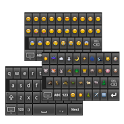
Emoji Keyboard was a tools app developed by klncity1. It was removed from Google Play Dec 26, 2014 and is no longer available for download.
Download Statistics
Emoji Keyboard had been downloaded 22 million times before it became unavailable.
User Ratings
Emoji Keyboard was rated 3.40 out of 5 stars, based on 200 thousand ratings.
App Information
Emoji Keyboard was free to download. The APK download size was 709.29 kB. The last available version was 1.05. The last update was on June 16, 2011.
Technical Requirements
Emoji Keyboard required Android 2.1+ or higher. The app had a content rating of Everyone. The app had been available on Google Play May 2011.
Description
Strongly Recommend to Read the following instruction before install this app.
★★★This app is NOT able to display Emoji★★★
─────────────────────────────────────────────
This is the Keyboard to input Emoji icons in everywhere such as email, twitter, sms…… together with the normal English keyboard which make input Emoji more convenience.
Main features: ★ Swipe left/right to different page of the same category emoji. ★ Click on the category to move to next page. ★ Swipe left/right to swap between alphabet & numbers keyboard. ★ Also, Input symbol such as ♥★♪♬◢◣◤◥♂♀▲▼█■㏂㏘ ✔✘∴∵⇦⇧⇨⇩‧ツ─…
─────────────────────────────────────────────
To enable the Emoji Keyboard, please go to home -> Setting -> Language & Keyboard, then check the Emoji Keyboard to enable it.
To use emoji keyboard, you need to change the input method In Gingerbread (Android 2.3.x), change the input method by holding the Text Box, and select the "Input Method", then choose Emoji Keyboard.
In Ice Cream Sandwich (Android 4.0.x), change the input method by chick on any text box, then drag down the notification bar and select "Select Input Method", then choose Emoji Keyboard. If you have issue, please send me an email. Please don't comment below only as I can't reach you directly from the section below. Thanks! klncity1@gmail.com http://twitter.com/#!/klncity1
Limitation: This app is not able to make Android to display the emoji as Android is not natively support Emoji
─────────────────────────────────────────────
If you want to see the Emoji icon on your device, please follow the steps below to replace the font. 1. you need to have a rooted device. For how to root your device, please google it yourself. 2. backup /system/fonts/DroidSansFallback.ttf by adb or Root Explorer 3. download the font with emoji from http://www.sendspace.com/file/hwk72t 4. replace the font in /system/fonts/DroidSansFallback.ttf by the "downloaded font" by adb or Root Explorer 5. if you use Root Explorer, please press "Mount R/W" on the top right corner to enable the write permission on /system/fonts/ 6. set the file permission of the font as below user = read & write group = read others = read
If you have used Font Changer to update the font previous, please use Font Changer to replace the system font to Emoji Font. Otherwise some of the Emoji could not been shown up.
◆◆◆◆ or you can download Emoji Font Updater below ◆◆◆◆ http://market.android.com/details?id=com.klncity1.emojifontupdater
Once more, please backup before you do anything.
If you don't have the emoji font, the emoji can still be sent correctly although it doesn't shown up on the screen. In addition, you can use this keyboard together with Whatsapp or others apps which support emoji.
Recent changes: Version 1.05 Additional Symbols from Unicode has been added. ♥★♪♬◢◣◤◥♂♀▲▼█■㏂㏘ ✔✘∴∵⇦⇧⇨⇩‧ツ─…
Version 1.04 Fixed Cap Lock issue. Double click shift to enable/disable Cap Lock.
Version 1.03 Fixed missing input characters after input symbol.
Version 1.02 Hold "123","ABC" or ":)" will show up the keyboard selection dialog box.
Version 1.01 Fix jumping issue when input before a word.
Get a detailed PDF report for Emoji Keyboard with download trends, rating history,
and key performance statistics — useful for competitive research or tracking your own app.
Learn more
★★★★★
it's good app. I don't hate something here in this app. Super like it :)
★★★★★
Works Great! Im an android user but, this emoji app works great on my phone. And it doesnt consume too much data. I love it!!!
★★★★★
Yea nice app Good app
★★★★★
Good Cool love the simplicity
★★★★★
Its Awesome! Its A Great App. I Have A Nook tablet and can't c the emojis but I understand why. The Emojis don't show up on Androids and Tablets that aren't made by Apple. It Doesn't Mean the keyboards bad. Because huh ha ehm its Da bomb!
★★☆☆☆
It doesn't work on my phone For sum reason and when I downloaded it, it said that it would work on my phone.......and its not so u people that own this app needs to fix it
★★☆☆☆
No show I couldn't see almost all the emoticons. But other people could see them when i used them
★★☆☆☆
Absolutely TERREBLE!!WORST APP EVER!!!!! It doest have emojis!!!It doesnt even show up on my phone!! Im uninstalling straight away!!!!!!!!!!!!!!!!!!!!!!!!!!!!!!!!!!!!!!!
Technologies used by Emoji Keyboard
Subscribe to see full permission and library details
Each subscription will automatically renew 3 days before the expiration date for
the same time period. Subscriptions can be cancelled at any time before the renewal.