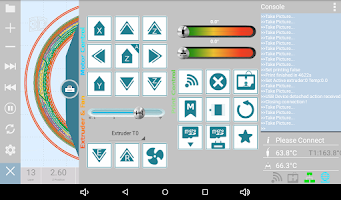
GCodePrintr - The 3D Print App is a niche app, with 9.3 thousand installs. Users are divided: 3.8 stars from 190 ratings.
GCodePrintr - The 3D Print App is made and published by
MDCode.
AppBrain is an independent app data site and isn't affiliated with MDCode.
The app name, icon, screenshots and description belong to MDCode and are shown as
published on Google Play.
About GCodePrintr - The 3D Print App
GCodePrintr - The 3D Print App is a tools app developed by MDCode.
How many times has GCodePrintr - The 3D Print App been installed?
GCodePrintr - The 3D Print App has been installed 9.3 thousand times. In the last 30 days, the app was installed 5 times.
What is the rating of GCodePrintr - The 3D Print App?
GCodePrintr - The 3D Print App is rated 3.82 out of 5 stars, based on 190 ratings.
Is GCodePrintr - The 3D Print App free?
GCodePrintr - The 3D Print App costs $3.99. The app size is 8.09 MB. The latest version available is 3.66. The last update was on February 24, 2024.
What are the requirements for GCodePrintr - The 3D Print App?
GCodePrintr - The 3D Print App requires Android 4.1+ or higher. The app has a content rating of Everyone. The app has been available on Google Play since November 2013.
Description by MDCode(from Google Play)
GCodePrintr enables you to use any Android tablet or phone as a touch screen for your 3D printer and to run 3D prints without the need for having a PC running.
Get a detailed PDF report for GCodePrintr - The 3D Print App with download trends, rating history,
and key performance statistics — useful for competitive research or tracking your own app.
Learn more
Are you the developer of this app? Join us for free to see more information about your app and learn how we can help you promote and earn money with your app.
Comments on GCodePrintr - The 3D Print App for Android
★★★★★Douglas Mousseau· Oct 14, 2017
Works great, better than my PC as a frontend for the printer. Really no issues for me. At this point, I use this app on a cheap tablet for all of my printing.
★★★★★A Google User· Dec 13, 2014
Very good Just plug in an usb otg, the printer, and I was good to go, excellent job!
★★★★☆Carlos Cervantes· Jul 21, 2017
Been using this program on my spare Samsung Tab 3 7". By factory, it does not work, because the Tab 3 7" does not support OTG out the box. After rooting and installing CM12 (Android 6), I have OTG. Program works very well, better than I anticipated. 1 issue I've been coming across is - it will force close when entering the app during a print, or after a print, into a second print. Not sure if this is due to system memory, or because of hiccups. One thing I'd like to see - treating the gcode receiving port as a wireless print server for slicing programs to send directly to. I'm fairly new in the 3d printer scene, so I'm not sure if this can be done. 4/5 due to random force closes.
★☆☆☆☆Adam Wayne· Apr 2, 2022
Would love this if it supported ender 3. Is there a way to make this work for reality ender 3?
★★☆☆☆turb0sn8l gaming· Aug 14, 2016
Won't load Hi guys. My loading keeps failing. I get all my files from thingies
★☆☆☆☆Michael Connolly· Feb 5, 2020
I revised my rating to one star because it turns out to be useless. I installed this app on an old Samsung Galaxy S3. It works but sadly loading gcode files takes forever. My previous rating was based on small one layer test files. Normal gcode files take way too long. The FAQ attributes this to the app parsing and calculating and blames Android for allocating memory in small chunks. Whatever the cause the performance is unacceptably slow.
★☆☆☆☆Leonardo Chen· Jun 4, 2019
I can't get connecting to my CTC replicator, please help
Google Play Rankings for GCodePrintr - The 3D Print App
This app is not ranked
Technologies used by GCodePrintr - The 3D Print App
15 permissions·19 libraries
Subscribe to see full permission and library details
Each subscription will automatically renew 3 days before the expiration date for
the same time period. Subscriptions can be cancelled at any time before the renewal.