

Grid Maker for Instagram Post
Grid Maker for Instagram Post is made and published by Tenet Studio. AppBrain is an independent app data site and isn't affiliated with Tenet Studio. The app name, icon, screenshots and description belong to Tenet Studio and are shown as published on Google Play.
AppBrain's verdict
EstablishedWell rated- Total installs
- 48 thousand
- Rating on Google Play
- 4.00
- 193 ratings
- Last updated
- September 21, 2026
Grid Maker for Instagram Post has 48 thousand installs. Users rate it well: 4.0 stars from 193 ratings.
Installs
Tracked by AppBrain- Last 30 days
- 670
- Per day
- 22
- 30-day average
- Play install range
- 10+ thousand
- Launched
- December 2020
Installs over time
Grid Maker for Instagram Post has been installed 48 thousand times. Over the past 30 days, it averaged 22 installs per day.
Rankings
Google Play top chartsGoogle Play Rankings for Grid Maker for Instagram Post
Competitors
Similar apps and more from Tenet StudioAlternatives to Grid Maker for Instagram Post


More from Tenet Studio


Releases
Updates seen on Google Play- Version
- 1.2.5
- Launched
- December 2020
User feedback
Ratings and reviews on Google PlayGoogle Play Rating history and histogram
Comments on Grid Maker for Instagram Post for Android
Technology
Found in the app by AppBrain- Ads
- Contains ads
- Price
- Free
- Libraries
- 20
- App size
- 10.7 MB
- Needs Android
- 4.4+
- Content rating
- Everyone
Technologies used by Grid Maker for Instagram Post
About the app and developer
About Grid Maker for Instagram Post
Grid Maker for Instagram Post is a photography app developed by Tenet Studio.
How many times has Grid Maker for Instagram Post been installed?
Grid Maker for Instagram Post has been installed 48 thousand times. In the last 30 days, the app was installed 670 times.
What is the rating of Grid Maker for Instagram Post?
Grid Maker for Instagram Post is rated 4.00 out of 5 stars, based on 190 ratings.
Is Grid Maker for Instagram Post free?
Grid Maker for Instagram Post is free. The app size is 10.71 MB. The latest version available is 1.2.5. The last update was on September 21, 2026.
What are the requirements for Grid Maker for Instagram Post?
Grid Maker for Instagram Post requires Android 4.4+ or higher. The app has a content rating of Everyone. The app has been available on Google Play since December 2020.
App Performance Report
Get a detailed PDF report for Grid Maker for Instagram Post with download trends, rating history, and key performance statistics — useful for competitive research or tracking your own app. Learn more
Get PDF Report — $29Developer information for Tenet Studio
Frequently asked questions about Grid Maker for Instagram Post
Is Grid Maker for Instagram Post free?
Yes. Grid Maker for Instagram Post is free on Google Play.
Is Grid Maker for Instagram Post still available?
Yes. Grid Maker for Instagram Post is on Google Play, and the last update we saw was on September 21, 2026.
Does Grid Maker for Instagram Post contain ads?
Yes. Google Play lists Grid Maker for Instagram Post as containing ads.
What Android version does Grid Maker for Instagram Post require?
Grid Maker for Instagram Post runs on Android 4.4 and higher.
How large is Grid Maker for Instagram Post?
Grid Maker for Instagram Post is 10.71 MB.
Is Grid Maker for Instagram Post suitable for children?
Google Play rates the content of Grid Maker for Instagram Post as suitable for everyone.
How many times has Grid Maker for Instagram Post been installed?
Google Play lists 10,000+ installs for Grid Maker for Instagram Post.
How do people rate Grid Maker for Instagram Post?
Grid Maker for Instagram Post scores 4.00 out of 5 stars, from 193 ratings on Google Play.
Who made Grid Maker for Instagram Post?
Grid Maker for Instagram Post was developed by Tenet Studio. It is listed in the photography category on Google Play.
What are the best alternatives to Grid Maker for Instagram Post?
People looking at Grid Maker for Instagram Post also look at these photography apps: Carousel Post Layout: SwipeMix, Grid Maker, Grid Post - Photo Grid Maker, Grid Maker - Giant Square Post, Pixislice - Image Splitter.
Store listing
By Tenet Studio, from Google Play“Make viral grid posts! Photo split, Swipeable carousel panorama photo & No crop”


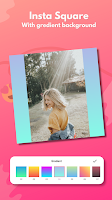

Description by Tenet Studio Written by the developer, not by AppBrain. Click to read.
Croppy is a power full Instagram post photo editor and Turn one picture into an eye-catching Instagram grid in seconds. Croppy is the 3-in-1 photo tool trusted by creators to make their profile feed stand out.
📷GRID MAKER — SPLIT PHOTOS FOR YOUR FEED
• Split photos into 3x1, 3x2, 3x3, 3x4, 3x5 … up to 3x10 grids
• Perfect grid alignment — no gaps, no misaligned tiles
• Preview exactly how your grid will look on your profile
• Post-order guide so you upload tiles in the right sequence
📷PANORAMA & CAROUSEL MAKER
• Slice wide photos into seamless swipeable carousel posts
• Design your post creatively
• Create smooth panorama crops for multi-photo posts
• Ideal for landscapes, group photos and product showcases
📷NO CROP — SQUARE FIT PHOTO EDITOR
• Post full-size photos without cropping anything out
• Blur background, solid colors and gradient backgrounds
• Rotate and flip photos horizontally or vertically
• Square fit for profile pictures and 1:1 posts
• Add text
📷 WHY CREATORS CHOOSE CROPPY
• Creates stylish Instagram posts
• Save photos in high resolution and share pictures to Instagram, Facebook, WhatsApp, Line, etc.
• Simple, fast and lightweight photo splitter
• No watermark on your photos*
HOW TO MAKE A GRID POST
1. Pick a photo from your gallery
2. Choose your grid layout (3x1 to 3x10)
3. Croppy splits the photo automatically
4. Upload the tiles in order and done! Your profile feed becomes one big picture.
Whether you need a grid maker for Instagram, a photo splitter for a giant profile mural, a panorama carousel for your travel shots, or a no crop square editor for your posts — Croppy does it all in one free app.
Recent changes:
✨Introducing Carousel Maker!✨
Create seamless Instagram carousels with a connected canvas — layers and backgrounds flow across all slides. Add text, stickers, shapes, and photos. Auto-saves drafts so you never lose progress. Export all slides in order, ready to post.