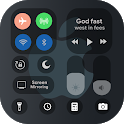
iOS Control Center for Android was a tools app developed by Black Art Tech Solutions. It was removed from Google Play Dec 5, 2022 and is no longer available for download.
Download Statistics
iOS Control Center for Android had been downloaded 220 thousand times before it became unavailable.
User Ratings
iOS Control Center for Android was rated 3.94 out of 5 stars, based on 570 ratings.
App Information
iOS Control Center for Android was free to download. The APK download size was 7.52 MB. The last available version was 1.9. The last update was on December 25, 2021.
Technical Requirements
iOS Control Center for Android required Android 4.1+ or higher. The app had a content rating of Everyone. The app had been available on Google Play February 2021.
Description
Control center ios with support icon pack and smooth animation. Control Center iOS 14 gives you instant access to the Camera, Clock, Record the screen, Screenshot, and more settings like to iOS X, iOS XS.
Control Center 2021 1). The virtual Volume button, quick touch to change volume and change sound mode 2). Easy touch to open your favorite application 3). Go to setting very quick with a touch 4) .Airplane Mode: Use Airplane Mode to instantly turn off Bluetooth, Wi-Fi, and cellular connections on your android device. 5). Wi-Fi: Turn on Wi-Fi to browse the web, stream music, download movies, and more. 6). Adjust brightness: Adjust the brightness of your display from any screen. 7). Do Not Disturb: Silence calls, alerts, and notifications that you receive while your device is locked. 8). Screen rotation: Portrait Orientation Lock, Keep your screen from rotating when you move your device. 9). Alarms and Timer: Set an alarm, timer, or stopwatch, or check the time in another country or region. 10). Flashlight Super Bright: The LED flash on your camera doubles as a flashlight, so you can get extra light when you need it. 11). Record Screen: Record any action on your phone. (Only support Android 5.0 and above) 12). Screenshot: Capture screen (Only support Android 5.0 and above) 13). Control audio: From here, you can quickly play, pause, and control the volume of your favorite song, podcast, and more. 14). Camera: Never miss a moment to take a picture with quick access to your camera. 15). Calculator: Tap numbers and functions in Calculator, just like a standard calculator. 16). Bluetooth: Connect to headphones, car kits, wireless keyboards, and other Bluetooth-enabled devices.
Control Center - quickly change settings:
1). Pin favorite application in Control Center 2). Screenshot, screen capture (Android 5.0 and above) 3). Silent, vibration, and sound 4). Brightness 5). Screen rotation 6). Wifi 7). Bluetooth 8). Volume controller: change volume ringtone, music, alarm, notification, and system sounds. 9). Flashlight 10). Mobile hotspot: easy to make a personal hotspot and share your internet. 11). Do not disturb 12). Change position of the bar (left, right, bottom) 13). Lock the screen (screen off) 14). Screen recorder be like iPhone (Android 5.0 and above) 15). Night mode (night light) and take care of your eyes
Get a detailed PDF report for iOS Control Center for Android with download trends, rating history,
and key performance statistics — useful for competitive research or tracking your own app.
Learn more
Comments on iOS Control Center for Android for Android
★★★★★
So nice app friends download it and enjoy too
★★★★★
This aap is very important U are will be this app download
★★★★★
Very good
★★★★★
I love the app
★★★★★
Super
★★★★★
Very bad
★★☆☆☆
Pappu dagada
★★☆☆☆
Monukhan
★★☆☆☆
Lots of bugs and false advertisment. The app doesn t look or feel as promised. Lots of extra features and customizability available with similar apps
★★☆☆☆
Volume is Not working on my Realme 8
Technologies used by iOS Control Center for Android
29 permissions·20 libraries
Subscribe to see full permission and library details
Each subscription will automatically renew 3 days before the expiration date for
the same time period. Subscriptions can be cancelled at any time before the renewal.