

Lock Screen S26 Style
Lock Screen S26 Style is made and published by Jalan. AppBrain is an independent app data site and isn't affiliated with Jalan. The app name, icon, screenshots and description belong to Jalan and are shown as published on Google Play.
AppBrain's verdict
EstablishedWell rated- Rating on Google Play
- 4.22
- 4,743 ratings
- Installs
- 990 thousand
- Last updated
- October 16, 2026
- Ads
- Contains ads
- Size
- 7.58 MB
Lock Screen S26 Style has 990 thousand installs. Users rate it well: 4.2 stars from 4,743 ratings.
User feedback
Ratings and reviews on Google PlayComments on Lock Screen S26 Style for Android
Google Play Rating history and histogram
Store listing
By Jalan, from Google Play“Gives a new look to your Lock screen with style S26”


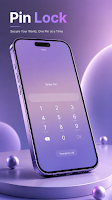


Description by Jalan Written by the developer, not by AppBrain. Click to read.
Give your Android phone a fresh and personalized lock-screen experience with a collection of customizable styles, wallpapers, animations, notifications, shortcuts, and useful information.
This app is designed as an independent personalization tool. It is **not affiliated with, endorsed by, or sponsored by any phone manufacturer or other brand**.
### 🔐 Lock Screen Features
• **Custom Lock Screen**
Replace your default lock-screen appearance with a personalized design.
• **Multiple Lock Styles**
Choose from different unlock styles, animations, sounds, and visual effects.
• **Slide to Unlock**
Unlock your device using a smooth slide interaction with customizable animations.
• **PIN & Password Options**
Set a PIN or password screen for an additional layer of lock-screen protection.
• **Custom Text**
Add your name, a message, or other custom text to personalize the lock screen.
• **Custom Wallpapers**
Choose from different wallpapers and visual styles to create your preferred appearance.
• **Live Wallpaper Effects**
Enjoy animated visual effects such as snowfall, floating particles, glowing effects, and other dynamic backgrounds.
• **Notification Display**
View supported notifications directly from the lock screen.
• **Media Controls**
Control supported media playback directly from the lock screen.
• **Weather Information**
Display weather information on your lock screen using your selected location.
• **Countdown**
Create a countdown and display it directly on your lock screen.
• **News Information**
Access configurable news information through the available lock-screen options.
• **Custom Colors**
Personalize the appearance of elements such as the clock, date, icons, and other lock-screen components.
### 🎨 Personalization
Create a lock screen that matches your style. Customize wallpapers, colors, text, animations, sounds, and other available visual elements.
Additional wallpaper and style options may be available through rewarded advertisements.
### 🔐 Permissions
**Foreground Service**
The foreground service is used for supported lock-screen functionality that needs to remain active while the feature is enabled. Android may display a system notification when a foreground service is running.
**Accessibility Service**
The Accessibility Service is used for core lock-screen functionality, including displaying the custom lock-screen interface and providing supported device-control features such as screenshots or the power menu where available. The service is only used when the corresponding functionality is enabled by the user.
**Notifications / Notification Access**
Notification access may be requested to display supported notifications and media information on the custom lock screen. Access is only used for the features that require it.
**Bluetooth / Nearby Devices**
Bluetooth-related access may be requested to support compatible Bluetooth devices and media-related functionality when required.
Permissions are used only to provide the features described in the application.
### 💬 Feedback & Support
If you experience any problems while using the app or have suggestions for improvements, please contact us through the available support channel. We will review your feedback and work to improve the application.
### ⚠️ Important Information
This application is an **independent Android personalization application**. It does not represent or claim to be an official lock screen, system application, or product of any phone manufacturer.
The app does not modify the original Android operating system. Its appearance and functionality are provided through Android-supported features and services.
Some features may vary depending on your Android version, device manufacturer, and system restrictions.
© Silky Apps Studio. All rights reserved.
Recent changes:
What's new
• Personalize now opens on Widgets, and a widget theme shows its widgets straight away.
• Weather widgets now show the weather right after your phone restarts, without opening another app first.
• Stability improvements and bug fixes.
Safety and technology
Found in the app by AppBrain- Ads
- Contains ads
- Price
- Free
- Libraries
- 50
- App size
- 7.58 MB
- Needs Android
- 6.0+
- Content rating
- Everyone
Technologies used by Lock Screen S26 Style
Releases
Updates seen on Google Play- Version
- 7.30
- Launched
- June 2019
Alternatives
Similar apps and more from JalanAlternatives to Lock Screen S26 Style


More from Jalan


Installs
Tracked by AppBrain- Last 30 days
- 7.3 thousand
- Per day
- 240
- 30-day average
- Play install range
- 500+ thousand
- Launched
- June 2019
Installs over time
Lock Screen S26 Style has been installed 990 thousand times. Over the past 30 days, it averaged 240 installs per day.
Rankings
Google Play top chartsGoogle Play Rankings for Lock Screen S26 Style
About the app and developer
About Lock Screen S26 Style
Lock Screen S26 Style is a personalization app developed by Jalan.
Install Statistics
Lock Screen S26 Style has been installed 990 thousand times. In the last 30 days, the app was installed 7.3 thousand times.
User Ratings
Lock Screen S26 Style is rated 4.22 out of 5 stars. The rating is based on 4.7 thousand ratings.
App Information
Lock Screen S26 Style is freely available from Google Play. The app size is 7.58 MB. The latest version available is 7.30. The last update was on October 16, 2026.
Technical Requirements
Lock Screen S26 Style requires Android 6.0+ or higher. The app has a content rating of Everyone. The app has been available on Google Play since June 2019.
App Performance Report
Get a detailed PDF report for Lock Screen S26 Style with download trends, rating history, and key performance statistics — useful for competitive research or tracking your own app. Learn more
Get PDF Report — $29Developer information for Jalan
Frequently asked questions about Lock Screen S26 Style
Is Lock Screen S26 Style free?
Yes. Lock Screen S26 Style is free on Google Play.
Is Lock Screen S26 Style still available?
Yes. Lock Screen S26 Style is on Google Play, and the last update we saw was on October 16, 2026.
Does Lock Screen S26 Style contain ads?
Yes. Google Play lists Lock Screen S26 Style as containing ads.
What Android version does Lock Screen S26 Style require?
Lock Screen S26 Style runs on Android 6.0 and higher.
How large is Lock Screen S26 Style?
Lock Screen S26 Style is 7.58 MB.
Is Lock Screen S26 Style suitable for children?
Google Play rates the content of Lock Screen S26 Style as suitable for everyone.
How many times has Lock Screen S26 Style been installed?
Google Play lists 500,000+ installs for Lock Screen S26 Style.
How do people rate Lock Screen S26 Style?
Lock Screen S26 Style scores 4.22 out of 5 stars, from 4,743 ratings on Google Play.
Who made Lock Screen S26 Style?
Lock Screen S26 Style was developed by Jalan. It is listed in the personalization category on Google Play.
What are the best alternatives to Lock Screen S26 Style?
People looking at Lock Screen S26 Style also look at these personalization apps: Touch Photo Lock screen, Touch Lock Screen &Touch Photo, Lock Screen OS, Keypad Lock - Phone Secure, Liquid Lock Screen: KaLock.