

Pixel Master: Pixel Art Maker
Pixel Master: Pixel Art Maker is made and published by shuo lin. AppBrain is an independent app data site and isn't affiliated with shuo lin. The app name, icon, screenshots and description belong to shuo lin and are shown as published on Google Play.
AppBrain's verdict
Niche- Installs
- 310
- Last updated
- July 21, 2026
- Ads
- No ads
- Size
- 10.4 MB
Pixel Master: Pixel Art Maker is a niche app, with 310 installs. It doesn't have enough ratings yet to judge what users think.
User feedback
Ratings and reviews on Google PlayComments on Pixel Master: Pixel Art Maker for Android
We don't have enough comments to show example comments. Please check back later.
Store listing
By shuo lin, from Google Play“Draw pixel art & turn photos into retro 8-bit art. 9 classic console palettes.”


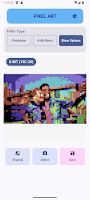


Description by shuo lin Written by the developer, not by AppBrain. Click to read.
🎨 CONVERT PHOTOS TO PIXEL ART
Pick a photo and watch it transform instantly. The live-preview engine re-renders your image the moment you move a slider or tap a palette — no apply button, no waiting.
• Adjustable resolution from chunky 16 px up to detailed 256 px wide
• Two filter modes: full-color Pixelate or palette-based 8-Bit Retro
• Real dithering algorithms: Floyd–Steinberg error diffusion and ordered Bayer — the same shading tricks vintage consoles and home computers used to squeeze extra tones out of tiny palettes
• Pinch to zoom into individual pixels, double-tap to reset the view
• Hold the compare button to flip back to the original photo at any time
• Exports keep the full resolution of your photo — the pixel look, without the blur
🕹️ 9 AUTHENTIC RETRO PALETTES
Every palette is faithfully recreated from real classic hardware:
• Game Boy — the legendary 4-shade green LCD look
• PICO-8 — the beloved 16-color fantasy console
• NES — the full Nintendo-era TV palette
• Commodore 64 & VIC-20 — warm 16-color home-computer classics
• Apple II — iconic hues from the machine that started it all
• ZX Spectrum Bright & Dim — both intensity levels of the 8-color micro
• 1-Bit — pure black and white for stark, striking artwork
✏️ DRAW YOUR OWN PIXEL ART
A clean, focused editor for original creations:
• Four canvas sizes: 8×8, 16×16, 32×32 and 64×64
• Pen with smooth drag drawing, flood-fill bucket, eraser and color picker
• Paint with colors from any of the 9 retro palettes
• Undo and redo up to 64 steps — experiment without fear
• Checkerboard transparency view, perfect for game sprites and stickers
• Your work-in-progress is kept safe while you switch between tabs
📱 HOW IT WORKS
1. Choose a photo with one tap — or open a blank canvas in the Draw tab
2. Pick a palette, set the resolution, toggle dithering and watch the live preview
3. Save to your gallery or share straight to your friends
💾 EXPORT & SHARE
• Save converted photos as full-resolution PNG to Pictures/PixelArt
• Drawings export as crisp 1024×1024 pixel-perfect PNG with transparency
• Share directly to social media, chat apps or your favorite game engine
⚡ FAST AND SMOOTH
The filter engine works at pixel-grid resolution, so even large photos preview instantly and dithering feels effortless. All heavy processing runs in the background, so the interface never freezes, and EXIF orientation is handled automatically so camera shots always come out the right way up.
🔒 PRIVATE BY DESIGN
• No ads, no account, no tracking and no internet access at all
• Photos are chosen through the Android Photo Picker, so the app never needs permission to read your gallery
• Every pixel is processed locally on your device — nothing ever leaves your phone
🎯 PERFECT FOR
• Game developers sketching sprites, tiles and mock-ups
• Streamers and gamers who want a retro avatar or custom emote
• Artists exploring the 8-bit and demoscene aesthetic
• Nostalgic wallpapers, profile pictures and pixel greeting cards
• Anyone who grew up with beeping consoles and the warm glow of a CRT
Pixel Master features a modern Material 3 design with beautiful light and dark themes, built entirely with Jetpack Compose for a fast, fluid experience on phones and tablets alike.
Download Pixel Master and start pixelating today!
Safety and technology
Found in the app by AppBrain- Ads
- No ads
- Price
- Free
- Libraries
- ?
- App size
- 10.4 MB
- Content rating
- Everyone
Technologies used by Pixel Master: Pixel Art Maker
Releases
Updates seen on Google Play- Version
- 2.00
- Launched
- May 2025
Alternatives
Similar apps and more from shuo linAlternatives to Pixel Master: Pixel Art Maker


More from shuo lin


Installs
Tracked by AppBrain- Last 30 days
- 89
- Play install range
- 100+
- Launched
- May 2025
Installs over time
Pixel Master: Pixel Art Maker has been installed 310 times. Over the past 30 days, it has been installed 89 times.
Rankings
Google Play top chartsGoogle Play Rankings for Pixel Master: Pixel Art Maker
About the app and developer
About Pixel Master: Pixel Art Maker
Pixel Master: Pixel Art Maker is a photography app developed by shuo lin.
Download Statistics
Pixel Master: Pixel Art Maker has been downloaded 310 times. In the last 30 days, the app was downloaded 89 times.
User Ratings
The app has no ratings yet.
App Information
Pixel Master: Pixel Art Maker is freely available from Google Play. The APK size is 10.37 MB. The latest APK version available is 2.00. The last update was on July 21, 2026.
Technical Requirements
The app has a content rating of Everyone. The APK has been available on Google Play since May 2025.
App Performance Report
Get a detailed PDF report for Pixel Master: Pixel Art Maker with download trends, rating history, and key performance statistics — useful for competitive research or tracking your own app. Learn more
Get PDF Report — $29Developer information for shuo lin
Frequently asked questions about Pixel Master: Pixel Art Maker
Is Pixel Master: Pixel Art Maker free?
Yes. Pixel Master: Pixel Art Maker is free on Google Play.
Is Pixel Master: Pixel Art Maker still available?
Yes. Pixel Master: Pixel Art Maker is on Google Play, and the last update we saw was on July 21, 2026.
Does Pixel Master: Pixel Art Maker contain ads?
No. Google Play does not list Pixel Master: Pixel Art Maker as containing ads.
How large is Pixel Master: Pixel Art Maker?
Pixel Master: Pixel Art Maker is 10.37 MB.
Is Pixel Master: Pixel Art Maker suitable for children?
Google Play rates the content of Pixel Master: Pixel Art Maker as suitable for everyone.
How many times has Pixel Master: Pixel Art Maker been installed?
Google Play lists 100+ installs for Pixel Master: Pixel Art Maker.
Who made Pixel Master: Pixel Art Maker?
Pixel Master: Pixel Art Maker was developed by shuo lin. It is listed in the photography category on Google Play.
What are the best alternatives to Pixel Master: Pixel Art Maker?
People looking at Pixel Master: Pixel Art Maker also look at these photography apps: Pixel Art Maker, 8Bit Photo Lab, Retro Effects, 1 bit pixels, Color Pixel Art Classic, Pixel Brush: Pixel Art Drawing.