AppBrain
AppBrain
  • Apps
  • Apps being viewed right now Trending apps today Most popular apps All-time most installed apps Top rated apps iPhone and iPad apps
  • Intelligence ▾
    Intelligence overview → Track any Android app or your whole market
    Track & analyze
    Keyword Tracker & OptimizerTrack & improve Play rankings App Performance ReportOne-off PDF for any app StatisticsFree Android & Play market stats
    Promote your app
    Featured Apps App Links
  • Intelligence
  • Pricing
  • Dashboard
  • Sign up
  • Log in
Android Apps > Tools > Remote & Mouse for Android
App profile & analytics · Tools · Data updated 2026-10-11
Remote & Mouse for Android icon

Remote & Mouse for Android

by Yuzvix · Free

“TV remote, mouse & touchpad for Android TV, Fire TV, Google TV & TV box etc.” the developer's tagline

Availability On Google Play since July 2026 ↗
Rating on Google Play
–
At a glance AppBrain's trailer of this app, made from our data
Rating
–
0 reviews
Total installs
950
Installs, last 30 days
380
Best rank
–
not in the top lists
Last updated
July 16, 2026
AppBrain's verdict Niche

Remote & Mouse for Android is a niche app, with 950 installs. It doesn't have enough ratings yet to judge what users think.

Remote & Mouse for Android is made and published by Yuzvix. AppBrain is an independent app data site and isn't affiliated with Yuzvix. The app name, icon, screenshots and description belong to Yuzvix and are shown as published on Google Play.

About Remote & Mouse for Android

Remote & Mouse for Android is a tools app developed by Yuzvix.

Install Statistics

Remote & Mouse for Android has been installed 950 times. In the last 30 days, the app was installed 380 times.

User Ratings

The app has no ratings yet.

App Information

Remote & Mouse for Android is freely available from Google Play. The last update was on July 16, 2026.

Technical Requirements

The app has a content rating of Everyone. The app has been available on Google Play since July 2026.

Description by Yuzvix (from Google Play)
Turn your Wear OS smartwatch into a complete TV remote, mouse and touchpad for Android TV, Google TV, Fire TV, Android TV boxes and Android projectors — straight from your wrist. No phone, no companion app, no extra accounts, no air mouse or keyboard dongle. Lost the TV remote or its batteries are dead? Your watch is always on your wrist. Includes a Wear OS Tile with quick TV actions right next to your watch face.

WORKS WITH:
- Android TV and Google TV (incl. Chromecast with Google TV and Google TV Streamer)
- Amazon Fire TV and Fire TV Stick (Fire OS)
- Android TV boxes (Nvidia Shield, Xiaomi and generic boxes)
- Android projectors and other Android-based media devices
- Any Wear OS 3+ watch: Samsung Galaxy Watch, Google Pixel Watch, OnePlus Watch and more

Remote & Mouse for Android connects over your local Wi-Fi using ADB (Android Debug Bridge) — the same wireless mechanism developers use to control a TV. Pair once, and your watch reconnects automatically every time.

FREE:
- One-time pairing — after that the watch connects to your TV automatically.
- D-pad navigation: up, down, left, right and OK, with haptic feedback.
- Home shortcut on a long press.
- TV power on / off.

PRO:
- Mouse cursor: a real, visible on-screen pointer on your TV — swipe to move, tap to click, double-tap for Back. Ideal for apps and browsers with no D-pad support.
- Touchpad mode: turn the whole watch screen into a trackpad — swipe to navigate, tap for OK, double-tap for Back.
- Media controls: play, pause, stop, skip, rewind, fast-forward, volume and mute.
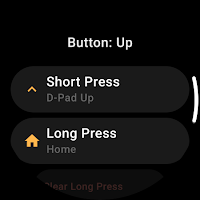
- Button remap: give each of the 5 D-pad zones its own short-press and long-press action, in Navigation and Media modes.
- Voice-to-text: speak or type on your watch keyboard and the text appears in any search box on your TV.
- App shortcuts: map a button to open an app in one tap — pick from a built-in catalog of ~40 popular apps (YouTube, Netflix etc.) or add any installed app.
- Control volume with the rotating bezel or crown.
- Always-on display: the remote stays on screen during a movie — no need to keep waking the watch.
- Multi-device support: save several TVs and fast-switch between them.
- Quick Actions Tile — see below.

WEAR OS TILE — QUICK ACTIONS:
Add the "Quick actions" Tile next to your watch face and control the TV with one swipe. Six buttons — Volume down, Volume up, Mute, Power, Home and Play/Pause by default — each remappable to any action or app shortcut. The Tile shows the TV connection status; tapping a button reconnects and sends the command even when the app is closed. Tile actions require Pro.

SETUP — PLEASE READ (Developer Options required):
1. Put the watch and the TV on the same Wi-Fi network.
2. Enable ADB / Wireless debugging on the TV:
- Fire TV: Settings > My Fire TV > Developer Options > turn on ADB Debugging.
- Android TV / Google TV / TV box: Settings > Device Preferences > About > tap "Build" 7 times to unlock Developer Options, then enable USB debugging (and Wireless debugging on Android 11+).
3. On the watch, tap "Scan network" and choose your TV.
4. Confirm the authorization dialog on the TV with its physical remote — the only step that needs the original remote. On Android 11+ and Android 14 Google TV, choose "Pair with code" and type the 6-digit code on your watch.

GOOD TO KNOW:
- Some TV boxes turn ADB off after a reboot — just re-enable it.
- If the TV is in deep sleep, wake it once with the physical remote so the watch can reconnect.

PRIVACY:
No personal data, no accounts, no ads. Your TV's local IP is stored on the watch only and never leaves your device. Only anonymous crash reports are sent so I can fix bugs.

Not affiliated with Google, Amazon, Samsung or any TV or watch manufacturer. "Android TV", "Google TV", "Fire TV", "Wear OS" and other names are trademarks of their respective owners.
Show more Show less

App Performance Report

Get a detailed PDF report for Remote & Mouse for Android with download trends, rating history, and key performance statistics — useful for competitive research or tracking your own app. Learn more

Get PDF Report — $29

Screenshots

Remote & Mouse for Android Screenshot 1 of 9
Remote & Mouse for Android Screenshot 2 of 9
Remote & Mouse for Android Screenshot 3 of 9
Remote & Mouse for Android Screenshot 4 of 9
Remote & Mouse for Android Screenshot 5 of 9
Remote & Mouse for Android Screenshot 6 of 9
Remote & Mouse for Android Screenshot 7 of 9
Remote & Mouse for Android Screenshot 8 of 9
Remote & Mouse for Android Screenshot 9 of 9
Screenshots by Yuzvix, from the Google Play listing
Official page on Google Play

Alternatives to Remote & Mouse for Android

Bluetooth Remote icon Bluetooth Remote
Frontiers Studio
4.1
Free
1,000,000+
Air Mouse Remote for PC & TV icon Air Mouse Remote for PC & TV
ConnectHID - Connect,Control,Command
4.0
Free
10,000+
Any TV Remote Control icon Any TV Remote Control
klebo
4.1
Free
100,000+
Google TV & Android TV Remote icon Google TV & Android TV Remote
Agile Works Holding B.V.
4.3
Free
100,000+
Smart TV Remote - AnyRemote icon Smart TV Remote - AnyRemote
Coco Studios
4.8
Free
10,000+
Remote for Android TV icon Remote for Android TV
Simha Software
4.6
Free
10,000,000+
Android TV Remote icon Android TV Remote
Miled Apps Studio
3.5
Free
50,000+
Remote for Android TV icon Remote for Android TV
BoostVision
4.1
Free
500,000+

More from Yuzvix

Remote for Android TV icon Remote for Android TV
Yuzvix
4.1
Free
1,000+
Remote for Roku icon Remote for Roku
Yuzvix
0.0
Free
100+
TV Remote for Samsung Smart TV icon TV Remote for Samsung Smart TV
Yuzvix
0.0
Free
100+

Installs over time

Remote & Mouse for Android has been installed 950 times. Over the past 30 days, it averaged 13 installs per day.

Changelog of Remote & Mouse for Android

Show changelog

Developer information for Yuzvix

Yuzvix

support@yuzvix.com

Sign in to see the developer's website

Legal name:

Address:

Phone number:

Are you the developer of this app? Join us for free to see more information about your app and learn how we can help you promote and earn money with your app.
I'm the developer of this app

Share Remote & Mouse for Android

Comments on Remote & Mouse for Android for Android

We don't have enough comments to show example comments. Please check back later.

Google Play Rankings for Remote & Mouse for Android

This app is not ranked

Technologies used by Remote & Mouse for Android

Frequently asked questions about Remote & Mouse for Android

Is Remote & Mouse for Android free?

Yes. Remote & Mouse for Android is free on Google Play.

Is Remote & Mouse for Android still available?

Yes. Remote & Mouse for Android is on Google Play, and the last update we saw was on July 16, 2026.

Does Remote & Mouse for Android contain ads?

No. Google Play does not list Remote & Mouse for Android as containing ads.

Is Remote & Mouse for Android suitable for children?

Google Play rates the content of Remote & Mouse for Android as suitable for everyone.

How many times has Remote & Mouse for Android been installed?

Google Play lists 500+ installs for Remote & Mouse for Android.

Who made Remote & Mouse for Android?

Remote & Mouse for Android was developed by Yuzvix. It is listed in the tools category on Google Play.

What are the best alternatives to Remote & Mouse for Android?

People looking at Remote & Mouse for Android also look at these tools apps: Bluetooth Remote, Air Mouse Remote for PC & TV, Any TV Remote Control, Google TV & Android TV Remote, Smart TV Remote - AnyRemote.

Apps other people are watching Popular Tools Apps Price drops on Google Play Top new apps Today's trending apps
Bluetooth Remote icon Bluetooth Remote
Air Mouse Remote for PC & TV icon Air Mouse Remote for PC & TV
Any TV Remote Control icon Any TV Remote Control
Google TV & Android TV Remote icon Google TV & Android TV Remote
Smart TV Remote - AnyRemote icon Smart TV Remote - AnyRemote
Remote for Android TV icon Remote for Android TV
Android TV Remote icon Android TV Remote
Remote for Android TV icon Remote for Android TV
Overview Alternatives History Reviews Rankings Technology
AppBrain Intelligence premium content

Subscribe now to get full and unlimited access to AppBrain Intelligence. You'll have access to:

  • App Intelligence dashboard (performance timeline, competitor comparison, country rankings, insight cards)
  • Detailed ranking data per app
  • Full timeline per developer
  • Device market shares data per country
  • Unlimited keyword tracking
1 Month

$75/mo
(billed every month)

SAVE 0%
Subscribe
3 Months

$65/mo
($195 billed every 3 months)

SAVE 13%
Subscribe
1 Year

$57.50/mo
($690 billed every year)

SAVE 23%
Subscribe
Each subscription will automatically renew 3 days before the expiration date for the same time period. Subscriptions can be cancelled at any time before the renewal.

AppBrain is an app data site, we track rankings, ratings, installs for all apps and games on Google Play and the App Store. AppBrain doesn't host app files or APKs, all install links go directly to the official store. All trademarks are owned by their respective owners. As an Amazon Associate AppBrain earns from qualifying purchases.

More apps

  • Top Android apps being viewed
  • View Alplakes
  • Madden NFL 27 Mobile Football
  • Ocean Fun Balls - Lucky Crash

App statistics

  • Android statistics
  • Google Play Developer stats
  • Trending Android Apps
  • Trending iOS apps
  • Top popular Apps
  • Buy the best Android phone
  • Buy & sell app businesses

About AppBrain

  • Contact
  • Privacy
  • Documentation
  • DMCA takedowns
  • Articles
  • Blog
  • Free App-Ads.Txt Validation
© 2010-2026 - AppBrain