

Downloads
Get Alert of your App Usage and keep record with screen time tracker app




AppBrain's verdict
- Rating on Google Play
- 3.67
- 123 ratings
- Installs
- 270 thousand
- Last updated
- September 27, 2026
- Ads
- Contains ads
- Size
- 9.56 MB
Screen time control App Usage has 270 thousand installs. Users are divided: 3.7 stars from 123 ratings.
User feedback
Ratings and reviews on Google PlayComments on Screen time control App Usage for Android
Google Play Rating history and histogram
Store listing
By Vidpal Apps Studio, from Google PlayDescription by Vidpal Apps Studio Written by the developer, not by AppBrain. Click to read.
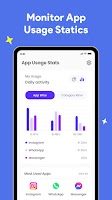
Do you ever feel like you spend more hours on your phone than you planned? Maybe you open social media “just for a minute” and realize an hour has passed. Or perhaps your kids spend too much time playing games instead of studying. That’s where Screen Time Control – App Usage Tracker comes in. This app is designed to help you take charge of your digital life by tracking how much time you spend on each app, setting limits, and building healthier habits.
🌟 Why You’ll Love It
Smartphones are powerful tools, but without limits, they can easily consume hours every day. This app makes your digital activity visible in a simple way. You’ll see exactly how long you spend on social media, videos, games, or work apps. With this awareness, you can make better choices, set boundaries, and get your time back for the things that matter most.
📊 Features That Work for You
✔ Accurate daily and weekly screen time reports.
✔ Detailed breakdown for every app you use.
✔ Customizable time schedules to plan your day.
✔ Smart app control – block or allow apps at specific times.
✔ Built-in parental control tools for families.
✔ Designed for students, professionals, and parents alike.
⏰ Build Better Habits
Instead of constantly battling distractions, set daily time limits on the apps that take up most of your time. Once you reach the limit, the app will block itself automatically, giving you the discipline boost you need. You can also create time schedules—for example, allow study apps during the day and entertainment apps only in the evening. This flexibility helps you build routines that last.
👨👩👧 For Parents Who Care
Children today are surrounded by screens, and it’s easy for them to spend hours gaming or scrolling. With Screen Time Control, you can monitor their activity, set time limits, and encourage balance between study, rest, and play. It’s a safe, simple, and effective parental control solution that gives you peace of mind while helping your kids build healthy digital habits.
💡 Boost Your Productivity
This isn’t just a parental control tool—it’s also perfect for adults who want to stay focused. Whether you’re preparing for exams, working on an important project, or simply trying to reduce distractions, this app helps you take control. Less wasted time means more productivity, sharper focus, and better results.
🔒 AccessibilityService Disclosure
This app uses the AccessibilityService API to monitor and track screen time usage. The AccessibilityService permission is required to detect which apps are being used and for how long, so that we can provide accurate reports, reminders, and digital wellbeing insights.
We do not collect or share personal data through the AccessibilityService API. The data is only used locally on your device to help you understand and manage your screen time better.
🚀 Why It Works
Good time management begins with awareness. When you see how you spend your time, you can start making changes. By setting limits and creating smart schedules, you’ll naturally find a better balance between work, study, and leisure. Students gain focus, professionals increase productivity, and parents ensure healthy routines for their children.
🌍 Who Can Benefit?
Parents looking for a reliable parental control app.
Students who need help avoiding distractions.
Professionals who want to focus better and work smarter.
Anyone who wants to cut screen time and live a healthier, more balanced life.
💬 Final Thoughts
Technology is part of our lives, but it shouldn’t control us. With Screen Time Control – App Usage Tracker, you get simple but powerful tools to manage your screen time, set boundaries, and stay focused. Whether you’re using it for yourself, your studies, your work, or your family, the results are the same: more focus, healthier habits, and better time management.
👉 Download now and take your first step toward a smarter, balanced, and distraction-free digital life!
Safety and technology
Found in the app by AppBrain- Ads
- Contains ads
- Price
- Free
- Libraries
- 23
- App size
- 9.56 MB
- Content rating
- Everyone
Technologies used by Screen time control App Usage
Releases
Updates seen on Google Play- Version
- 1.6.20
- Launched
- August 2025
Alternatives
Similar apps and more from Vidpal Apps StudioAlternatives to Screen time control App Usage


More from Vidpal Apps Studio


Installs
Tracked by AppBrain- Last 30 days
- 4.4 thousand
- Per day
- 150
- 30-day average
- Play install range
- 100+ thousand
- Launched
- August 2025
Installs over time
Screen time control App Usage has been installed 270 thousand times. Over the past 30 days, it averaged 150 installs per day.
Rankings
Google Play top chartsGoogle Play Rankings for Screen time control App Usage
About the app and developer
About Screen time control App Usage
Screen time control App Usage is a productivity app developed by Vidpal Apps Studio.
Install Statistics
Screen time control App Usage has been installed 270 thousand times. In the last 30 days, the app was installed 4.4 thousand times.
User Ratings
Screen time control App Usage is rated 3.67 out of 5 stars. The rating is based on 120 ratings.
App Information
Screen time control App Usage is freely available from Google Play. The app size is 9.56 MB. The latest version available is 1.6.20. The last update was on September 27, 2026.
Technical Requirements
The app has a content rating of Everyone. The app has been available on Google Play since August 2025.
Screen time control App Usage is made and published by Vidpal Apps Studio. AppBrain is an independent app data site and isn't affiliated with Vidpal Apps Studio. The app name, icon, screenshots and description belong to Vidpal Apps Studio and are shown as published on Google Play.
App Performance Report
Get a detailed PDF report for Screen time control App Usage with download trends, rating history, and key performance statistics — useful for competitive research or tracking your own app. Learn more
Get PDF Report — $29