

Speed Dial Pro Max
Speed Dial Pro Max is made and published by Pragma Infotech. AppBrain is an independent app data site and isn't affiliated with Pragma Infotech. The app name, icon, screenshots and description belong to Pragma Infotech and are shown as published on Google Play.
AppBrain's verdict
EstablishedWell rated- Rating on Google Play
- 4.11
- 2,044 ratings
- Installs
- 200 thousand
- Last updated
- October 20, 2026
- Ads
- Contains ads
- Size
- 25.8 MB
Speed Dial Pro Max has 200 thousand installs. Users rate it well: 4.1 stars from 2,044 ratings.
User feedback
Ratings and reviews on Google PlayComments on Speed Dial Pro Max for Android
Google Play Rating history and histogram
Store listing
By Pragma Infotech, from Google Play“Best app for easy and rapid call, email and message to your favorite with widget”




Description by Pragma Infotech Written by the developer, not by AppBrain. Click to read.
Features:
▶▶ Speed Dial page
For instant call, User can add speed dial contacts by tapping on speed dial empty cell. The default action is tap to call the contact and long press for SMS which can also be changed from the setting options (message via WhatsApp, audio / video call via WhatsApp, call reminder, email , share contact ) .There are total ten pages and user can assign names to each page. USSD and MMI codes can be saved and dialed from Speed Dial page and Dial pad.
▶▶ Groups - Group SMS and Group Email
User can now set up maximum of ten groups (for ex. Family, Business, Friends). Each Speed Dial group can have unlimited numbers of contacts. User can send group message / email to all the members in very fast and convenient way by using the inbuilt templates. User can also add quick group with default message/mail options.
▶▶ Speed Dial widget - Contact Widget
Notification Widget supports direct calling. Widget will give user an ease to call directly to the added contacts. Just tap to call the contact without having to open the Speed dial app. It will also display the contact picture and user can add as many Speed dial contacts to the quick dial widget as they want.
▶▶ Voice Command - Voice Calling and Dialing
Long Press on Speed Dial Pro Max logo on Speed dial home page for voice command dial, speak name to instantly call.
▶▶ Call Reminders
User can long press on the speed dial contacts to set multiple call reminders with customized notes. This will remind user on specific time along with the note. User can keep it “one time” or can repeat the reminders daily, weekly, yearly.
▶▶ T9 Dial pad - Fast dialer search
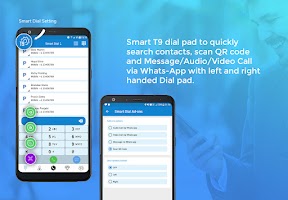
T9 Dial-pad will be used to call any number from the Speed Dial App. It includes search facility which searches your contacts by name and number in smart T9 fashion. It can also be used in left handed or right handed mode.
▶▶ T9 Dial Add-ons
User can select scan QR code on the T9 Dial-pad or can set chat via WhatsApp, Audio or Video call via WhatsApp as a quick access option.
Scan QR option will allow user to scan QR code from gallery as well as from camera. It will make a call if it is a Call QR code, send SMS if it is a SMS QR code, browse user to the valid link if it is Link QR code or it will show data.
▶▶ A complete Phone book
A refreshing phone book to easily add new contacts and edit information like photo, email and phone numbers. Easy inline icons to SMS and Call.
▶▶ Customize Speed Dial Screen
Customize your own Speed Dial Screen using custom background with Blur & Tint facility. Change Speed dial icon shape with Round, Square & Rounded Square. Also user can opt for black or white theme.
Single click and long click action can also be customized from the main setting page.
▶▶ Backup your Contact
User can take Contact backup of all or desired contacts from the phonebook section and can share or transfer backup files.
▶▶ SpeedMoji
User can now add SpeedMoji to any contacts. SpeedMojis are good replacement for any photo. User can make their Speed dial page interesting by adding SpeedMoji.
▶▶ Speed Dial Watch App
Speed Dial Watch App lets you call, message and email instantly from Android Smart Watch. The watch app page will display Speed dial contacts.Tap any contact to call, message and email through android wearable watch.
▶▶ Native Speed Dial
Now user can add Speed Dial contacts on long press of digits 1-9 of Smart Dial pad.
To set Speed Dial contacts, click on Native Speed Dial icon on right top corner and add any contact on desired digit. Long press on digit to call.
▶▶ Dark Mode
Supports dark mode which reduces sleep disruption, uses less phone battery!!
Recent changes:
Now Enjoy One-Tap Calls
Bugs Solved
Safety and technology
Found in the app by AppBrain- Ads
- Contains ads
- Price
- Free
- Libraries
- 7
- App size
- 25.8 MB
- Needs Android
- 2.2+
- Content rating
- Everyone
Technologies used by Speed Dial Pro Max
Releases
Updates seen on Google Play- Version
- 7.3.4
- Launched
- December 2013
Alternatives
Similar apps and more from Pragma InfotechAlternatives to Speed Dial Pro Max


More from Pragma Infotech


Installs
Tracked by AppBrain- Last 30 days
- 77
- Play install range
- 100+ thousand
- Launched
- December 2013
Installs over time
Speed Dial Pro Max has been installed 200 thousand times. Over the past 30 days, it has been installed 77 times.
Rankings
Google Play top chartsGoogle Play Rankings for Speed Dial Pro Max
About the app and developer
About Speed Dial Pro Max
Speed Dial Pro Max is a communication app developed by Pragma Infotech.
Download Statistics
Speed Dial Pro Max has been downloaded 200 thousand times. In the last 30 days, the app was downloaded 77 times.
User Ratings
Speed Dial Pro Max is rated 4.11 out of 5 stars. The rating is based on 2 thousand ratings.
App Information
Speed Dial Pro Max is freely available from Google Play. The APK size is 25.83 MB. The latest APK version available is 7.3.4. The last update was on October 20, 2026.
Technical Requirements
Speed Dial Pro Max requires Android 2.2+ or higher. The app has a content rating of Everyone. The APK has been available on Google Play since December 2013.
App Performance Report
Get a detailed PDF report for Speed Dial Pro Max with download trends, rating history, and key performance statistics — useful for competitive research or tracking your own app. Learn more
Get PDF Report — $29