

Terminal Z Watch Face
Terminal Z Watch Face is made and published by BR Faces. AppBrain is an independent app data site and isn't affiliated with BR Faces. The app name, icon, screenshots and description belong to BR Faces and are shown as published on Google Play.
AppBrain's verdict
Niche- Total installs
- 20
- Last updated
- June 6, 2026
Terminal Z Watch Face is a niche app, with 20 installs. It doesn't have enough ratings yet to judge what users think.
Installs
Tracked by AppBrain- Last 30 days
- 7
- Play install range
- 10+
- Launched
- June 2026
Installs over time
Terminal Z Watch Face has been installed 20 times. Over the past 30 days, it has been installed 7 times.
Rankings
Google Play top chartsGoogle Play Rankings for Terminal Z Watch Face
Competitors
Similar apps and more from BR FacesAlternatives to Terminal Z Watch Face


More from BR Faces


Releases
Updates seen on Google Play- Version
- 1.0.3
- Launched
- June 2026
User feedback
Ratings and reviews on Google PlayComments on Terminal Z Watch Face for Android
We don't have enough comments to show example comments. Please check back later.
Technology
Found in the app by AppBrain- Ads
- No ads
- Price
- $0.99
- Libraries
- ?
- App size
- 21.7 MB
- Content rating
- Everyone
Technologies used by Terminal Z Watch Face
About the app and developer
About Terminal Z Watch Face
Terminal Z Watch Face is a personalization app developed by BR Faces.
Install Statistics
Terminal Z Watch Face has been installed 20 times. In the last 30 days, the app was installed 7 times.
User Ratings
The app has no ratings yet.
App Information
Terminal Z Watch Face costs $0.99. The app size is 21.67 MB. The latest version available is 1.0.3. The last update was on June 6, 2026.
Technical Requirements
The app has a content rating of Everyone. The app has been available on Google Play since June 2026.
App Performance Report
Get a detailed PDF report for Terminal Z Watch Face with download trends, rating history, and key performance statistics — useful for competitive research or tracking your own app. Learn more
Get PDF Report — $29Developer information for BR Faces
Store listing
By BR Faces, from Google Play“A real live terminal on your wrist. Dynamic paths & ASCII battery”




Description by BR Faces Written by the developer, not by AppBrain. Click to read.
From the blinking cursor to the dynamic directory path that changes as your day progresses, every detail is crafted to feel like an active shell session.
Compatible with Wear OS 4+ (API 33+) only.
Requires Samsung Galaxy Watch 4/5/6/7/Ultra, Pixel Watch 2/3, or newer devices.
_> FEATURES
Running...
• Dynamic Shell Environment: Your prompt directory changes automatically based on the time of day (e.g., ~/morning-coffee vs ~/night-mode).
• Active Notification Stream: Unread messages trigger a command line alert: echo "3 new messages".
• ASCII Battery Bar: A retro-styled progress bar visualizes your power level.
• Blinking Cursor: An animated cursor keeps the terminal feeling "live."
_> SYSTEM SHORTCUTS
chmod +x ./apps
Run apps directly from the terminal interface by tapping specific zones:
• Click Time → Opens Alarm
• Click Date → Opens Calendar
• Click Battery → Opens Battery Status
• Click BPM → Opens Heart Rate Monitor
_> CUSTOMIZATION
source .zshrc --theme
• 3x Configurable Complications: Add weather, steps, or UV index to your command arguments.
• 12 Color Themes: Switch between Matrix Green, Ubuntu Purple, Arch Blue, and more.
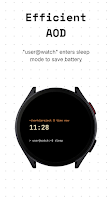
_> SMART AOD
systemctl suspend
Optimized for efficiency. The screen dims to a low-power mode showing only the time and a witty "sleep" status message, saving battery while keeping the aesthetic alive.
_> COMPATIBILITY & TECHNICAL
Target API: Android 13 (API Level 33)
Minimum Requirement: Wear OS 4.0
Tested Devices:
• Samsung: Galaxy Watch 7, Galaxy Watch Ultra, Galaxy Watch 6, Galaxy Watch 5, Galaxy Watch 4 (updated to Wear OS 4)
• Google: Pixel Watch 3, Pixel Watch 2
• OnePlus: OnePlus Watch 2
• Xiaomi: Watch 2 Pro
Installation Note: Please ensure your watch firmware is updated to the latest version (Wear OS 4) for full compatibility.
Recent changes:
first version