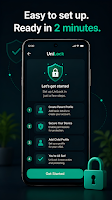
Block apps, limit screen time & build healthy digital habits for kids.
10+ downloads
About UniLock: Screen Time &App Lock
UniLock: Screen Time &App Lock is a parenting app developed by Unity Apps Studio.
Download Statistics
UniLock: Screen Time &App Lock has been downloaded 10 times. In the last 30 days, the app was downloaded 10 times. It is ranked in the top 100 parenting apps.
User Ratings
The app has no ratings yet.
App Information
UniLock: Screen Time &App Lock is FREE to download. The APK download size is 22.94 MB. The latest version available is 1.4. The last update was on August 11, 2026.
Technical Requirements
The app has a content rating of Everyone. The app has been available on Google Play 4 weeks ago.
Description
Help your child build healthier digital habits with UniLock.
Handing your phone to your child shouldn't mean handing over unrestricted access to every app. UniLock helps parents create a safer digital experience by managing screen time, allowed apps, and device settings—all directly on the Android device.
Unlike many parental control apps, UniLock is designed to work without creating an account, without a second device, and without a cloud connection. Everything is managed locally on your phone, giving you greater privacy and simple setup.
๐ฑ Child Mode
Turn on Child Mode with a single tap to create a safer environment for your child.
UniLock helps parents control:
• Which apps can be opened
• Daily screen time
• Device usage schedule
• Bedtime hours
• Important device settings
• Parent PIN protection
โฐ Screen Time Management
Create healthy digital habits with flexible screen time controls.
• Set daily screen time limits
• Create custom schedules
• Enable automatic bedtime lock
• Lock the device instantly
• Receive friendly break reminders when screen time ends
When the daily limit is reached, UniLock encourages children to take a break and enjoy offline activities such as reading, drawing, stretching, or playing outdoors.
๐ Allowed Apps
Choose exactly which apps your child can access.
Only approved apps remain available while other apps display the UniLock protection screen.
Perfect for allowing only:
• Educational apps
• Learning platforms
• Video learning apps
• Calling apps
• Camera
• Calculator
๐ก Device Protection
Help prevent unwanted changes while your child is using the device.
UniLock can help protect access to selected device features, including:
• Play Store
• App installation
• Selected Android Settings
• Accessibility Settings
• Developer Options
• App information screens
Protected areas require the parent PIN before changes can be made.
โ Device Controls
Keep important settings consistent.
• Lock screen brightness
• Lock volume level
• Parent PIN protection
• Protection continues after device restart
๐จ๐ฉ๐ง Built for Parents
UniLock focuses on protecting the device rather than monitoring your child.
โ No account required
โ No sign-up required
โ No second phone required
โ Works completely offline
โ No advertisements
โ No subscription required
โ No cloud dependency
๐ Local Activity History
Review important events directly on the device.
View information such as:
• Blocked apps
• Protection enabled or disabled
• Parent unlock events
Activity history remains stored locally on your device.
๐ Privacy First
Your privacy matters.
UniLock does not sell your information or share your personal data with third parties.
App settings, allowed apps, parent PIN, and activity history remain stored locally on your device.
โฟ Accessibility Service
UniLock uses the Android Accessibility Service only to help enforce the parental controls that you configure.
This permission allows UniLock to detect which application is opened so it can apply screen time limits and app restrictions.
Accessibility data is processed on your device and is not collected, transmitted, or shared.
๐จ๐ฉ๐ง Who is UniLock for?
UniLock is ideal for:
• Parents of children aged 3–15
• Shared family devices
• Learning tablets
• Schools
• Coaching centres
• Educational environments
โญ Key Features
• Child Mode
• Parental Controls
• Screen Time Limits
• App Lock
• Allowed Apps
• Bedtime Mode
• Device Schedule
• Parent PIN
• Brightness Lock
• Volume Lock
• Local Activity History
• Offline Protection
Build healthier screen habits with UniLock.
Simple to set up. Easy for parents. Designed for safer digital experiences.
Get a detailed PDF report for UniLock: Screen Time &App Lock with download trends, rating history,
and key performance statistics โ useful for competitive research or tracking your own app.
Learn more
Are you the developer of this app? Join us for free to see more information about your app and learn how we can help you promote and earn money with your app.
Subscribe to see full ranking history in this country
AppBrain offers valuable information about your app and those of your competitors. Join AppBrain for free and claim this app to view more ranking data, view history etc.
Each subscription will automatically renew 3 days before the expiration date for
the same time period. Subscriptions can be cancelled at any time before the renewal.