
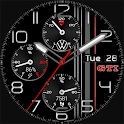
VW Sport is made and published by SP Watch. AppBrain is an independent app data site and isn't affiliated with SP Watch. The app name, icon, screenshots and description belong to SP Watch and are shown as published on Google Play.
AppBrain's verdict
Niche- Total installs
- 530
- Last updated
- August 29, 2026
VW Sport is a niche app, with 530 installs. It doesn't have enough ratings yet to judge what users think.
Installs
Tracked by AppBrain- Last 30 days
- 20
- Play install range
- 500+
- Launched
- January 2025
Installs over time
VW Sport has been installed 530 times. Over the past 30 days, it has been installed 20 times.
Rankings
Google Play top chartsGoogle Play Rankings for VW Sport
Competitors
Similar apps and more from SP WatchAlternatives to VW Sport


More from SP Watch


Releases
Updates seen on Google Play- Version
- 1.1
- Launched
- January 2025
User feedback
Ratings and reviews on Google PlayComments on VW Sport for Android
We don't have enough comments to show example comments. Please check back later.
Technology
Found in the app by AppBrain- Ads
- No ads
- Price
- $0.99
- Libraries
- ?
- App size
- 6.14 MB
- Content rating
- Everyone
Technologies used by VW Sport
About the app and developer
About VW Sport
VW Sport is a personalization app developed by SP Watch.
Install Statistics
VW Sport has been installed 530 times. In the last 30 days, the app was installed 20 times.
User Ratings
The app has no ratings yet.
App Information
VW Sport costs $0.99. The app size is 6.14 MB. The latest version available is 1.1. The last update was on August 29, 2026.
Technical Requirements
The app has a content rating of Everyone. The app has been available on Google Play since January 2025.
App Performance Report
Get a detailed PDF report for VW Sport with download trends, rating history, and key performance statistics — useful for competitive research or tracking your own app. Learn more
Get PDF Report — $29Developer information for SP Watch
Frequently asked questions about VW Sport
Is VW Sport free?
No. VW Sport costs $0.99 on Google Play.
Is VW Sport still available?
Yes. VW Sport is on Google Play, and the last update we saw was on August 29, 2026.
Does VW Sport contain ads?
No. Google Play does not list VW Sport as containing ads.
How large is VW Sport?
VW Sport is 6.14 MB.
Is VW Sport suitable for children?
Google Play rates the content of VW Sport as suitable for everyone.
How many times has VW Sport been installed?
Google Play lists 500+ installs for VW Sport.
Who made VW Sport?
VW Sport was developed by SP Watch. It is listed in the personalization category on Google Play.
What are the best alternatives to VW Sport?
People looking at VW Sport also look at these personalization apps: Dream 117 - Analog watch face, Ballozi AERO Hybrid Watch Face, Ballozi GLANZ Watch Face, Minimal Black v27 watch face, Carbon v9 hybrid watch face.
Store listing
By SP Watch, from Google Play“Premium Wear OS Watch Face - Customizable”


Description by SP Watch Written by the developer, not by AppBrain. Click to read.
This is a Wear OS Watch Face. It supporting only smartwatch devices which are running with WEAR OS API 30+. For example: Samsung Galaxy Watch 4/5/6/7 and many more.
If you have problems with the installation or download, even though you have a compatible smartwatch, open the supplied companion app and follow the instructions under Installation Guide. Alternatively, write me an e-mail to: mail@sp-watch.de
This sporty watch face is a tribute to VW. It is customizable, has 12 theme colors as well as 10 index colors, 10 Backgrounds, 5 watch hands, 9 second hands, 1 customizable complication, 5 GTI / 5 R Symbol colors, Minute fine division on/off and 2 AOD options. It's designed to provide users with the flexibility to personalize their smartwatch appearance to match their personal taste.
Features:
- Date / Week
- Battery
- Analog Heart rate
- Analog Stepcount
- 12 theme colors
- 1 customizable complication
- 5 watch hands
- 9 second hands
- 10 index colors
- 10 backgrounds
- 5 GTI / 5 R Logo color options
- 2 AOD options
- Minute fine division on/off
Customization:
1 - Tap and hold Display
2 - Tap customize option
3 - Swipe left and right
4 - Swipe up or down
Feel free to leave feedback in the Play Store!