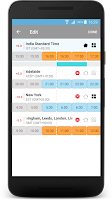
World Clock: Maps Time Zones has 49 thousand installs. Users rate it well: 4.2 stars from 636 ratings.
World Clock: Maps Time Zones is made and published by
Pulse Software Solutions LLC.
AppBrain is an independent app data site and isn't affiliated with Pulse Software Solutions LLC.
The app name, icon, screenshots and description belong to Pulse Software Solutions LLC and are shown as
published on Google Play.
About World Clock: Maps Time Zones
World Clock: Maps Time Zones is a productivity app developed by Pulse Software Solutions LLC.
Install Statistics
World Clock: Maps Time Zones has been installed 49 thousand times. In the last 30 days, the app was installed 66 times.
User Ratings
World Clock: Maps Time Zones is rated 4.18 out of 5 stars. The rating is based on 640 ratings.
App Information
World Clock: Maps Time Zones is freely available from Google Play. The app size is 18.41 MB. The latest version available is 1.12. The last update was on June 16, 2025.
Technical Requirements
World Clock: Maps Time Zones requires Android 4.2+ or higher. The app has a content rating of Everyone. The app has been available on Google Play since April 2016.
Description by Pulse Software Solutions LLC(from Google Play)
A time zone converter for professional use integrated with your calendar. Built as a technology experiment and offered free without ads. We welcome input from users to make the app better.
Easy world time clock app can be used to schedule meetings across time zones and finding the best appointment times for cross timezone appointments.
The time zone converter slider shows you what would the time be in other cities compared to your home city, add an unlimited number of time zones to your dashboard and keep a tab on multiple time zones at the same time. Find best times to speak on the phone and schedule appointments using Google calendar.
Slide between time zones with conversion between cities. Simple and intuitive interface.
Features That You'll Love!
- Free/busy time imported from your Google calendar in the event color assigned. - Support for both Gmail calendar and Google apps calendar. - Add multiple time zones and see what's current time in each time zone. - Search, add & convert between time zones across all the world. - Closely integrated with Google calendar to schedule meetings on the fly from the app. - Add unlimited time zones to compare. - Handy app for persons working with international clients or associates. - Ideal app for IT companies and BPO. - Works offline even when your phone is not connected to the internet.
Easy World Time Clock is very popular with international professionals who need a quick time zone converter to see what's the time at the place where they are calling.
Get a detailed PDF report for World Clock: Maps Time Zones with download trends, rating history,
and key performance statistics — useful for competitive research or tracking your own app.
Learn more
Are you the developer of this app? Join us for free to see more information about your app and learn how we can help you promote and earn money with your app.
Comments on World Clock: Maps Time Zones for Android
★★★★☆William Pietschman· Apr 8, 2024
Wow, I really like it, especially the coordination with Google Calendar! Having a UCT time zone is VERY important for Amateur Radio Operators, so I'm glad to see that! Similar programs seem to omit UCT as a "choice"entirely, so we can't use them at all in that case. However, It's got a few bugs, if you select UCT as "home" that I'm sure can be ironed out. I can foresee a time when it might even integrate with propagation forecasting to pick a frequency, and send a message to the other parties!
★★★★★Jerry Suppan· Dec 27, 2021
Excellent intuitive app for maintaining time zones around the world. I highly recommend this application for those that have to deal with multiple time zones.
★★★★★John· Apr 7, 2021
Serves the purpose and has a very readable/easy UI. Timezones can be re-ordered and can be labelled. The app would have been even better with good widgets and the ability to search for any place in the world. The developer provides this app free of cost, and it has no ads. So all five stars to appreciate this good product. 👍
★★★★★Chrono Lucca· Aug 7, 2023
I give 5 stars b/c it's a nice app, what it does, it does well. I had to uninstall for several reasons specific to me & 1 annoying bug. - bug: When the phone resets, all clocks I created are displayed, it doesn't save my settings. - can't have multiple clocks for different cities in the same timezone. - The white font is only visible on dark backgrounds, I couldn't find a way to increase the font size or change the font color. A choice of fonts would also be helpful.
★★★★☆Roberta Prouse· Mar 16, 2026
To keep our time all together to our city of Terre Haute Indiana okay sir To keep our time in the city of Terre Haute Indiana
★☆☆☆☆J W· Jun 9, 2025
Can't even change my home time zone. It just keeps wanting me to sign in through Google. Even though there is a "skip" option, you can't do anything, you just get a run-around and eventually the Google sign in again. I don't WANT it connected to and importing from my calendar! I just want a widget to check time zones at a glance!!! Jeezuz.
★☆☆☆☆Sky Clipper· Dec 19, 2021
Does not work on the Galaxy fold 3: Can not remove a Time Zone. Can not Sort Time Zones. Can not Add Time Zones conveniently as the button gets hidden by keyboard and there is no indication as to how to proceed. And lastly, Singapore Time Zone is same as Hong Kong??? Uninstalled.
★★☆☆☆Sp3lly· May 3, 2021
Stupid. The line showing current time at all displayed time zones is set for Eastern Time (USA) even though I don't display that timezone and don't care what time it is in that zone. I actually can add 1 to my time zone (Central). The line should equate with the home time zone.
★☆☆☆☆Mac McElroy· Jan 6, 2026
On my pixel 10, international time zones don't show in 24 hr display. Like earlier on my pixel 6. Makes it useless to me.
Google Play Rankings for World Clock: Maps Time Zones
This app is not ranked
Technologies used by World Clock: Maps Time Zones
8 permissions·32 libraries
Subscribe to see full permission and library details
Each subscription will automatically renew 3 days before the expiration date for
the same time period. Subscriptions can be cancelled at any time before the renewal.