

ÉSZLA is made and published by Magyar Nemzeti Bank. AppBrain is an independent app data site and isn't affiliated with Magyar Nemzeti Bank. The app name, icon, screenshots and description belong to Magyar Nemzeti Bank and are shown as published on the App Store.
AppBrain's verdict
- Last updated
- July 3, 2025
Rankings
App Store top chartsApp Store Rankings for ÉSZLA
Competitors
Similar apps and more from Magyar Nemzeti BankAlternatives to ÉSZLA


More from Magyar Nemzeti Bank


Releases
Updates seen on the App Store- Version
- 1.3
- Launched
- September 2022
No changelog data
User feedback
Ratings and reviews on the App StoreComments on ÉSZLA for iOS
We don't have enough comments to show example comments. Please check back later.
Technology
Found in the app by AppBrain- Price
- Free
- App size
- 10.2 MB
- Content rating
- Everyone
Technologies used by ÉSZLA
About the app and developer
About ÉSZLA
ÉSZLA is a finance app developed by Magyar Nemzeti Bank.
User Ratings
The app has no ratings yet.
App Information
ÉSZLA is freely available from the App Store. The app size is 10.19 MB. The latest version available is 1.3. The last update was on July 3, 2025.
Technical Requirements
The app has a content rating of Everyone. The app has been available on the App Store since September 2022.
Developer information for Magyar Nemzeti Bank
Address:
Store listing
By Magyar Nemzeti Bank, from the App Store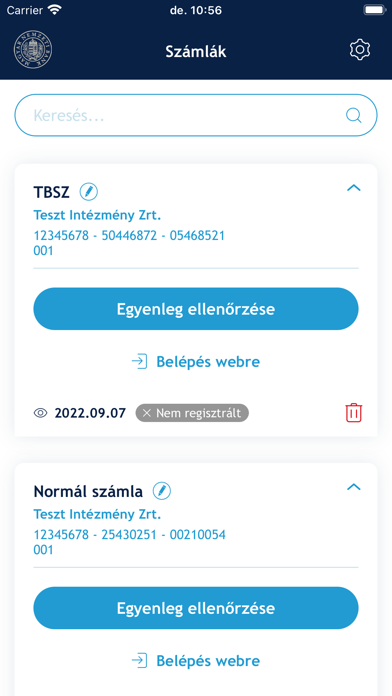

Description by Magyar Nemzeti Bank Written by the developer, not by AppBrain. Click to read.
Why is it useful for you?
By checking the on-line balance on a regular basis you can make sure that your service provider manages your securities account correctly, i.e. it transfers the same information to the Magyar Nemzeti Bank and to you.
The application provides the possibility to query the securities account balance in a clear and user-friendly way, even without entering a password, by scanning the QR code on the statement, which service providers are obliged to place on each securities account statement. In addition, the mobile app also provides a number of convenience and notification features compared to the ÉSZLA online enquiry application.
The convenience features: if the account holder activates this feature in the mobile application and checks his/her securities account in at least three different months, the account becomes a registered account, which means that in subsequent months, you can access the balance data uploaded to the ÉSZLA system with a single click, without having to enter the current monthly password, by logging into the mobile application.
QR code on the monthly statement: the password, generated monthly by the investment service provider and sent to the account holder together with the monthly statement, will also be displayed on the statement in the form of a QR code. You can conveniently enter your password to retrieve the account balance using the dedicated QR code reader of the ÉSZLA mobile application without entering the password by scanning the QR code on the account statement.
Access to the web-based ÉSZLA application with a QR code: if the account holder wishes to view his/her statement on a larger display on a computer, you must select a QR code entry on the MNB web-based ÉSZLA enquiry application page, which will display a QR code on the web interface, which must be scanned using the "Access to web" function of the mobile application, after which the mobile application may still ask for a login password (if the account is not yet "registered").
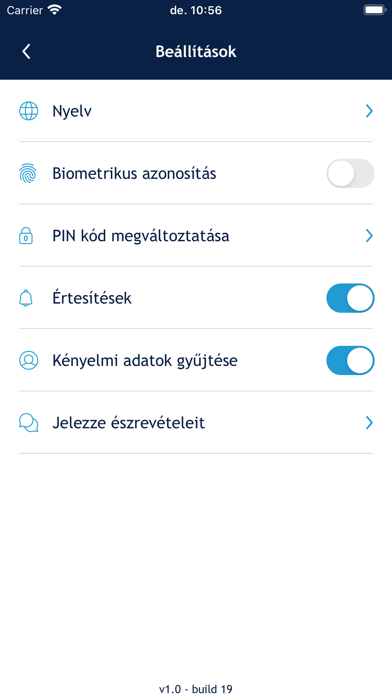
PUSH notifications: if you activate this feature in the mobile application, you will receive a PUSH message from the mobile application typically on the 10th working day of each month, informing you that your balance data has been uploaded to the system, which you can retrieve and compare with your statement using the mobile application.
Saving as PDF: in the ÉSZLA application, it is possible to retrieve the balance data for a given month from the 10th working day following the month in question until the 10th working day of the second month following the month in question. If you wish to access the ÉSZLA balance data beyond this period, it is advisable to download it in PDF format to your smartphone or you can also send it (e.g. as an e-mail attachment).
Check your securities account balance now and compare it with the statement sent to you by your investment service provider.
If you notice a discrepancy, notify the discrepancy to your investment service provider immediately.