


AppBrain's verdict
Established- Rating on App Store
- 4.50
- 22 ratings
- Last updated
- August 11, 2026
- Size
- 5.88 MB
It doesn't have enough ratings yet to judge what users think.
User feedback
Ratings and reviews on the App StoreComments on *Passwords* Copy to Paste for iOS
We don't have enough comments to show example comments. Please check back later.
Store listing
By Claudio Guirunas, from the App StoreDescription by Claudio Guirunas Written by the developer, not by AppBrain. Click to read.
Simple but powerful where your password list is genuinely yours!
Would you trust entering your Bitcoin wallet’s private keys into apps that require an online account? I wouldn’t either.
Easy, intuitive and secure for real.
How many passwords, codes, and numbers do you need to remember (and retype) every single day?
Your ATM PIN, internet banking, emails, logins, social media accounts, credit card numbers… the list is endless.
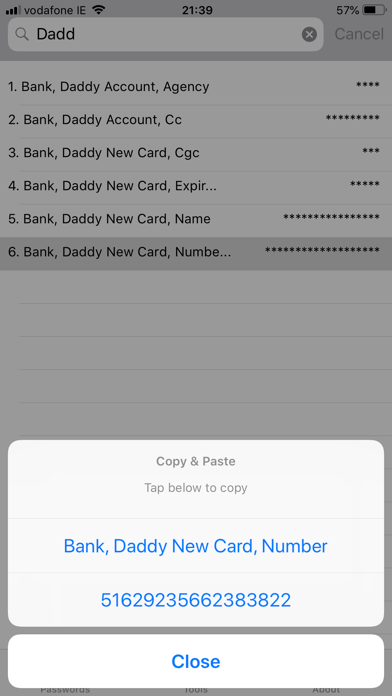
You have the option to simplify it. Just open the app, tap to copy any password, number or name, and paste it wherever you need.
No friction. No typing. No memorising.
And the best part? You don’t need a master password or account to unlock the app.
Your fingerprint or your face — the same one you already use to unlock your phone — is all you need to access the entire password list.
Your data stays safe:
This app is completely disconnected from the Internet and just live on your devices without accessing API or making hidden requests to outside from its environment to "check something in somewhere over the internet" like the majority of other apps. You know these hidden activities clearly indicate insecurity and data leaks.
Everything you adding is securely stored inside the app and can only be accessed by you using this app.
No boring filling accounts, no cloud, no external access.
Key Features:
- Generate extremely strong passwords using complex and valid UTF-8 characters;
- Name and Password fields with unlimited length.
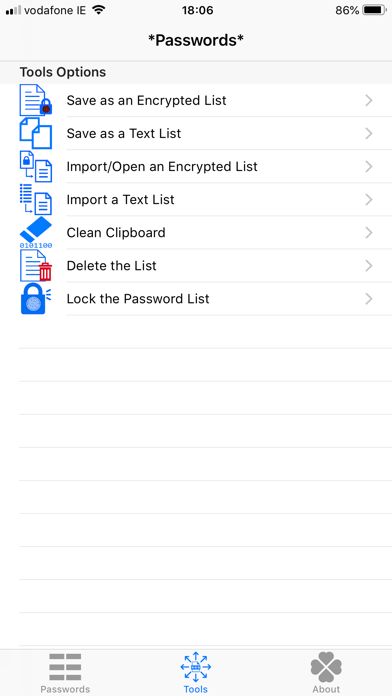
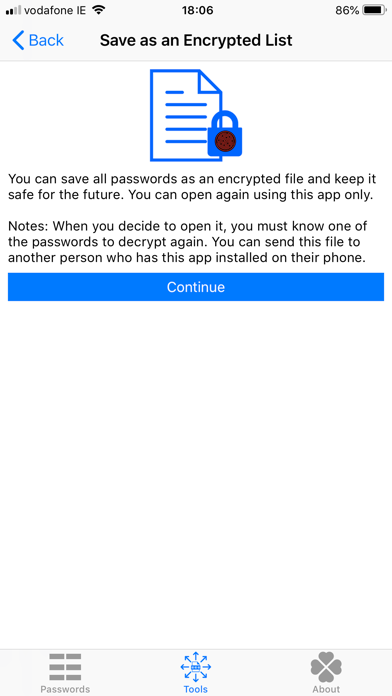
- Export/Backup the entire list as an Encrypted List(.plist)
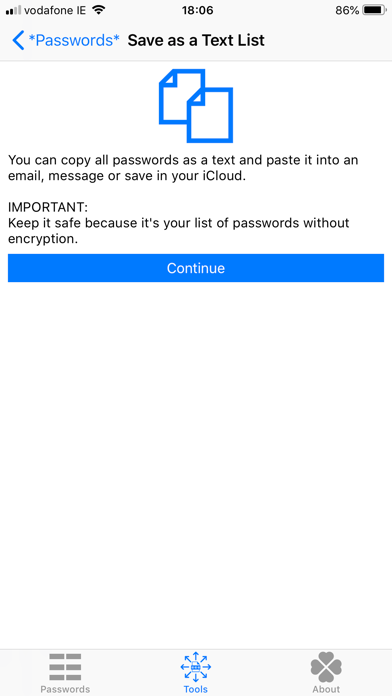
- Export/Save the list of passwords as Plain Text (.txt)
- Import your Encrypted Password List(.plist) to other devices (macOS or iOS)
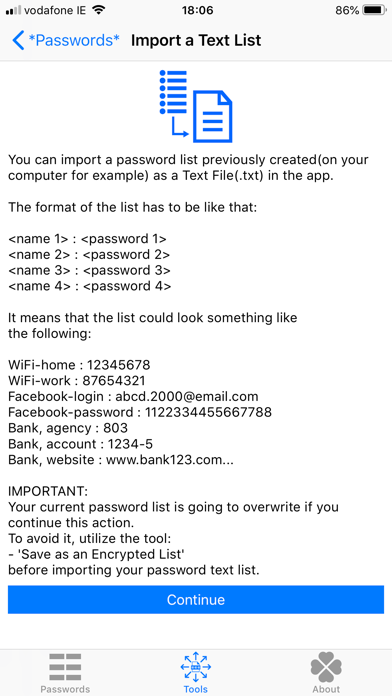
- Import a Plain Text Password List to easily insert large volume of passwords at once
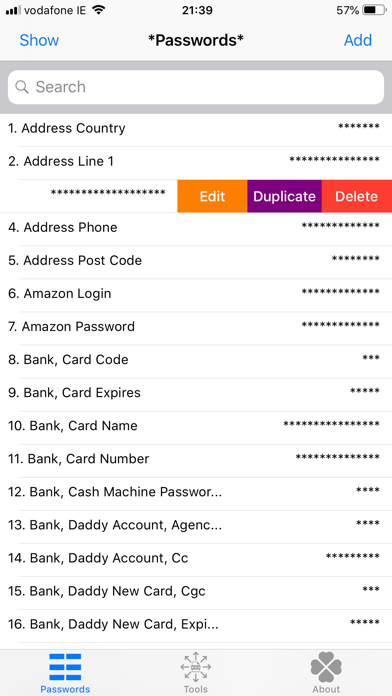
- Duplicate a password to easily create a similar one by editing it
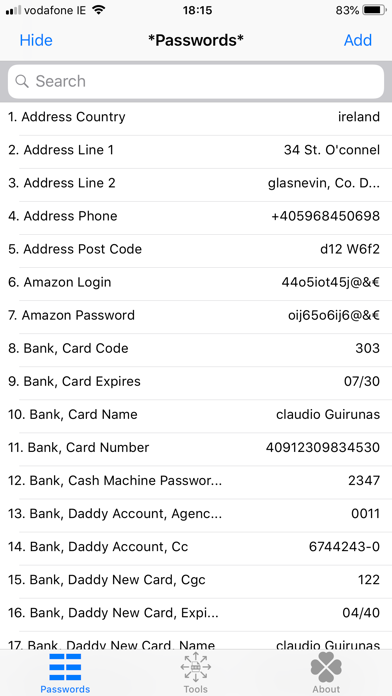
- Show/Hide all passwords in the list at once
- Instantly find any password or name by typing any part of it in the search field
- No Redundancy: Eliminates extra steps present in similar apps
- No Ads: 100% ad-free and designed to respect your privacy
- No Extortion Walls: No friction when copying and pasting, exporting, or importing passwords
Ready to make your life easier and safer?
Download now for iOS and macOS.
Terms and conditions: https://passwords.398031.xyz/?g=term_and_conditions&l=en
Privacy policy: https://passwords.398031.xyz/?g=privacypolicy&l=en
Disclaimer: https://passwords.398031.xyz/?g=disclaimer&l=en
Available in 27 languages:
Arabic, Bengali, Chinese, Czech, Dutch, English, French, German, Greek, Hebrew, Hindi, Hungarian, Indonesian, Italian, Japanese, Korean, Malay, Persian, Polish, Portuguese, Romanian, Russian, Spanish, Swedish, Thai, Turkish, Vietnamese
Safety and technology
Found in the app by AppBrain- Price
- Free
- App size
- 5.88 MB
- Content rating
- Everyone
Technologies used by *Passwords* Copy to Paste
Releases
Updates seen on the App Store- Version
- 5.2
- Launched
- December 2017
No changelog data
Alternatives
Similar apps and more from Claudio GuirunasAlternatives to *Passwords* Copy to Paste








More from Claudio Guirunas


Rankings
App Store top chartsApp Store Rankings for *Passwords* Copy to Paste
About the app and developer
About *Passwords* Copy to Paste
*Passwords* Copy to Paste is a productivity app developed by Claudio Guirunas.
What is the rating of *Passwords* Copy to Paste?
*Passwords* Copy to Paste is rated 4.50 out of 5 stars, based on 22 ratings.
Is *Passwords* Copy to Paste free?
*Passwords* Copy to Paste is free. The app size is 5.88 MB. The latest version available is 5.2. The last update was on August 11, 2026.
What are the requirements for *Passwords* Copy to Paste?
The app has a content rating of Everyone. The app has been available on the App Store since December 2017.
*Passwords* Copy to Paste is made and published by Claudio Guirunas. AppBrain is an independent app data site and isn't affiliated with Claudio Guirunas. The app name, icon, screenshots and description belong to Claudio Guirunas and are shown as published on the App Store.
Developer information for Claudio Guirunas
Address:
Frequently asked questions about *Passwords* Copy to Paste
Is *Passwords* Copy to Paste free?
Yes. *Passwords* Copy to Paste is free on the App Store.
Is *Passwords* Copy to Paste still available?
Yes. *Passwords* Copy to Paste is on the App Store, and the last update we saw was on August 11, 2026.
How large is *Passwords* Copy to Paste?
*Passwords* Copy to Paste is 5.88 MB.
Is *Passwords* Copy to Paste suitable for children?
App Store rates the content of *Passwords* Copy to Paste as suitable for everyone.
How do people rate *Passwords* Copy to Paste?
*Passwords* Copy to Paste scores 4.50 out of 5 stars, from 22 ratings on the App Store.
Who made *Passwords* Copy to Paste?
*Passwords* Copy to Paste was developed by Claudio Guirunas. It is listed in the productivity category on the App Store.
What are the best alternatives to *Passwords* Copy to Paste?
People looking at *Passwords* Copy to Paste also look at these productivity apps: #1 Password Manager, MemoMa, KeyZ: Password Manager, Password Manager - Lockie, NoteBox - Simple & Powerful.