




AppBrain's verdict
- Last updated
- November 2, 2026
- Size
- 47.6 MB
User feedback
Ratings and reviews on the App StoreComments on 15minutes: Screen Time Limit for iOS
We don't have enough comments to show example comments. Please check back later.
Store listing
By Nikola Hack, from the App StoreDescription by Nikola Hack Written by the developer, not by AppBrain. Click to read.
15minutes gives the feed a beginning and an end. Choose the apps that tend to pull you in, use them for up to 15 minutes, and then take a one-hour break. When the hour is over, your minutes return and the cycle can begin again.
Those 15 minutes are shared across your whole selection, so switching from Instagram to TikTok to Reddit does not reset the clock. You decide exactly what belongs in that selection, whether it is a social network, game, browser, or messaging app.
There is no daily allowance to burn through before lunch and regret that evening. Instead, 15minutes creates a rhythm you can live with all day. The hour away gives the urge time to fade and gives something else time to begin. Closing 15minutes or restarting your phone will not bypass an active block.
A BETTER PLACE TO LAND
Reach for a blocked app and you will find a short, surprising fact instead of a blank screen. Browse discoveries from science, history, language, and the everyday myths many of us still believe. It turns a reflexive tap into a small moment of curiosity without reopening the feed.
TIME AWAY CAN EARN TIME BACK
Premium rewards the hours when you could scroll but choose not to. Each uninterrupted hour away from your selected feeds adds five bonus minutes, up to twice your usual budget. Open one of those apps and the earning streak starts over.
AN EXIT THAT MAKES YOU PAUSE
If you genuinely need an app before the hour is over, you can always get back in. The free version asks you to complete a 20-second breathing exercise. Premium lets you adjust the exercise or replace it with a few mental-math questions. Breathing remains available as a fallback, so you are never trapped; the brief moment of intention is the point.
You can also end a session early. Any unused minutes are set aside and the one-hour break begins immediately, giving you an easy way to act the moment you realize you have had enough.
ROUTINES FOR REAL LIFE
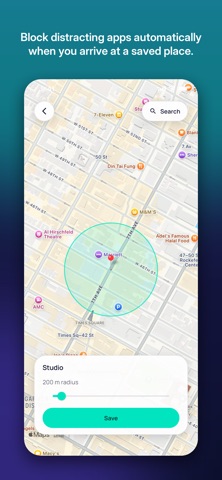
With Premium, Work, Free Time, and Sleep can each have their own schedule and app list. Work and Free Time rules can also start automatically when you arrive at a saved place such as the office, gym, or home. Depending on the moment, you can block an app completely or give it a separate repeating budget. Every routine is off until you choose to set it up.
PROGRESS WITHOUT MAKE-BELIEVE MATH
See today’s completed breaks, your day streak, minutes used, and trends over 7, 30, or 60 days. “Time reclaimed” includes only breaks you actually kept. Unlock early and the counter stops, because progress should reflect what really happened.
THE CORE STAYS FREE
The 15/60 cycle, block screen, 20-second breathing unlock, progress view, and off switch are free for good. Premium adds earned minutes, the complete fact collection, custom cycle lengths, automatic routines, and more unlock options. The essential blocker itself is never held behind a subscription.
NO ACCOUNT REQUIRED
There is no signup, login, or profile to create. Your history and settings stay on your device; only subscription billing communicates with a server.
Choose your apps once, then let 15minutes hold the boundary when your attention is somewhere else.
Standard Apple Terms of Use (EULA): https://www.apple.com/legal/internet-services/itunes/dev/stdeula/
Safety and technology
Found in the app by AppBrain- Price
- Free
- App size
- 47.6 MB
- Content rating
- Everyone
Technologies used by 15minutes: Screen Time Limit
Releases
Updates seen on the App Store- Version
- 1.0.47
- Launched
- July 2026
No changelog data
Alternatives
Similar apps and more from Nikola HackAlternatives to 15minutes: Screen Time Limit


More from Nikola Hack

Rankings
App Store top chartsApp Store Rankings for 15minutes: Screen Time Limit
About the app and developer
About 15minutes: Screen Time Limit
15minutes: Screen Time Limit is a productivity app developed by Nikola Hack.
User Ratings
The app has no ratings yet.
App Information
15minutes: Screen Time Limit is freely available from the App Store. The app size is 47.57 MB. The latest version available is 1.0.47. The last update was on November 2, 2026.
Technical Requirements
The app has a content rating of Everyone. The app has been available on the App Store since July 2026.
15minutes: Screen Time Limit is made and published by Nikola Hack. AppBrain is an independent app data site and isn't affiliated with Nikola Hack. The app name, icon, screenshots and description belong to Nikola Hack and are shown as published on the App Store.
Developer information for Nikola Hack
Address:
Frequently asked questions about 15minutes: Screen Time Limit
Is 15minutes: Screen Time Limit free?
Yes. 15minutes: Screen Time Limit is free on the App Store.
Is 15minutes: Screen Time Limit still available?
Yes. 15minutes: Screen Time Limit is on the App Store, and the last update we saw was on November 2, 2026.
How large is 15minutes: Screen Time Limit?
15minutes: Screen Time Limit is 47.57 MB.
Is 15minutes: Screen Time Limit suitable for children?
App Store rates the content of 15minutes: Screen Time Limit as suitable for everyone.
Who made 15minutes: Screen Time Limit?
15minutes: Screen Time Limit was developed by Nikola Hack. It is listed in the productivity category on the App Store.
What are the best alternatives to 15minutes: Screen Time Limit?
People looking at 15minutes: Screen Time Limit also look at these productivity apps: PlanFlow: Calendar & Planner, ADHD Organizer & Todo: Unstuck, Just Do This: ADHD Planner, Habitic: Offline Habit Tracker, Unhook: Earn Screen Time.