1Extn - Extensions & Shortcuts
1Extn - Extensions & Shortcuts is made and published by Charles Kautsire. AppBrain is an independent app data site and isn't affiliated with Charles Kautsire. The app name, icon, screenshots and description belong to Charles Kautsire and are shown as published on the App Store.
AppBrain's verdict
- Rating on App Store
- 4.57
- 23 ratings
- Last updated
- October 12, 2026
It doesn't have enough ratings yet to judge what users think.
Rankings
App Store top chartsApp Store Rankings for 1Extn - Extensions & Shortcuts
Competitors
Similar apps and more from Charles KautsireAlternatives to 1Extn - Extensions & Shortcuts
More from Charles Kautsire

Releases
Updates seen on the App Store- Version
- 45.0
- Launched
- December 2021
No changelog data
User feedback
Ratings and reviews on the App StoreComments on 1Extn - Extensions & Shortcuts for iOS
We don't have enough comments to show example comments. Please check back later.
Technology
Found in the app by AppBrain- Price
- $1.99
- App size
- 2.99 MB
- Content rating
- Everyone
Technologies used by 1Extn - Extensions & Shortcuts
About the app and developer
About 1Extn - Extensions & Shortcuts
1Extn - Extensions & Shortcuts is an utilities app developed by Charles Kautsire.
User Ratings
1Extn - Extensions & Shortcuts is rated 4.57 out of 5 stars. The rating is based on 23 ratings.
App Information
1Extn - Extensions & Shortcuts costs $1.99. The app size is 2.99 MB. The latest version available is 45.0. The last update was on October 12, 2026.
Technical Requirements
The app has a content rating of Everyone. The app has been available on the App Store since December 2021.
Developer information for Charles Kautsire
Address:
Store listing
By Charles Kautsire, from the App StoreDescription by Charles Kautsire Written by the developer, not by AppBrain. Click to read.
1Extn brings useful Safari tools, keyword searches, Share actions, scripts, and website redirects together in one focused app. Start with ready-made features, then customize more when you need them.
CHOOSE YOUR SAFARI TOOL
Use 1Extn - Tools for the job you need. Read pages more comfortably, inspect page source, use Picture in Picture, create QR codes, translate pages, build YouTube playlists, find lyrics, or connect Safari to Apple Shortcuts and Scriptable.
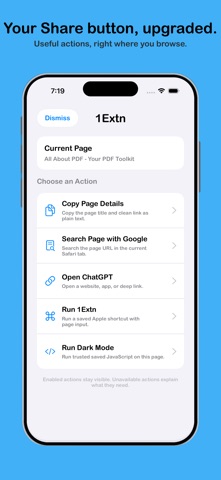
DO MORE FROM SAFARI’S SHARE BUTTON
Use 1Extn Actions to:
• Copy a page title and clean link
• Search the current page
• Find selected text or a page title on YouTube
• Summarize a page
• Open a website, installed app, or supported deep link
• Run an Apple Shortcut with Safari content
• Run a trusted saved script on the current page
Choose which actions appear and arrange them around the way you browse.
OPEN LINKS YOUR WAY
Save an HTTPS website, app URL scheme, or deep link as an Open Link action. Dynamic variables can pass the current page URL, page title, selected text, or clipboard content to compatible websites and apps.
Custom app links depend on the destination app being installed and supporting the URL scheme or deep link.
SEARCH FROM SAFARI’S ADDRESS BAR
Create your own keyword search engines for websites you use often. Type a short keyword followed by your search into Safari’s address bar, and 1Extn sends it to the search engine you selected.
AUTOMATE YOUR BROWSING
Save scripts that run automatically on matching pages or manually from Safari’s Share button. Only trusted local scripts with Auto Run turned off appear as manual Share actions, helping keep automatic and manual behavior separate.
Ready-made scripts offer an easy starting point, while advanced users can add their own code or import scripts for review.
SCRIPT LIBRARY
Start faster with ready-made scripts and practical examples. Open the Script Library from inside 1Extn to discover scripts for common Safari tasks, download them, review the code, and save the ones you trust.
Imported scripts start with Auto Run turned off, so you remain in control.
Create redirects to send matching website links somewhere else automatically. Redirects can preserve the rest of the page address and optionally include subdomains or both HTTP and HTTPS links.
RUN APPLE SHORTCUTS
Launch a named Apple Shortcut directly from Safari. Pass the current page URL, selected text, clipboard content, or no input depending on your workflow.
SIMPLE TO START, FLEXIBLE WHEN NEEDED
A guided setup explains which extensions to enable and lets you choose your first Safari tool. Extras keeps scripts, searches, redirects, Share actions, Shortcuts, and Scriptable settings in one place.
1Extn’s ready-made features require no coding. For users who want more control, custom scripts, Apple Shortcuts, Scriptable workflows, backups, and sharing are available too.
Safari extensions must be enabled in Settings. Some tools open third-party apps or websites and depend on those services being installed or available.