AppBrain
AppBrain
  • Apps
  • Apps being viewed right now Trending apps today Most popular apps All-time most installed apps Top rated apps iPhone and iPad apps
  • Intelligence ▾
    Intelligence overview → Track any Android app or your whole market
    Track & analyze
    Keyword Tracker & OptimizerTrack & improve Play rankings App Performance ReportOne-off PDF for any app StatisticsFree Android & Play market stats
    Promote your app
    Featured Apps App Links
  • Intelligence
  • Pricing
  • Dashboard
  • Sign up
  • Log in
App Store Apps > Graphics & Design > 3D Model Print Simple Edit
3D Model Print Simple Edit icon

3D Model Print Simple Edit

1.11.3
Huragan Kodu s.p z o.o.
4.40
5 reviews
Free

3D Model Print Simple Edit Screenshot 1 of 8
3D Model Print Simple Edit Screenshot 2 of 8
3D Model Print Simple Edit Screenshot 3 of 8
3D Model Print Simple Edit Screenshot 4 of 8
3D Model Print Simple Edit Screenshot 5 of 8
3D Model Print Simple Edit Screenshot 6 of 8
3D Model Print Simple Edit Screenshot 7 of 8
3D Model Print Simple Edit Screenshot 8 of 8
Screenshots by Huragan Kodu s.p z o.o., from the the App Store listing
View on the App Store Also on Google Play

About 3D Model Print Simple Edit

3D Model Print Simple Edit is a graphics & design app developed by Huragan Kodu s.p z o.o.

What is the rating of 3D Model Print Simple Edit?

3D Model Print Simple Edit is rated 4.40 out of 5 stars, based on 5 ratings.

Is 3D Model Print Simple Edit free?

3D Model Print Simple Edit is free. The app size is 207.36 MB. The latest version available is 1.11.3. The last update was on November 11, 2026.

What are the requirements for 3D Model Print Simple Edit?

The app has a content rating of Medium Maturity. The app has been available on the App Store since April 2026.

3D Model Print Simple Edit is made and published by Huragan Kodu s.p z o.o. AppBrain is an independent app data site and isn't affiliated with Huragan Kodu s.p z o.o. The app name, icon, screenshots and description belong to Huragan Kodu s.p z o.o. and are shown as published on the App Store.

Description by Huragan Kodu s.p z o.o. (from the App Store)
Design, edit and prepare 3D models for printing right on your phone or tablet, or tell an AI agent what you need and watch it build the model for you.

3D Model Print Simple Edit is a fast 3D editor made for touchscreens, makers and 3D printing fans. No desktop CAD and no steep learning curve: shape your idea, check it for printing and send it to your slicer.

SIMPLE OR ADVANCED

Start in Simple mode with the essential tools, or switch to Advanced for every tool, including the Print panel. Your models and files are the same in both.

READY TO PRINT

• The Print panel checks for holes, thin walls, overhangs, floating parts and whether the model fits your printer's bed, and its results match a real slicer
• Weight and print time estimate, with a material for each object
• Best orientation lays the part flat in one tap
• Fix the model: Repair (watertight), Hollow, Cut flat or split and Symmetrize, each with a preview
• Printer presets and a real-size grid in mm, cm or inches

LET AI BUILD IT — MCP

Connect Claude or any AI agent that supports the Model Context Protocol (MCP). Copy the setup prompt from the app, paste it into your agent and describe what you need: "a phone stand" or "a box with a lid". The agent creates and edits real objects in your scene while you watch it work, and an agent on your computer can also work with the app on your phone or tablet over your Wi-Fi network.

Then refine, sculpt and paint the result by hand. Go from one sentence to a print-ready model in minutes.

SCULPTING

Push, pull, inflate, smooth and pinch surfaces with intuitive brushes. Print brushes (Layer, Scrape, Fill, Clay, Crease) and Protect base keep the part printable.

CAD-STYLE EDITING

• CSG: union, subtract and intersect solids to cut holes and join parts
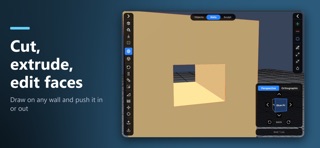
• Walls: push and pull faces by an exact distance
• Points: move vertices with soft selection and lasso
• Round edges; twist, bend, taper and mirror parts
• Draw your own shapes and turn them into 3D objects
• 3D text in your own fonts, in all 15 app languages, Arabic and Hindi included
• Screws, nuts, print-in-place hinges and gears from a parametric catalogue

COLOURS FOR MULTICOLOUR PRINTING

Paint areas, walls and whole objects. The colour picker shows the colours already in your project, and "Whole colour" changes a colour everywhere in one step. 3MF files keep each colour in its own filament slot.

YOUR FILES

• Import STL, 3MF, OBJ with MTL and textures, glTF/GLB, SVG and .zip, several files at once
• Export a 3MF for your slicer with build plates, or STL, OBJ and glTF, also one file per object
• Big models save, open and import in the background, with progress and Cancel
• Autosave reopens your project, and Undo and Redo name every step

BUILT FOR TOUCH

• Normal or Large interface size, light or dark theme
• 15 languages, including Arabic (right to left), Hindi, Chinese, Japanese and Korean
• Built-in help with short videos for every tool
• Works great on phones and tablets

WHO IS IT FOR?

• 3D printing hobbyists who want to modify models on the go
• Makers who need a custom part, bracket or replacement quickly
• Beginners who want to create without complicated CAD software
• Anyone curious to see how AI can design real, printable objects

Download 3D Model Print Simple Edit and turn your ideas, or your prompts, into real objects.
Show more Show less

More data about 3D Model Print Simple Edit

Price Free
Rating 4.40 based on 5 ratings
Ranking Not ranked
Version 1.11.3
App size 207.4 MB
Maturity Medium Maturity

Also available on Google Play

3D Model Print Simple Edit icon 3D Model Print Simple Edit
Huragan Kodu
0.0
Free
1,000+

Alternatives to 3D Model Print Simple Edit

Forma3D - 3D Modeling & Print icon Forma3D - 3D Modeling & Print
Denis Vazyulya
4.2
Free
10 ratings
3D Modeling: Design & Sculpt icon 3D Modeling: Design & Sculpt
Ha Vu Thi
4.4
Free
70 ratings
Wafer - 3D Texture Paint icon Wafer - 3D Texture Paint
Sparseal SL
3.9
Free
17 ratings
CAD Smart Modeling – 3D CAD icon CAD Smart Modeling – 3D CAD
Sebastian Kemper
3.5
Free
10 ratings
Blend3D: Image to 3D icon Blend3D: Image to 3D
Muhammad Shahbaz
2.2
Free
96 ratings
3D Model Maker: ImgTo3D icon 3D Model Maker: ImgTo3D
Creator View, L.L.C.
4.3
Free
327 ratings
ModelPlay-3D Model Viewer icon ModelPlay-3D Model Viewer
俊卿 吴
3.0
Free
8 ratings
Remeshy: AI 3D Printables icon Remeshy: AI 3D Printables
REMESHY LTD
4.6
Free
162 ratings

Changelog of 3D Model Print Simple Edit

No changelog data

Developer information for Huragan Kodu s.p z o.o.

Huragan Kodu s.p z o.o.

Address:

Share 3D Model Print Simple Edit

Comments on 3D Model Print Simple Edit for iOS

We don't have enough comments to show example comments. Please check back later.

App Store Rankings for 3D Model Print Simple Edit

This app is not ranked

Technologies used by 3D Model Print Simple Edit

Frequently asked questions about 3D Model Print Simple Edit

Is 3D Model Print Simple Edit free?

Yes. 3D Model Print Simple Edit is free on the App Store.

Is 3D Model Print Simple Edit still available?

Yes. 3D Model Print Simple Edit is on the App Store, and the last update we saw was on November 11, 2026.

How large is 3D Model Print Simple Edit?

3D Model Print Simple Edit is 207.36 MB.

Is 3D Model Print Simple Edit suitable for children?

App Store gives 3D Model Print Simple Edit a medium maturity rating, so it is not meant for young children.

How do people rate 3D Model Print Simple Edit?

3D Model Print Simple Edit scores 4.40 out of 5 stars, from 5 ratings on the App Store.

Who made 3D Model Print Simple Edit?

3D Model Print Simple Edit was developed by Huragan Kodu s.p z o.o. It is listed in the graphics & design category on the App Store.

What are the best alternatives to 3D Model Print Simple Edit?

People looking at 3D Model Print Simple Edit also look at these graphics & design apps: Forma3D - 3D Modeling & Print, 3D Modeling: Design & Sculpt, Wafer - 3D Texture Paint, CAD Smart Modeling – 3D CAD, Blend3D: Image to 3D.

Price drops on Google Play Popular Graphics & Design Apps Top new apps Today's trending apps Apps other people are watching
Forma3D - 3D Modeling & Print icon Forma3D - 3D Modeling & Print
3D Modeling: Design & Sculpt icon 3D Modeling: Design & Sculpt
Wafer - 3D Texture Paint icon Wafer - 3D Texture Paint
CAD Smart Modeling – 3D CAD icon CAD Smart Modeling – 3D CAD
Blend3D: Image to 3D icon Blend3D: Image to 3D
3D Model Maker: ImgTo3D icon 3D Model Maker: ImgTo3D
ModelPlay-3D Model Viewer icon ModelPlay-3D Model Viewer
Remeshy: AI 3D Printables icon Remeshy: AI 3D Printables
AppBrain Intelligence premium content

Subscribe now to get full and unlimited access to AppBrain Intelligence. You'll have access to:

  • App Intelligence dashboard (performance timeline, competitor comparison, country rankings, insight cards)
  • Detailed ranking data per app
  • Full timeline per developer
  • Device market shares data per country
  • Unlimited keyword tracking
  • AI assistant access via MCP (Claude, Cursor or any MCP client)
1 Month

$75/mo
(billed every month)

SAVE 0%
Subscribe
3 Months

$65/mo
($195 billed every 3 months)

SAVE 13%
Subscribe
1 Year

$57.50/mo
($690 billed every year)

SAVE 23%
Subscribe
Each subscription will automatically renew 3 days before the expiration date for the same time period. Subscriptions can be cancelled at any time before the renewal.

AppBrain is an app data site, we track rankings, ratings, installs for all apps and games on Google Play and the App Store. AppBrain doesn't host app files or APKs, all install links go directly to the official store. All trademarks are owned by their respective owners.

More apps

  • Top Android apps being viewed
  • Big Win - Slots Casino™ Android App
  • Tunebat: Key & BPM Finder Hint
  • Liquid Glass Icon Pack

App statistics

  • Android statistics
  • Google Play Developer stats
  • Trending Android Apps
  • Trending iOS apps
  • Top popular Apps
  • Buy the best Android phone
  • Buy & sell app businesses

About AppBrain

  • Contact
  • Privacy
  • Documentation
  • DMCA takedowns
  • Blog
  • Top Free Games Apps for your iPhone or iPad
© 2010-2026 - AppBrain