

3D Print Cost: PrintMate
3D Print Cost: PrintMate is made and published by EMRE YILDIRIM. AppBrain is an independent app data site and isn't affiliated with EMRE YILDIRIM. The app name, icon, screenshots and description belong to EMRE YILDIRIM and are shown as published on the App Store.
AppBrain's verdict
- Rating on App Store
- 4.83
- 18 ratings
- Last updated
- October 14, 2026
It doesn't have enough ratings yet to judge what users think.
Rankings
App Store top chartsApp Store Rankings for 3D Print Cost: PrintMate
Competitors
Similar apps and more from EMRE YILDIRIM





Releases
Updates seen on the App Store- Version
- 2026.10.01
- Launched
- April 2025
No changelog data
User feedback
Ratings and reviews on the App StoreComments on 3D Print Cost: PrintMate for iOS
We don't have enough comments to show example comments. Please check back later.
Technology
Found in the app by AppBrain- Price
- Free
- App size
- 45.1 MB
- Content rating
- Everyone
Technologies used by 3D Print Cost: PrintMate
About the app and developer
About 3D Print Cost: PrintMate
3D Print Cost: PrintMate is an utilities app developed by EMRE YILDIRIM.
What is the rating of 3D Print Cost: PrintMate?
3D Print Cost: PrintMate is rated 4.83 out of 5 stars, based on 18 ratings.
Is 3D Print Cost: PrintMate free?
3D Print Cost: PrintMate is free. The app size is 45.11 MB. The latest version available is 2026.10.01. The last update was on October 14, 2026.
What are the requirements for 3D Print Cost: PrintMate?
The app has a content rating of Everyone. The app has been available on the App Store since April 2025.
Developer information for EMRE YILDIRIM
Address:
Store listing
By EMRE YILDIRIM, from the App Store



Description by EMRE YILDIRIM Written by the developer, not by AppBrain. Click to read.
Whether you print for fun, sell your creations, or manage multiple printers, keep your workshop organized and make more informed pricing decisions.
CALCULATE YOUR 3D PRINTING COSTS
Go beyond filament and electricity. Build a detailed cost estimate using your material usage, print duration, printer settings, and additional expenses.
• Calculate filament, electricity, and printer wear costs.
• Include labor, packaging, delivery, hardware, and custom expenses.
• Calculate costs for multiple filaments within a single print.
• Create printer profiles with individual power consumption and depreciation settings.
• Keep a history of your prints with saved cost breakdowns.
PRICE YOUR WORK WITH CONFIDENCE
Find a selling price that accounts for your costs and the profit you want to make.
• Calculate suggested prices using a target profit margin or markup.
• Account for VAT, discounts, and percentage-based fees.
• See estimated profit and margin before recording a sale.
• Save pricing details for future reference.
MANAGE FILAMENT & INVENTORY
Manage your filament collection by brand, material, color, and price. Enable inventory tracking to update remaining filament weight when you record a print.
• Monitor remaining filament and spot low stock.
• Organize materials for single-color and multicolor projects.
• Track hardware and packaging supplies.
• Manage finished-print inventory alongside your materials.
MANAGE CUSTOMERS AND ORDERS
Keep the business side of your workshop organized, from the first quote to delivery.
• Maintain a customer directory with linked orders and sales.
• Track orders through quoted, accepted, printed, and delivered stages.
• Monitor payment status and delivery deadlines.
• Record quantities, costs, and selling prices.
CREATE QUOTES AND INVOICES
Turn order details into clear documents for your customers.
• Create and share PDF quotes and invoices.
• Include your business and customer information.
• Keep issued documents available for future reference.
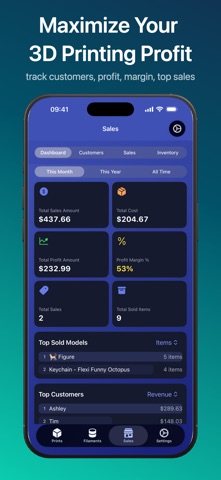
TRACK SALES, EXPENSES & PROFIT
Understand your revenue, expenses, and profit with sales summaries and detailed breakdowns.
• Review performance across different periods.
• Identify leading products and customers by revenue or profit.
• Record one-time and recurring business expenses.
• See where your money goes and which projects earn the most.
IMPORT BAMBU LAB PRINT HISTORY
Connect your Bambu Lab account to browse available print history and import print details, reducing manual entry.
SYNC ACROSS YOUR APPLE DEVICES : Use PrintMate on iPhone, iPad, and Mac, with iCloud sync to keep your workshop data available across your devices.
PRINTMATE PREMIUM : Get started free with up to 5 filaments, 5 prints, 5 customers, and 5 sales. An optional PrintMate Premium purchase removes these item limits.
Download PrintMate and bring your printing costs, inventory, and business records together.
—————————
Terms of Use: https://www.apple.com/legal/internet-services/itunes/dev/stdeula/