

5cut: Record & Trim Lectures
5cut: Record & Trim Lectures is made and published by Robin Maximilian Schoppner. AppBrain is an independent app data site and isn't affiliated with Robin Maximilian Schoppner. The app name, icon, screenshots and description belong to Robin Maximilian Schoppner and are shown as published on the App Store.
AppBrain's verdict
- Last updated
- October 19, 2026
Rankings
App Store top chartsApp Store Rankings for 5cut: Record & Trim Lectures
Releases
Updates seen on the App Store- Version
- 1.3.0
- Launched
- February 2026
No changelog data
User feedback
Ratings and reviews on the App StoreComments on 5cut: Record & Trim Lectures for iOS
We don't have enough comments to show example comments. Please check back later.
Technology
Found in the app by AppBrain- Price
- Free
- App size
- 88.1 MB
- Content rating
- Everyone
Technologies used by 5cut: Record & Trim Lectures
About the app and developer
About 5cut: Record & Trim Lectures
5cut: Record & Trim Lectures is an education app developed by Robin Maximilian Schoppner.
User Ratings
The app has no ratings yet.
App Information
5cut: Record & Trim Lectures is freely available from the App Store. The app size is 88.12 MB. The latest version available is 1.3.0. The last update was on October 19, 2026.
Technical Requirements
The app has a content rating of Everyone. The app has been available on the App Store since February 2026.
Developer information for Robin Maximilian Schoppner
Address:
Store listing
By Robin Maximilian Schoppner, from the App Store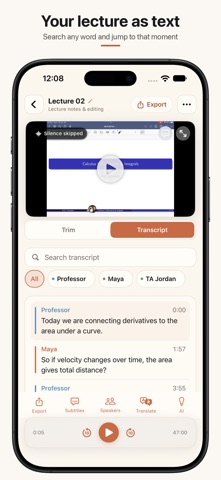


Description by Robin Maximilian Schoppner Written by the developer, not by AppBrain. Click to read.
Free: every lecture you record in 5cut gets the full transcript. There is no length limit.
Your recordings never leave your iPhone. Premium is a monthly subscription with a 7-day free trial for new subscribers, a 6-month Semester subscription, or a one-time purchase.
HOW IT WORKS
1. Tap Record in class. 5cut records audio only. The recording continues when the screen locks.
2. Read the transcript. On an iPhone 12 or later with iOS 26, you can see the text while the professor speaks. Otherwise, for 25 European languages such as English, Spanish and French, 5cut transcribes when you stop. For other languages, such as Chinese, Japanese, Korean or Vietnamese, open the Transcript tab after you stop and tap Transcribe.
3. Search for a word. Tap a result to jump to that moment.
4. Export the text, or send notes and flashcards to your study app.
WHAT IS FREE
• Record lectures and get the full transcript. No length limit.
• Search inside each transcript.
• Translate the transcript (iOS 18 and later).
• Imported audio and video files: 5cut transcribes the first 5 minutes.
• 5 exports each month: plain text, notes, SRT, Anki cards or video.
• Free video exports show a small watermark.
WHAT PREMIUM ADDS
• Full transcripts of imported files, of any length
• Unlimited exports and no watermark
• Speaker labels for up to 4 speakers
• AI notes, summaries, flashcards and answers to your questions, made on the device
• Search across all saved transcripts
• Batch with speaker labels and AI notes
PRICE
Premium is a monthly subscription, a 6-month Semester subscription or a one-time lifetime purchase. You choose. New subscribers can try the monthly plan free for 7 days. 5cut can remind you 2 days before the trial ends. Cancel at least 24 hours before it ends and you pay nothing. The App Store shows the prices for your region. The free version does not expire.
PRIVACY
Your recordings never leave your iPhone. 5cut cuts, transcribes and makes notes on the device. There is no 5cut server.
The first transcription downloads a speech model once, usually 50 to 600 MB depending on your language. Wi-Fi is best. Then test it yourself: use 5cut in Airplane Mode. It works the same.
No account. No ads. No trackers. No analytics.
LANGUAGES
5cut transcribes on the device in 30+ languages. The list depends on the engine you choose. On iOS 18 and later, 5cut translates the transcript with Apple's on-device translation. You can choose any language it supports, including English, Chinese (Simplified and Traditional), German, Spanish, French, Italian, Japanese, Korean, Portuguese and Vietnamese.
EXPORT TO YOUR STUDY TOOLS
Send the transcript and notes to Anki, Notion, Obsidian, Apple Notes or Markdown. Export subtitles as SRT, or the transcript as plain text.
MEETINGS AND VOICE MEMOS
5cut also works with meeting recordings, interviews and voice memos. Import audio or video files from Files or Photos.
OPTIONAL: CUT THE SILENCE
5cut can remove the silent parts of a recording. Choose Gentle, Moderate or Aggressive. You do not need this step to get a transcript.
Privacy Policy: https://get5cut.com/privacy/
Terms of Use: https://get5cut.com/terms/