

6X806 Drum Synth Loop Maker
6X806 Drum Synth Loop Maker is made and published by Rob Wilmot. AppBrain is an independent app data site and isn't affiliated with Rob Wilmot. The app name, icon, screenshots and description belong to Rob Wilmot and are shown as published on the App Store.
AppBrain's verdict
Established- Rating on App Store
- 4.60
- 25 ratings
- Last updated
- May 30, 2025
It doesn't have enough ratings yet to judge what users think.
Rankings
App Store top chartsApp Store Rankings for 6X806 Drum Synth Loop Maker
Competitors
Similar apps and more from Rob WilmotAlternatives to 6X806 Drum Synth Loop Maker






More from Rob Wilmot







Releases
Updates seen on the App Store- Version
- 5.3
- Launched
- February 2019
No changelog data
User feedback
Ratings and reviews on the App StoreComments on 6X806 Drum Synth Loop Maker for iOS
We don't have enough comments to show example comments. Please check back later.
Technology
Found in the app by AppBrain- Price
- $2.99
- App size
- 12.8 MB
- Content rating
- Everyone
Technologies used by 6X806 Drum Synth Loop Maker
About the app and developer
About 6X806 Drum Synth Loop Maker
6X806 Drum Synth Loop Maker is a music app developed by Rob Wilmot.
User Ratings
6X806 Drum Synth Loop Maker is rated 4.60 out of 5 stars. The rating is based on 25 ratings.
App Information
6X806 Drum Synth Loop Maker costs $2.99. The app size is 12.80 MB. The latest version available is 5.3. The last update was on May 30, 2025.
Technical Requirements
The app has a content rating of Everyone. The app has been available on the App Store since February 2019.
Developer information for Rob Wilmot
Address:
Store listing
By Rob Wilmot, from the App Store


Description by Rob Wilmot Written by the developer, not by AppBrain. Click to read.
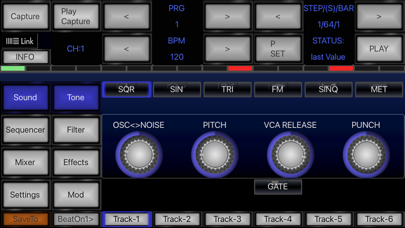
Synthesizer controls shape each sound on each track to various electro synth drum & percussion sounds.
Create drum patterns using step edit as on various drum synthesisers, drum machines & sequencers or can be generated randomly.
Independent FX, GarageBand routing, Ableton Link, IAA, & Audiobus 3 support.
Parameter Set to step per track manually or while playing.
Press P-Set to enter mode (Flashing). turn dials, this stores on that current step. Double tap the P-Set to enter erase mode. Any dial turned will erase all that dials settings for the whole track.
Easily capture what you hear, export to AudioShare, Audio-Copy, Email or iTunes Shared Folder
Check out the "How to" video demo on Youtube
https://youtu.be/in4V0P6nigM
DRUM SYNTHESIS:
3 Filters: Low, High & Band Pass + resonance & side-pass high pass level, envelope amount & decay time.
Adjust pitch
VCA decay time + PUNCH for extra kick velocity.
Extra attack for track 1 option.
Create almost any drum synth sound
SEQUENCER:
Swing/groove
Dynamics. Each step per track can also have a variable dynamics level (double tap) to accentuate pitch, filter or amplitude.
RANDOM FILL: From zero to 100 percent this will create random non accentuated steps in mealtime so you can create free flowing dynamic drum beats sequences.
Adjust number of steps & offsets in each track to create complex poly rhythms
INIT starts over with a blank pattern.
Find this in Settings/System.
BPM control +/-1 or double tap for +/-5 increments.
MOD SECTION:
LFO low pass CUT-OFF & PITCH. The pitch level can give a vintage effect subtly detuning with low SPEED or faster for ring modulated effect.
Trig forces reset on step to provide pitch or filter envelope.
CHAIN MODE:
Press P+1, P+2, P+3 for automatically switching to next 1,2, or 3 patterns at each loop end.
Changing pattern manually will reset.
Drum step edits cant be made during this mode.
LIVE CONTROL feature:
Use the pattern play section for the following cool tricks:
[Sequence/Control/Pattern]: Instantly switch to a saved sequence while playing. Keys correspond to available programs, starting from the current program thats loaded (key 1 is your current program, key 2 is current program+1 etc). Highlighted keys show stored programs. Blue tint shows if your are in Pattern Play still. This is great for building up live tracks and can be cut instantly like DJ cross-fade.
With P-Lock enabled, loading patterns locks parameters & just loads the patterns.
EFFECTS (Global/master are in yellow.)
OVERDRIVE.
SPRING REVERB
ECHO tempo synced with feedback & wetness.
MIXER section:
fade each track, mute/ unmute
Bass boost and pan on each track
SYNCING
Ableton Link syncs with Link apps .Enable for precise timing without syncing. Press LINK button at the bottom for settings. You can link to our other apps like 2XB303
MIDI sync with External, Virtual or Audiobus. 6X806 can be master or slave. ( any simple class-compliant USB should work but some may need to be power assisted)
Virtual MIDI In is always on. If you send from another app AND receive MIDI clock then you will be receiving both MIDI CLOCKS.
While Ableton Link is enabled you can send clock. This means you can use one app to control 6X806 with external hardware
MIDI note data is sent out on each channel
AUDIO
Record a fixed length, default to 32 steps. Can be changed in settings.
Arming sampling with CAPTURE (flashing). Starts at counter 1 (ON).
PLAY CAP to listen to your sample loop.
Audio can be routed via IAA (Inter App Audio) into apps like Apple's Garageband. Garageband will also sync your sequence for excellent multi-track recording.
Audiobus 3. Route audio to mix or record into other applications
To save you press "Save To", it then flashes. Now choose destination ("!" means its occupied ) then press "Save All" to confirm.