

7ODAY: Weekly Planner & To Do
7ODAY: Weekly Planner & To Do is made and published by Jose Pedro Franco Moreno. AppBrain is an independent app data site and isn't affiliated with Jose Pedro Franco Moreno. The app name, icon, screenshots and description belong to Jose Pedro Franco Moreno and are shown as published on the App Store.
AppBrain's verdict
- Last updated
- October 15, 2026
Rankings
App Store top chartsApp Store Rankings for 7ODAY: Weekly Planner & To Do
Competitors
Similar apps and more from Jose Pedro Franco MorenoAlternatives to 7ODAY: Weekly Planner & To Do


More from Jose Pedro Franco Moreno


Releases
Updates seen on the App Store- Version
- 1.0.4
- Launched
- September 2026
No changelog data
User feedback
Ratings and reviews on the App StoreComments on 7ODAY: Weekly Planner & To Do for iOS
We don't have enough comments to show example comments. Please check back later.
Technology
Found in the app by AppBrain- Price
- Free
- App size
- 12.2 MB
- Content rating
- Everyone
Technologies used by 7ODAY: Weekly Planner & To Do
About the app and developer
About 7ODAY: Weekly Planner & To Do
7ODAY: Weekly Planner & To Do is a productivity app developed by Jose Pedro Franco Moreno.
What is the rating of 7ODAY: Weekly Planner & To Do?
7ODAY: Weekly Planner & To Do has no ratings yet.
Is 7ODAY: Weekly Planner & To Do free?
7ODAY: Weekly Planner & To Do is free. The app size is 12.25 MB. The latest version available is 1.0.4. The last update was on October 15, 2026.
What are the requirements for 7ODAY: Weekly Planner & To Do?
The app has a content rating of Everyone. The app has been available on the App Store since September 2026.
Developer information for Jose Pedro Franco Moreno
Address:
Frequently asked questions about 7ODAY: Weekly Planner & To Do
Is 7ODAY: Weekly Planner & To Do free?
Yes. 7ODAY: Weekly Planner & To Do is free on the App Store.
Is 7ODAY: Weekly Planner & To Do still available?
Yes. 7ODAY: Weekly Planner & To Do is on the App Store, and the last update we saw was on October 15, 2026.
How large is 7ODAY: Weekly Planner & To Do?
7ODAY: Weekly Planner & To Do is 12.25 MB.
Is 7ODAY: Weekly Planner & To Do suitable for children?
App Store rates the content of 7ODAY: Weekly Planner & To Do as suitable for everyone.
Who made 7ODAY: Weekly Planner & To Do?
7ODAY: Weekly Planner & To Do was developed by Jose Pedro Franco Moreno. It is listed in the productivity category on the App Store.
What are the best alternatives to 7ODAY: Weekly Planner & To Do?
People looking at 7ODAY: Weekly Planner & To Do also look at these productivity apps: Since - When did I last ...?, FloatyDo, Sorven: Home Asset Inventory, Smartlist Organizer, Overdue: minimal to-do.
Store listing
By Jose Pedro Franco Moreno, from the App Store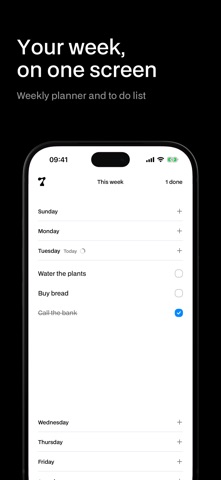


Description by Jose Pedro Franco Moreno Written by the developer, not by AppBrain. Click to read.
7ODAY is a weekly planner and to do list that shows your whole week on one screen. Open a day, write what you have to do, and tick it off when it’s done. That’s the app.
What you don’t finish stays where you left it. What you finish stays too, crossed out, with a small ring that fills as the day goes. There is no inbox, no projects, no tags, no account. Your tasks live on your phone from the first second.
• A week you can see at a glance, in your region’s order.
• One day open at a time. The others keep you oriented.
• Add with one tap. Confirm by tapping anywhere.
• Write several tasks in a row without leaving the keyboard.
• Tick a task and it stays, crossed out at the bottom of its day. Tap it again to bring it back.
• Two widgets, free: today’s list on your Home Screen, and you can tick things off without opening anything.
• Dark mode from day one.
Premium adds ten things, and only if you want them:
• Unlimited tasks (the free plan keeps four going at a time).
• Change day: move a task to another day without writing it again.
• iCloud sync across your devices.
• One notification a day, with what’s left. On a day with nothing, it stays quiet.
• Lock Screen and Control Center: today at a glance, and a new task one tap away.
• Siri: add a task without opening the app.
• Analytics: which days you finish things. No goals, no streaks.
• A light or a dark app icon.
• The large widget, with the whole day.
• A clean start: clear what’s left when the week turns, only if you ask for it.
Premium is a yearly subscription or a one-time purchase. The yearly plan renews automatically until you cancel it from your Apple account. Terms of Use: https://7oday.app/terms/. Privacy Policy: https://7oday.app/privacy/.