AppBrain
AppBrain
  • Apps
  • Apps being viewed right now Trending apps today Most popular apps All-time most installed apps Top rated apps iPhone and iPad apps
  • Intelligence ▾
    Intelligence overview → Track any Android app or your whole market
    Track & analyze
    Keyword Tracker & OptimizerTrack & improve Play rankings App Performance ReportOne-off PDF for any app StatisticsFree Android & Play market stats
    Promote your app
    Featured Apps App Links
  • Intelligence
  • Pricing
  • Dashboard
  • Sign up
  • Log in
App Store Apps > Utilities > 8PWD: Password Manager & 2FA
8PWD: Password Manager & 2FA icon

8PWD: Password Manager & 2FA

6.0
MNV LIMITED
0.00
0 reviews
Free

8PWD: Password Manager & 2FA Screenshot 1 of 10
8PWD: Password Manager & 2FA Screenshot 2 of 10
8PWD: Password Manager & 2FA Screenshot 3 of 10
8PWD: Password Manager & 2FA Screenshot 4 of 10
8PWD: Password Manager & 2FA Screenshot 5 of 10
8PWD: Password Manager & 2FA Screenshot 6 of 10
8PWD: Password Manager & 2FA Screenshot 7 of 10
8PWD: Password Manager & 2FA Screenshot 8 of 10
8PWD: Password Manager & 2FA Screenshot 9 of 10
8PWD: Password Manager & 2FA Screenshot 10 of 10
Screenshots by MNV LIMITED, from the the App Store listing
View on the App Store

About 8PWD: Password Manager & 2FA

8PWD: Password Manager & 2FA is an utilities app developed by MNV LIMITED.

What is the rating of 8PWD: Password Manager & 2FA?

8PWD: Password Manager & 2FA has no ratings yet.

Is 8PWD: Password Manager & 2FA free?

8PWD: Password Manager & 2FA is free. The app size is 63.62 MB. The latest version available is 6.0. The last update was on November 14, 2026.

What are the requirements for 8PWD: Password Manager & 2FA?

The app has a content rating of Everyone. The app has been available on the App Store since September 2026.

8PWD: Password Manager & 2FA is made and published by MNV LIMITED. AppBrain is an independent app data site and isn't affiliated with MNV LIMITED. The app name, icon, screenshots and description belong to MNV LIMITED and are shown as published on the App Store.

Description by MNV LIMITED (from the App Store)
Your passwords, passkeys and 2FA codes stay on your iPhone, iPad and Mac — nowhere else.
The App Store label says “Data Not Collected”, there's no account, and it works in Airplane Mode: 8PWD has no networking code and we run no server that could leak.
Move in from Apple Passwords, Chrome or another password manager in two minutes; viewing, copying, exporting and deleting always stay available.

MOVE IN ON DAY ONE
The first launch walks you through importing: one tap from Apple Passwords (no plain-text file), pasted text, a CSV from Chrome, Firefox, Bitwarden, 1Password, LastPass and others, or a Google Authenticator transfer code. Then turn on AutoFill and set 8PWD as your code app, one tap each.

WHAT IT DOES FOR YOU
• Sign in with a tap: system AutoFill in Safari, apps and on Mac. Signing up or changing a password? 8PWD generates one that follows the site's rules and saves it when you tap Save (iOS 26.2+).
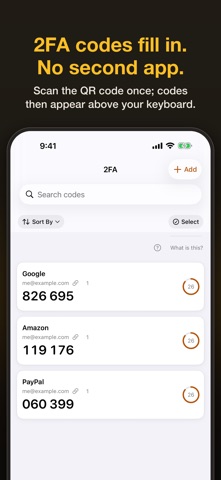
• Built-in 2FA: scan a QR code once and the code appears above the keyboard. No second app; recovery codes live with their 2FA code.
• Passkeys: create and keep passkeys and sign in with Face ID; sites can upgrade you to a passkey right after 8PWD fills a password.
• Link 2FA codes, credit and debit cards and identities to accounts; aliases remember old email addresses and phone numbers.
• Next Step on Home walks you through setup in 7 steps, from bringing passwords in to your first backup.
• Calm leak alerts: 1,000,000 publicly leaked passwords, checked on your phone with no requests sent. Being on the list doesn't mean you were hacked — it tells you what to do.
• Account deletion guide for 2,100+ sites, with a ready-made request; the site guide shows which sites support 2FA and passkeys.
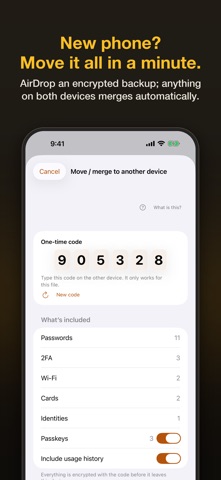
• New phone: AirDrop an encrypted backup and import it — smart merge keeps the more recently edited copy of each record. .8pwd is an open format (CC0) and plain CSV export is there too.
• View a password large to type it on a computer or TV; share Wi‑Fi as a QR code.
• Travel mode hides chosen folders or members everywhere until you turn it off with Face ID. Nothing is deleted.
• A section for each family member.
• Native on iPhone, iPad and Mac, in twelve languages, with accessibility throughout.

HOW IT'S PROTECTED
Everything is stored as AES‑256‑GCM ciphertext; the key is created on your device and kept in the system keychain. With a master password (600,000 PBKDF2 rounds) or Face ID / Touch ID the vault opens; a 12-word recovery phrase takes over on a new device. We hold none of these. No analytics, no crash reporting, no third-party SDKs; the only network request is Apple's StoreKit when you buy.

TRIAL AND SUBSCRIPTION
A 7-day trial with every feature starts the first time you save or import something — no payment details needed. After that, subscribe monthly or yearly, or buy Lifetime once (yearly and Lifetime support Family Sharing). When a trial or subscription ends, nothing is deleted: every record can still be viewed, searched, copied (verification codes included), exported and deleted. If you installed before 5.0, you keep the free plan with 10 passwords. Prices are shown on the store page; one purchase covers iPhone, iPad and Mac on the same Apple Account.

READ THIS BEFORE YOU START
We hold no copy of your key. Lose the device before setting a master password — or later both the master password and the recovery phrase — and only your own backup can bring the data back. Export one when the app reminds you.

Available in twelve languages; English legal texts prevail.

Terms of Use: https://www.8pwd.com/terms
Privacy Policy: https://www.8pwd.com/privacy
Show more Show less

More data about 8PWD: Password Manager & 2FA

Price Free
Rating No ratings
Ranking Not ranked
Version 6.0
App size 63.6 MB
Suitable for Everyone

Alternatives to 8PWD: Password Manager & 2FA

Vault – Password Manager & 2FA icon Vault – Password Manager & 2FA
迎迎 林
0.0
Free
AuthGuard – 2FA & OTP Codes icon AuthGuard – 2FA & OTP Codes
宇杰 辛
5.0
Free
1 ratings
DocRelay: Mobile Fax icon DocRelay: Mobile Fax
Beta Thrill Limited
5.0
Free
1 ratings
Tongs - http(s) stream catcher icon Tongs - http(s) stream catcher
VZ TECH SOLUTIONS, LLC
0.0
Free
Photo Cleaner:LightSweep icon Photo Cleaner:LightSweep
BEES NEST
5.0
Free
1 ratings
IronVault: Password Manager icon IronVault: Password Manager
Saket Suman
0.0
Free
OffVault - Password Manager icon OffVault - Password Manager
Brothapps, SL
0.0
Free
Chox: Sermon summaries icon Chox: Sermon summaries
Chiebuka Anelechi
0.0
Free

Changelog of 8PWD: Password Manager & 2FA

No changelog data

Developer information for MNV LIMITED

MNV LIMITED

Address:

Share 8PWD: Password Manager & 2FA

Comments on 8PWD: Password Manager & 2FA for iOS

We don't have enough comments to show example comments. Please check back later.

App Store Rankings for 8PWD: Password Manager & 2FA

This app is not ranked

Technologies used by 8PWD: Password Manager & 2FA

Frequently asked questions about 8PWD: Password Manager & 2FA

Is 8PWD: Password Manager & 2FA free?

Yes. 8PWD: Password Manager & 2FA is free on the App Store.

Is 8PWD: Password Manager & 2FA still available?

Yes. 8PWD: Password Manager & 2FA is on the App Store, and the last update we saw was on November 14, 2026.

How large is 8PWD: Password Manager & 2FA?

8PWD: Password Manager & 2FA is 63.62 MB.

Is 8PWD: Password Manager & 2FA suitable for children?

App Store rates the content of 8PWD: Password Manager & 2FA as suitable for everyone.

Who made 8PWD: Password Manager & 2FA?

8PWD: Password Manager & 2FA was developed by MNV LIMITED. It is listed in the utilities category on the App Store.

What are the best alternatives to 8PWD: Password Manager & 2FA?

People looking at 8PWD: Password Manager & 2FA also look at these utilities apps: Vault – Password Manager & 2FA, AuthGuard – 2FA & OTP Codes, DocRelay: Mobile Fax, Tongs - http(s) stream catcher, Photo Cleaner:LightSweep.

Today's trending apps Price drops on Google Play Popular Utilities Apps Apps other people are watching Top new apps
Vault – Password Manager & 2FA icon Vault – Password Manager & 2FA
AuthGuard – 2FA & OTP Codes icon AuthGuard – 2FA & OTP Codes
DocRelay: Mobile Fax icon DocRelay: Mobile Fax
Tongs - http(s) stream catcher icon Tongs - http(s) stream catcher
Photo Cleaner:LightSweep icon Photo Cleaner:LightSweep
IronVault: Password Manager icon IronVault: Password Manager
OffVault - Password Manager icon OffVault - Password Manager
Chox: Sermon summaries icon Chox: Sermon summaries
AppBrain Intelligence premium content

Subscribe now to get full and unlimited access to AppBrain Intelligence. You'll have access to:

  • App Intelligence dashboard (performance timeline, competitor comparison, country rankings, insight cards)
  • Detailed ranking data per app
  • Full timeline per developer
  • Device market shares data per country
  • Unlimited keyword tracking
1 Month

$75/mo
(billed every month)

SAVE 0%
Subscribe
3 Months

$65/mo
($195 billed every 3 months)

SAVE 13%
Subscribe
1 Year

$57.50/mo
($690 billed every year)

SAVE 23%
Subscribe
Each subscription will automatically renew 3 days before the expiration date for the same time period. Subscriptions can be cancelled at any time before the renewal.

AppBrain is an app data site, we track rankings, ratings, installs for all apps and games on Google Play and the App Store. AppBrain doesn't host app files or APKs, all install links go directly to the official store. All trademarks are owned by their respective owners.

More apps

  • Top Android apps being viewed
  • Stickman 234 Offline Minigames
  • CineCap
  • Veloura: AI Girlfriend Chat

App statistics

  • Android statistics
  • Google Play Developer stats
  • Trending Android Apps
  • Trending iOS apps
  • Top popular Apps
  • Buy the best Android phone
  • Buy & sell app businesses

About AppBrain

  • Contact
  • Privacy
  • Documentation
  • DMCA takedowns
  • Blog
  • Android app Install tracking and attribution options for the AppBrain ad network
© 2010-2026 - AppBrain