

A320 FAP Simulator
A320 FAP Simulator is made and published by ERM SIMS LLC. AppBrain is an independent app data site and isn't affiliated with ERM SIMS LLC. The app name, icon, screenshots and description belong to ERM SIMS LLC and are shown as published on the App Store.
AppBrain's verdict
- Rating on App Store
- 5.00
- 2 ratings
- Last updated
- June 26, 2026
- Size
- 77.2 MB
It doesn't have enough ratings yet to judge what users think.
User feedback
Ratings and reviews on the App StoreComments on A320 FAP Simulator for iOS
We don't have enough comments to show example comments. Please check back later.
Store listing
By ERM SIMS LLC, from the App Store



Description by ERM SIMS LLC Written by the developer, not by AppBrain. Click to read.
Key Features:
- Aircraft Flexibility: Switch seamlessly between A318, A319, A320, A321, and A321ACF configurations (including FLEX cabin layouts).
- Advanced Cabin Controls: Adjust cabin temperatures, lavatory positions, water/waste levels, seat settings for multiple zone layouts, cabin options and more!
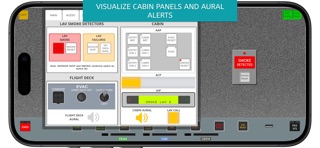
- Interactive Panels & Alerts: Simulate Attendant Indication Panel (AIP), Area Call Panel (ACP), and Aural Alerts for scenarios like EVAC and smoke. Lower FAP Panel access.
- Customizable Operations: Set door statuses, boarding/flight modes, cabin lighting, LAV Positions, and even set your own FAP screen saver image.
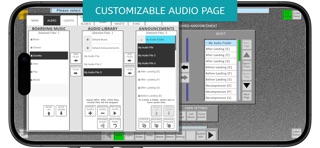
- Preloaded Announcements: Access preloaded safety and flight announcements (in English, Spanish, and French) with demo background music.
- Customizable PRAM: Highly requested feature! Import your own audio files to customize Pre-recorded Announcements and Boarding Music directly from the Audio Configuration menu.
- Fault Simulation: Trigger up to 36 faults that affect key operational pages for advanced scenario training.
- Persistence & Customization: Configuration changes are retained after reloading, with options for tailored settings and secure access codes for protected pages.
- Training-Ready Modules: Removable Cabin Assignment Module (CAM), PRAM (Programmable Announcement Module), and OBRM (Onboard Removal Module). Software loading possible via OBRM.
- Realistic MCDU Integration: MCDU CIDS menus for maintenance practice.
Who is it for?
- Flight attendants preparing for real-world cabin operations.
- Maintenance personnel needing a detailed training tool.
Your Ultimate Cabin Experience Awaits. Download now!
Safety and technology
Found in the app by AppBrain- Price
- $24.99
- App size
- 77.2 MB
- Content rating
- Everyone
Technologies used by A320 FAP Simulator
Releases
Updates seen on the App Store- Version
- 1.1.2
- Launched
- December 2024
No changelog data
Alternatives
Similar apps and more from ERM SIMS LLCMore from ERM SIMS LLC


Also available on Google Play

Rankings
App Store top chartsApp Store Rankings for A320 FAP Simulator
About the app and developer
About A320 FAP Simulator
A320 FAP Simulator is an education app developed by ERM SIMS LLC.
What is the rating of A320 FAP Simulator?
A320 FAP Simulator is rated 5.00 out of 5 stars, based on 2 ratings.
Is A320 FAP Simulator free?
A320 FAP Simulator costs $24.99. The app size is 77.16 MB. The latest version available is 1.1.2. The last update was on June 26, 2026.
What are the requirements for A320 FAP Simulator?
The app has a content rating of Everyone. The app has been available on the App Store since December 2024.
Developer information for ERM SIMS LLC
Address:
Frequently asked questions about A320 FAP Simulator
Is A320 FAP Simulator free?
No. A320 FAP Simulator costs $24.99 on the App Store.
Is A320 FAP Simulator still available?
Yes. A320 FAP Simulator is on the App Store, and the last update we saw was on June 26, 2026.
How large is A320 FAP Simulator?
A320 FAP Simulator is 77.16 MB.
Is A320 FAP Simulator suitable for children?
App Store rates the content of A320 FAP Simulator as suitable for everyone.
How do people rate A320 FAP Simulator?
A320 FAP Simulator scores 5.00 out of 5 stars, from 2 ratings on the App Store.
Who made A320 FAP Simulator?
A320 FAP Simulator was developed by ERM SIMS LLC. It is listed in the education category on the App Store.