

AAC Speech & Communication
AAC Speech & Communication is made and published by Christopher Mckellar. AppBrain is an independent app data site and isn't affiliated with Christopher Mckellar. The app name, icon, screenshots and description belong to Christopher Mckellar and are shown as published on the App Store.
AppBrain's verdict
- Last updated
- October 17, 2026
Rankings
App Store top chartsApp Store Rankings for AAC Speech & Communication
Competitors
Similar apps and more from Christopher MckellarAlso available on Google Play

Releases
Updates seen on the App Store- Version
- 2.0
- Launched
- August 2026
No changelog data
User feedback
Ratings and reviews on the App StoreComments on AAC Speech & Communication for iOS
We don't have enough comments to show example comments. Please check back later.
Technology
Found in the app by AppBrain- Price
- Free
- App size
- 113.8 MB
- Content rating
- Everyone
Technologies used by AAC Speech & Communication
About the app and developer
About AAC Speech & Communication
AAC Speech & Communication is an education app developed by Christopher Mckellar.
User Ratings
The app has no ratings yet.
App Information
AAC Speech & Communication is freely available from the App Store. The app size is 113.82 MB. The latest version available is 2.0. The last update was on October 17, 2026.
Technical Requirements
The app has a content rating of Everyone. The app has been available on the App Store since August 2026.
Developer information for Christopher Mckellar
Address:
Store listing
By Christopher Mckellar, from the App Store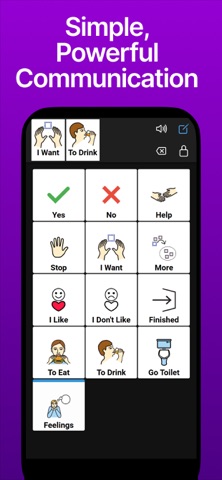


Description by Christopher Mckellar Written by the developer, not by AppBrain. Click to read.
Designed for autism, aphasia, ALS/MND, stroke recovery, cerebral palsy, and more. Perfect for home, school, therapy sessions, or everyday communication.
Free Version – Core AAC Features
• Intuitive communication grids with symbols, photos, voice clips and text
• Tap tiles to build and speak sentences instantly
• Ready-made topic boards (emotions, food, school, daily activities & more)
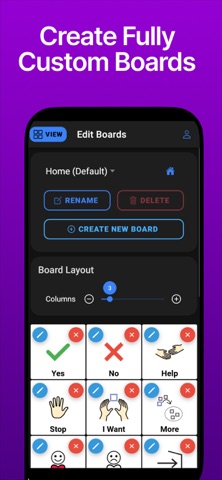
• Create and edit up to 3 custom boards
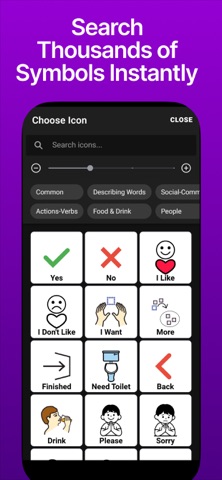
• Searchable library with thousands of Mulberry SVG symbols
• Add your own photos, icons, or recorded audio
• Folder navigation between boards
• Clear message bar with consistent core word placement
• Export boards as printable PDFs
• Accessibility options: adjustable fonts & spacing, highlight scanning, cream background (glare reduction), high-contrast mode (CVI support)
• Profile Export & Import: Share boards, tiles, custom images, and voice recordings offline between devices.
• Offline AI Board Generation: Create complete boards from simple text prompts offline. Adjust tile counts, swap or remove suggestions.
Premium – One-Time Unlock (No Subscription)
Pay once. Own forever. Includes all future updates.
• Unlimited custom boards
• Cloud Sync for backup and cross-device access
• Multiple Profiles (school vs home, siblings, clients)
• Camera Scan – photograph objects or materials to create boards instantly
• Gallery Import – auto-detect symbols from saved photos
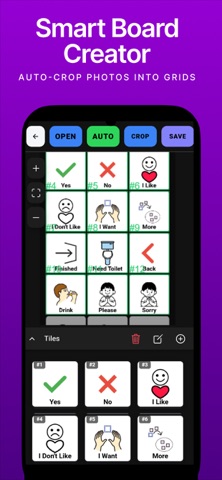
• Smart Board Creator (Standout Feature):
Take a photo of printed symbol sheets, worksheets, scene photos, or real-world objects. The app automatically detects items, places crop boxes, and turns them into a ready-to-use digital communication grid in seconds — with manual adjustment if needed.
Whether you’re a parent modelling language, a speech & language therapist, teacher, or caregiver, this app makes AAC simple, fast, and affordable. Start with core words, use templates for quick wins, or digitize paper-based systems effortlessly.
No subscriptions. No recurring fees.
Give a voice. Empower communication.