

ABC Word Magic is made and published by Similesoft. AppBrain is an independent app data site and isn't affiliated with Similesoft. The app name, icon, screenshots and description belong to Similesoft and are shown as published on the App Store.
AppBrain's verdict
- Last updated
- August 26, 2025
Rankings
App Store top chartsApp Store Rankings for ABC Word Magic
Competitors
Similar apps and more from Similesoft




Releases
Updates seen on the App Store- Version
- 1.3.1
- Launched
- June 2023
No changelog data
User feedback
Ratings and reviews on the App StoreComments on ABC Word Magic for iOS
We don't have enough comments to show example comments. Please check back later.
Technology
Found in the app by AppBrain- Price
- $3.99
- App size
- 46.5 MB
- Content rating
- Everyone
Technologies used by ABC Word Magic
About the app and developer
About ABC Word Magic
ABC Word Magic is an education app developed by Similesoft.
What is the rating of ABC Word Magic?
ABC Word Magic has no ratings yet.
Is ABC Word Magic free?
ABC Word Magic costs $3.99. The app size is 46.47 MB. The latest version available is 1.3.1. The last update was on August 26, 2025.
What are the requirements for ABC Word Magic?
The app has a content rating of Everyone. The app has been available on the App Store since June 2023.
Developer information for Similesoft
Address:
Frequently asked questions about ABC Word Magic
Is ABC Word Magic free?
No. ABC Word Magic costs $3.99 on the App Store.
Is ABC Word Magic still available?
Yes. ABC Word Magic is on the App Store, and the last update we saw was on August 26, 2025.
How large is ABC Word Magic?
ABC Word Magic is 46.47 MB.
Is ABC Word Magic suitable for children?
App Store rates the content of ABC Word Magic as suitable for everyone.
Who made ABC Word Magic?
ABC Word Magic was developed by Similesoft. It is listed in the education category on the App Store.
What are the best alternatives to ABC Word Magic?
People looking at ABC Word Magic also look at these education apps: Scottie Go! Edu, Number writing practice math 1, Second Grade Math Quiz, Tynker Junior: Coding for Kids, First Grade Math Quiz.
Store listing
By Similesoft, from the App Store


Description by Similesoft Written by the developer, not by AppBrain. Click to read.
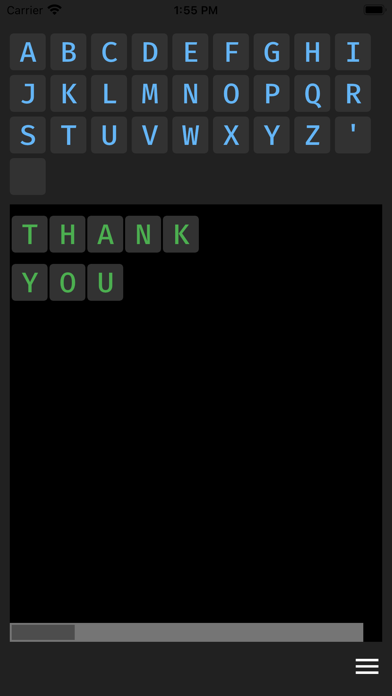
Craft words with a simple drag and drop from the alphabet to the editor panel. To take the learning a notch higher, ABC Word Magic features Text-To-Speech (TTS) technology, allowing your device to vocalize the words you compose.
ABC Word Magic intersects simplicity and customization, creating an ideal learning tool for all children, including those with specific learning disabilities. Parents and teachers can easily tailor settings to meet each child's unique learning needs.
Personalize the learning experience by selecting the language, activating auto-speak mode (all, line, letter), choosing visual themes, and adjusting the size of letters. We've designed these settings to be managed by parents or teachers, minimizing the need for children to make any changes themselves.
In our quest to promote multilingual learning, we support a diverse range of languages. With alphabets available in more than 25 languages, children have the opportunity to gain exposure to global languages at their fingertips.
Explore languages with ABC Word Magic's random sample feature. With 150 unique word or phrase samples per language, there's always something new. Change the language setting and watch as the sample text automatically translates. If Text-To-Speech is supported, you can hear the sample in the new language immediately. Enhance your multilingual skills and vocabulary in a simple, engaging way with ABC Word Magic.
ABC Word Magic supports the following languages: Albanian, Bulgarian, Czech, Croatian, Danish, Dutch, English, Estonian, Finnish, French, German, Greek, Hungarian, Indonesian, Italian, Icelandic, Latvian, Lithuanian, Malay, Norwegian, Polish, Portuguese, Romanian, Russian, Slovak, Serbian, Slovenian, Spanish, Swedish, Turkish, and Ukrainian.
Please note that Text-To-Speech support for your selected language may require additional language pack installation in your operating system. To enrich your experience, please install the appropriate language pack on your device, if available. These are typically located in your device's settings, under 'Language & Input' or similar sections. Keep in mind, some operating systems may automatically load language packs in the background.