

AcoustiTools®
AcoustiTools® is made and published by ACOUSTIC MASTERMINDS INC. AppBrain is an independent app data site and isn't affiliated with ACOUSTIC MASTERMINDS INC. The app name, icon, screenshots and description belong to ACOUSTIC MASTERMINDS INC. and are shown as published on the App Store.
AppBrain's verdict
Established- Rating on App Store
- 4.43
- 7 ratings
- Last updated
- December 30, 2023
- Size
- 157.8 MB
It doesn't have enough ratings yet to judge what users think.
User feedback
Ratings and reviews on the App StoreComments on AcoustiTools® for iOS
We don't have enough comments to show example comments. Please check back later.
Store listing
By ACOUSTIC MASTERMINDS INC., from the App Store



Description by ACOUSTIC MASTERMINDS INC. Written by the developer, not by AppBrain. Click to read.
Five interactive modules – four tile display:
1) Audio Information in Augmented Reality
Know the volume level across the venue using the ground-breaking AR Spatial Analyzer module. This module uses augmented reality (AR) to tag locations and calculate the volume level, distance, and delay for each placed tag. Ever need to use asymmetrically placed speakers? Prevent a blurred delay of sound for the audience. With the AR Spatial Analyzer module, you can instantly know how to accommodate for the depth difference and correct the time alignment.
- Map The Volume
The Volume Variance feature uses tagged locations to quickly map the sound level variations from tagged and labeled main speakers to your current position. The live values display in a 2D overlay allowing you to monitor the sound levels across the audience and keep the volume enjoyable for everyone.
- Simplify Delay Timing
The Delay Calc feature makes it simple to solve delay problems, calculating the delay timing between a tagged and labeled front speaker and delay stack. The displayed results give you the information needed to quickly sync your audio.
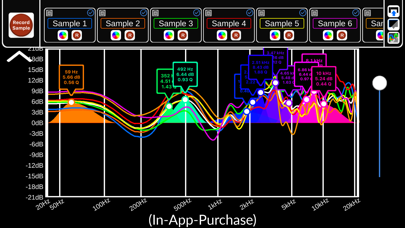
2) Diagnostic PEQ (in-app-purchase)
Using the revolutionary real-time Diagnostic PEQ (parametric equalizer) module to listen to pink noise, receive recommended corrective EQ settings to implement for tuning your audio system, whether you’re in a large or small space.
Want to reduce the stress of identifying the most problematic frequencies under pressure and choosing the most effective EQ settings to correct it? Available through in-app-purchase, the revolutionary Diagnostic PEQ module diagnoses your audio and recommends a corrective EQ curve to implement for your mix based on live audio or averaged recorded samples. With values for each setting of your PEQ — the center frequency, the Q, and the amplitude — you have a professional, real-time solution to your immediate audio challenges.
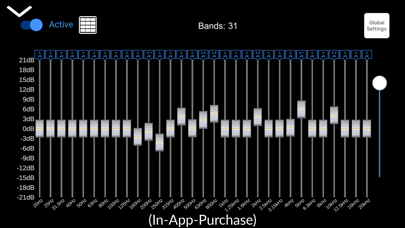
3) Diagnostic GEQ (in-app-purchase)
If your system uses a graphic equalizer, use the revolutionary real-time Diagnostic GEQ (graphic equalizer) module to listen to pink noise and receive recommended corrective GEQ settings to implement for tuning your audio system, whether you’re in a large or small space.
Want to quickly balance your car’s audio system? Set the Diagnostic GEQ to match the number of bands your car’s audio system uses.
Available through in-app-purchase, the revolutionary Diagnostic GEQ module diagnoses your audio and recommends a corrective EQ curve based on live audio or averaged recorded samples making it easy to get the most out of your audio system.
4) Real-Time Analyzer
The RTA module gives you the information you need to determine the best on-the-fly frequency corrections. The AcoustiTools RTA module includes a red problem frequency line to highlight the frequency on the RTA graph with the largest difference from surrounding frequencies. You can also keep your eye on a specific frequency you set using the blue selectable frequency line. Easily switch between a spectrum color display for bright environments or display the graph in solid blue for dimmer environments.
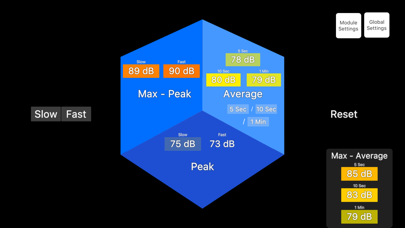
5) dB Meter
- Max-Peak/Max-Average
- Fast/Slow
- User selectable Max-Average time periods
- Threshold Alerts
__________
AcoustiTools’ innovative design simultaneously displays four active modules. This breakthrough feature allows you to view information from multiple modules at once and quickly select a module to interact with.
Global Features:
- Spectral Weightings
- Averaging Options
- Selectable Block Sizes
- Microphone Calibration Trim
AcoustiTools — superpowers in your hands.
For tutorial videos & the user guide, go to www.acousticmasterminds.com
Safety and technology
Found in the app by AppBrain- Price
- $39.99
- App size
- 157.8 MB
- Content rating
- Everyone
Technologies used by AcoustiTools®
Releases
Updates seen on the App Store- Version
- 2.2.00
- Launched
- January 2019
No changelog data
Alternatives
Similar apps and more from ACOUSTIC MASTERMINDS INC.Alternatives to AcoustiTools®




Rankings
App Store top chartsApp Store Rankings for AcoustiTools®
About the app and developer
About AcoustiTools®
AcoustiTools® is an utilities app developed by ACOUSTIC MASTERMINDS INC.
User Ratings
AcoustiTools® is rated 4.43 out of 5 stars. The rating is based on 7 ratings.
App Information
AcoustiTools® costs $39.99. The app size is 157.80 MB. The latest version available is 2.2.00. The last update was on December 30, 2023.
Technical Requirements
The app has a content rating of Everyone. The app has been available on the App Store since January 2019.
Developer information for ACOUSTIC MASTERMINDS INC.
Address: