

Actions is made and published by Sindre Sorhus. AppBrain is an independent app data site and isn't affiliated with Sindre Sorhus. The app name, icon, screenshots and description belong to Sindre Sorhus and are shown as published on the App Store.
AppBrain's verdict
Loved by users- Rating on App Store
- 4.80
- 508 ratings
- Last updated
- June 8, 2026
Users love it: 4.8 stars from 508 ratings.
Rankings
App Store top chartsApp Store Rankings for Actions
Competitors
Similar apps and more from Sindre SorhusAlternatives to Actions






More from Sindre Sorhus





Releases
Updates seen on the App Store- Version
- 4.2.0
- Launched
- October 2021
No changelog data
User feedback
Ratings and reviews on the App StoreComments on Actions for iOS
We don't have enough comments to show example comments. Please check back later.
Technology
Found in the app by AppBrain- Price
- Free
- App size
- 27.7 MB
- Content rating
- Everyone
Technologies used by Actions
About the app and developer
About Actions
Actions is an utilities app developed by Sindre Sorhus.
User Ratings
Actions is rated 4.80 out of 5 stars. The rating is based on 510 ratings.
App Information
Actions is freely available from the App Store. The app size is 27.72 MB. The latest version available is 4.2.0. The last update was on June 8, 2026.
Technical Requirements
The app has a content rating of Everyone. The app has been available on the App Store since October 2021.
Developer information for Sindre Sorhus
Address:
Frequently asked questions about Actions
Is Actions free?
Yes. Actions is free on the App Store.
Is Actions still available?
Yes. Actions is on the App Store, and the last update we saw was on June 8, 2026.
How large is Actions?
Actions is 27.72 MB.
Is Actions suitable for children?
App Store rates the content of Actions as suitable for everyone.
How do people rate Actions?
Actions scores 4.80 out of 5 stars, from 508 ratings on the App Store.
Who made Actions?
Actions was developed by Sindre Sorhus. It is listed in the utilities category on the App Store.
What are the best alternatives to Actions?
People looking at Actions also look at these utilities apps: Toolbox Pro for Shortcuts, Lock Launcher Widgets LockFlow, PiPifier, ShortFlow: Lockscreen Shortcut, AllMyBatteries.
Store listing
By Sindre Sorhus, from the App Store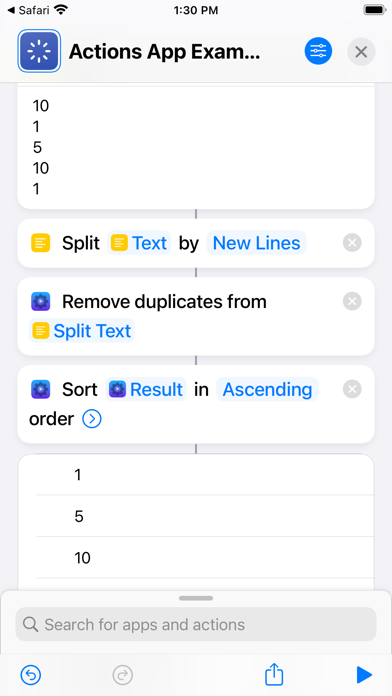
Description by Sindre Sorhus Written by the developer, not by AppBrain. Click to read.
It provides additional actions for the Shortcuts app.
IMPORTANT: Because of an iOS bug, to make the actions show up in the Shortcuts app, you need to first launch the app and then restart your device.
重要提示:由于 iOS 错误,要使操作显示在“快捷方式”应用程序中,您需要先启动该应用程序,然后重新启动设备。
WICHTIG: Aufgrund eines iOS-Fehlers müssen Sie, damit die Aktionen in der Shortcuts-App angezeigt werden, zuerst die App starten und dann Ihr Gerät neu starten.
IMPORTANT : en raison d'un bug iOS, pour que les actions s'affichent dans l'application Raccourcis, vous devez d'abord lancer l'application, puis redémarrer votre appareil.
The actions are not able to run on Apple Watch or HomePod.
Restart your device if the actions don't show up in the Shortcuts app.
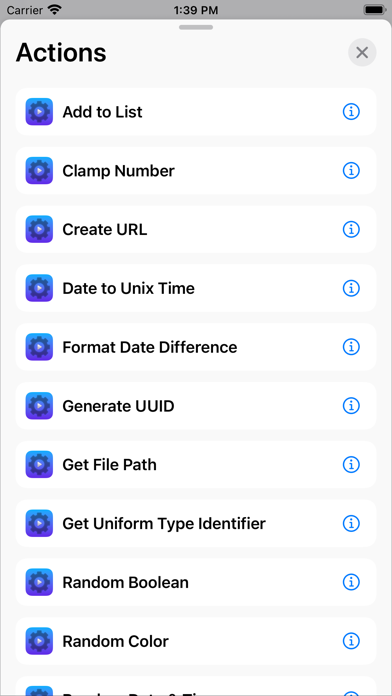
■ Actions
- Add to List
- Apply Capture Date
- Ask for Text with Timeout
- Authenticate
- Blur Images
- Boolean
- Calculate with Soulver
- Choose from List (Extended)
- Clamp Number
- Color
- Combine Lists
- Combine Videos
- Convert Coordinates to Location
- Convert Date to Unix Time
- Convert Location to Geo URI
- Convert Unix Time to Date
- Create Color Image
- Create Menu Item
- Create URL
- Download File
- Edit URL
- Encrypt File
- Encrypt Text
- Filter List
- Find Music Playlist
- Format Currency
- Format Date Difference
- Format Duration
- Format Number as Ordinal
- Format Number — Compact
- Format Person Name
- Format Text List
- Generate CSV
- Generate Haptic Feedback
- Generate Random Data
- Generate Random Text
- Generate UUID
- Get All System Colors
- Get Audio Playback Destination
- Get Average Color
- Get Average Color of Image
- Get Battery State
- Get Bluetooth Device
- Get Bluetooth Devices
- Get Boolean from Input
- Get Compass Heading
- Get Device Details (Extended)
- Get Device Motion Activity
- Get Device Motion Data
- Get Device Orientation
- Get Dominant Colors of Image
- Get Elevation
- Get Emojis
- Get File Path
- Get High-Resolution Timestamp
- Get Image Capture Date / Set Image Capture Date
- Get Image Location / Set Image Location
- Get Index of List Item
- Get Map Image of Location
- Get Paragraphs from Text
- Get Query Item Value from URL
- Get Query Items from URL
- Get Query Items from URL as Dictionary
- Get Random Boolean
- Get Random Color
- Get Random Date and Time
- Get Random Emoticon
- Get Random Floating-Point Number
- Get Random Number from Seed
- Get Related Words
- Get Sentences from Text
- Get SF Symbol Image
- Get System Color
- Get Title of URL
- Get Uniform Type Identifier / Set Uniform Type Identifier
- Get User Details
- Get Values Using JSONPath
- Global Variable
- Hex Encode
- Hide Shortcuts App
- Invert Images
- Is Accessibility Feature On
- Is Audio Playing
- Is Bluetooth On
- Is Call Active
- Is Cellular Data On
- Is Cellular Low Data Mode On
- Is Conforming to Uniform Type Identifier
- Is Connected to VPN
- Is Dark Mode On
- Is Day
- Is Device Locked
- Is Device Moving
- Is Device Orientation
- Is Host Reachable
- Is Location Services Enabled
- Is Low Power Mode On
- Is Online
- Is Shaking Device
- Is Silent Mode On
- Is Time
- Is Time In Range
- Is Web Server Reachable
- Join Wi-Fi
- Merge Dictionaries
- Open URLs in Safari
- Overwrite File
- Parse CSV
- Parse JSON5
- Pick Color
- Pretty Print Dictionaries
- Remove Duplicate Lines
- Remove Duplicates from List
- Remove Emojis
- Remove Empty Lines
- Remove from List
- Remove Non-Printable Characters
- Reverse Lines
- Reverse List
- Round Number to Multiple
- Scan Documents
- Scan QR Codes in Image
- Set Creation and Modification Date of File
- Show Black Screen
- Show Notification
- Shuffle List
- Sort List
- Sort Months
- Spell Out Number
- Toggle Boolean
- Transform Lists
- Transform Text
- Transform Text with JavaScript
- Trim Whitespace
- Truncate List
- Truncate Number
- Truncate Text
- Wait Milliseconds
- Write or Edit Text