

ADB Remote: TV Touchscreen
ADB Remote: TV Touchscreen is made and published by Shivam Raj. AppBrain is an independent app data site and isn't affiliated with Shivam Raj. The app name, icon, screenshots and description belong to Shivam Raj and are shown as published on the App Store.




AppBrain's verdict
- Last updated
- September 29, 2026
- Size
- 1.95 MB
User feedback
Ratings and reviews on the App StoreComments on ADB Remote: TV Touchscreen for iOS
We don't have enough comments to show example comments. Please check back later.
Store listing
By Shivam Raj, from the App StoreDescription by Shivam Raj Written by the developer, not by AppBrain. Click to read.
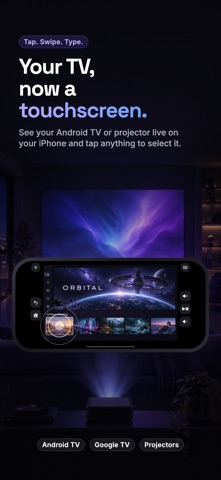
ADB Remote turns your Android TV, Google TV or Android projector into a touchscreen. See the TV's screen live on your iPhone, tap anything to select it, swipe through rows, and type with your iPhone keyboard. A fast, haptic remote is always one tap away.
YOUR TV, NOW A TOUCHSCREEN
• A live preview of the TV screen, right on your phone
• Tap a poster, button or menu to select it
• Swipe to move through rows; press and hold for more options
• Full-screen mode: turn your phone sideways and the TV fills it
TYPE WITH YOUR IPHONE KEYBOARD
• When a search box opens on the TV, your keyboard pops up automatically
• Text already in the box comes along, so you can edit it instead of starting over
• Clear the TV's text box in one tap
A REMOTE THAT FEELS RIGHT
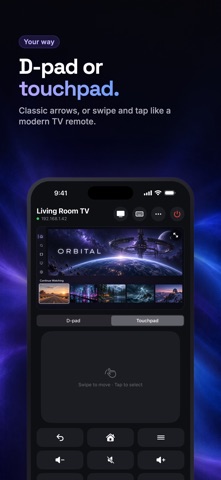
• D-pad or touchpad: pick classic arrows or swipe and tap like a modern TV remote
• Back, Home, Menu, volume, mute, play/pause, rewind, fast-forward and power
• Hold an arrow or volume button to repeat
• A gentle haptic tap on every press
• Near-instant response on many Android projectors
ONE-TAP APPS
• Launch any app installed on your TV
• Pin your favorites to the front, in the order you want
HEADPHONES IN TWO TAPS
• Open your TV's Bluetooth settings from your phone and connect your earbuds to the TV, with lip sync handled by the TV
PRIVATE BY DESIGN
• No account, no sign-in, no ads, no analytics
• Your phone talks directly to your TV on your Wi-Fi, and nothing else
• The app collects no data
SETUP (ABOUT TWO MINUTES, ONCE)
ADB Remote uses Android's built-in debugging connection (ADB), so your TV needs one setting turned on:
1. On the TV, open Settings > About and select Build number 7 times to unlock Developer options.
2. In Developer options, turn on USB debugging (and ADB over network, if listed).
3. Open ADB Remote on the same Wi-Fi. It finds your TV automatically.
4. On the TV's "Allow USB debugging?" prompt, tick Always allow and choose Allow.
Works with Android-based TVs, Google TV and Android TV devices, projectors and streaming boxes that support ADB debugging over the network (port 5555). Some features depend on your device and apps.
Need help? Visit adbremote.xyz/support.
Android and Google TV are trademarks of Google LLC. ADB Remote is not affiliated with or endorsed by Google.
Safety and technology
Found in the app by AppBrain- Price
- Free
- App size
- 1.95 MB
- Content rating
- Everyone
Technologies used by ADB Remote: TV Touchscreen
Releases
Updates seen on the App Store- Version
- 1.0
- Launched
- September 2026
No changelog data
Alternatives
Similar apps and more from Shivam RajAlternatives to ADB Remote: TV Touchscreen


More from Shivam Raj

Rankings
App Store top chartsApp Store Rankings for ADB Remote: TV Touchscreen
About the app and developer
About ADB Remote: TV Touchscreen
ADB Remote: TV Touchscreen is an utilities app developed by Shivam Raj.
What is the rating of ADB Remote: TV Touchscreen?
ADB Remote: TV Touchscreen has no ratings yet.
Is ADB Remote: TV Touchscreen free?
ADB Remote: TV Touchscreen is free. The app size is 1.95 MB. The latest version available is 1.0. The last update was on September 29, 2026.
What are the requirements for ADB Remote: TV Touchscreen?
The app has a content rating of Everyone. The app has been available on the App Store since September 2026.
Developer information for Shivam Raj
Address: