

Add Text to PDF - Fill Forms
Add Text to PDF - Fill Forms is made and published by OneRack. AppBrain is an independent app data site and isn't affiliated with OneRack. The app name, icon, screenshots and description belong to OneRack and are shown as published on the App Store.
AppBrain's verdict
- Rating on App Store
- 5.00
- 4 ratings
- Last updated
- September 6, 2026
- Size
- 72.0 MB
It doesn't have enough ratings yet to judge what users think.
User feedback
Ratings and reviews on the App StoreComments on Add Text to PDF - Fill Forms for iOS
We don't have enough comments to show example comments. Please check back later.
Store listing
By OneRack, from the App Store


Description by OneRack Written by the developer, not by AppBrain. Click to read.
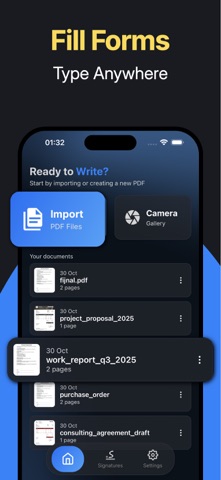
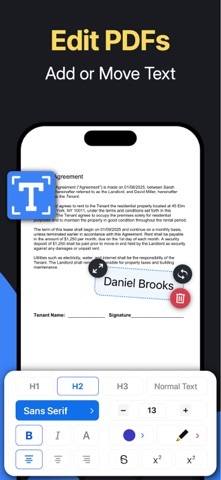
Whenever you need to add text to an existing PDF, simply open your file, tap where you want to write, and start typing. It feels natural and fast, with results that look professional. You can even import photos from your gallery and place text or captions directly on top of them, making it useful for labeling receipts, adding titles to images, or filling out forms from scanned documents.
Key Features
• Add text and write directly on PDF documents
• Fill out forms or annotate existing files instantly
• Import photos from your gallery and add text or captions
• Insert your digital signature anywhere in the document
• All your files are automatically saved for quick access
• Clean, intuitive design focused on fast editing
Why Add Text to PDF – Fill Forms
1. Designed for quick and accurate text editing on PDFs
2. Works seamlessly with both documents and imported images
3. Keeps every file automatically organized and saved
4. Simple, modern interface without distractions
5. Fully offline, secure, and privacy-friendly
Adding your signature is simple too. Just draw or import it once and place it wherever needed. Every document you edit or create is automatically saved, so you never lose your work. Your files are organized in one place for easy viewing and sharing whenever you need them.
With Add Text to PDF – Fill Forms, editing becomes effortless. Write on PDFs, fill forms, and add notes wherever you need them. Everything you create stays saved automatically, ready to view or share anytime. It’s the simplest way to add text to documents and keep your workflow smooth and organized.
Privacy Policy: https://www.onerack.nl/apps/pdf-text/privacy-policy
Terms of Service: https://www.onerack.nl/apps/pdf-text/terms-and-conditions
Safety and technology
Found in the app by AppBrain- Price
- Free
- App size
- 72.0 MB
- Content rating
- Everyone
Technologies used by Add Text to PDF - Fill Forms
Releases
Updates seen on the App Store- Version
- 1.0.7
- Launched
- November 2025
No changelog data
Alternatives
Similar apps and more from OneRack


Rankings
App Store top chartsApp Store Rankings for Add Text to PDF - Fill Forms
About the app and developer
About Add Text to PDF - Fill Forms
Add Text to PDF - Fill Forms is a productivity app developed by OneRack.
User Ratings
Add Text to PDF - Fill Forms is rated 5.00 out of 5 stars. The rating is based on 4 ratings.
App Information
Add Text to PDF - Fill Forms is freely available from the App Store. The app size is 72.03 MB. The latest version available is 1.0.7. The last update was on September 6, 2026.
Technical Requirements
The app has a content rating of Everyone. The app has been available on the App Store since November 2025.
Developer information for OneRack
Address:
Frequently asked questions about Add Text to PDF - Fill Forms
Is Add Text to PDF - Fill Forms free?
Yes. Add Text to PDF - Fill Forms is free on the App Store.
Is Add Text to PDF - Fill Forms still available?
Yes. Add Text to PDF - Fill Forms is on the App Store, and the last update we saw was on September 6, 2026.
How large is Add Text to PDF - Fill Forms?
Add Text to PDF - Fill Forms is 72.03 MB.
Is Add Text to PDF - Fill Forms suitable for children?
App Store rates the content of Add Text to PDF - Fill Forms as suitable for everyone.
How do people rate Add Text to PDF - Fill Forms?
Add Text to PDF - Fill Forms scores 5.00 out of 5 stars, from 4 ratings on the App Store.
Who made Add Text to PDF - Fill Forms?
Add Text to PDF - Fill Forms was developed by OneRack. It is listed in the productivity category on the App Store.
What are the best alternatives to Add Text to PDF - Fill Forms?
People looking at Add Text to PDF - Fill Forms also look at these productivity apps: Magic and Cocktails, PLNTRK APP, Lovvly - AI GirlFriend Chat, Sortly-Sorglos, AI PDF Converter - PDF to word.