

AddCalc PRO
AddCalc PRO is made and published by Shinichi Aokawa. AppBrain is an independent app data site and isn't affiliated with Shinichi Aokawa. The app name, icon, screenshots and description belong to Shinichi Aokawa and are shown as published on the App Store.
AppBrain's verdict
- Best rank
- #75
- Top Paid, Japan
- Last updated
- August 15, 2026
Rankings
App Store top charts- Highest rank
- #75
- Chart
- Top Paid
- Productivity
- Country
- Japan
App Store Rankings for AddCalc PRO
Top rankings
| Rank | Country | Category | List |
|---|---|---|---|
| 75 | Japan | Productivity | Top Paid |
Ranking history in Japan
Competitors
Similar apps and more from Shinichi AokawaAlternatives to AddCalc PRO







More from Shinichi Aokawa


Releases
Updates seen on the App Store- Version
- 19.10
- Launched
- February 2012
No changelog data
User feedback
Ratings and reviews on the App StoreComments on AddCalc PRO for iOS
We don't have enough comments to show example comments. Please check back later.
Technology
Found in the app by AppBrain- Price
- $0.99
- App size
- 3.54 MB
- Content rating
- Everyone
Technologies used by AddCalc PRO
About the app and developer
About AddCalc PRO
AddCalc PRO is a productivity app developed by Shinichi Aokawa.
User Ratings
The app has no ratings yet.
App Information
AddCalc PRO costs $0.99. The app size is 3.54 MB. The latest version available is 19.10. The last update was on August 15, 2026.
Technical Requirements
The app has a content rating of Everyone. The app has been available on the App Store since February 2012.
Developer information for Shinichi Aokawa
Address:
Frequently asked questions about AddCalc PRO
Is AddCalc PRO free?
No. AddCalc PRO costs $0.99 on the App Store.
Is AddCalc PRO still available?
Yes. AddCalc PRO is on the App Store, and the last update we saw was on August 15, 2026.
How large is AddCalc PRO?
AddCalc PRO is 3.54 MB.
Is AddCalc PRO suitable for children?
App Store rates the content of AddCalc PRO as suitable for everyone.
Who made AddCalc PRO?
AddCalc PRO was developed by Shinichi Aokawa. It is listed in the productivity category on the App Store.
What are the best alternatives to AddCalc PRO?
People looking at AddCalc PRO also look at these productivity apps: ICONIT QRcode Reader, Calculator Easy Lite, PDF Photos ·, Naver Mail, NAS Pro.
Store listing
By Shinichi Aokawa, from the App Store
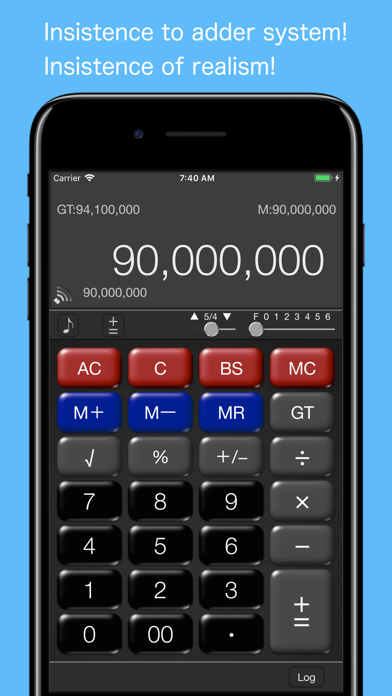

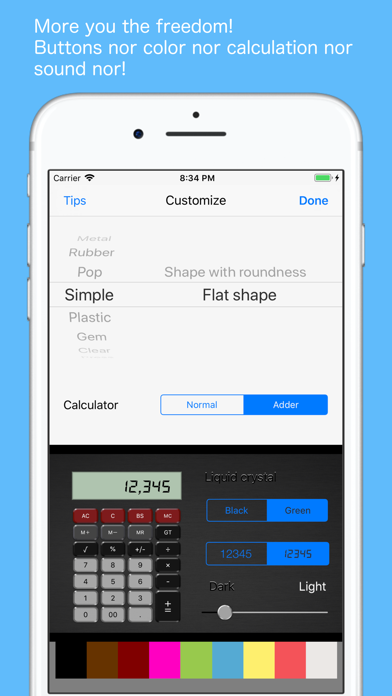

Description by Shinichi Aokawa Written by the developer, not by AppBrain. Click to read.
(with the calculation method change function)
Try it on iPhone and iPad you always carry around.
【Feature】
- This can switch an "adder calculator" and "ordinary calculator"
- The design of a button can be chosen
- The regulating function of a background color and brightness
- Select your favorite sound from sound effects
- Input log editing + recalculation function
- Voice reading of the input log
- Copy the log and total (paste to memo etc)
- Display switching function digit after the decimal point (FULL · 0 ~ 6 digits)
- The (up-truncation Ri rounded-off) Rounding switching function
- 14 Number of significant digits
- Always display "GT:Grand Total"
- Always display "MR:Memory"
- BS:BackSpace function
【How to use an adder calculator】
”(10×10)+(5×5)-(6×5)=95”
10 [×] 10 [+=] 5 [×] 5 [+=] 6 [×] 5 [-] [GT]
(10×10)Add(5×5)Add(6×5)Pull
% Calculation example : 500 + (500 × 12%) = 560
500 [+=] 12 [%] [+=]
【How to use an ordinary calculator】
”(10×10)+(5×5)-(6×5)=95”
10 [×] 10 [=][M+] 5 [×] 5 [=][M+] 6 [×] 5 [=] [M-][MR]
Added to the Grand Total by "="
The continuous input will be "10×10+5×5-6×5=2595"
% Calculation example : 500 + (500 × 12%) = 560
500 [+] 12 [%] [=]