

ADHD Planner & To Do Organizer
ADHD Planner & To Do Organizer is made and published by Ravi Mishra. AppBrain is an independent app data site and isn't affiliated with Ravi Mishra. The app name, icon, screenshots and description belong to Ravi Mishra and are shown as published on the App Store.
AppBrain's verdict
- Last updated
- November 7, 2026
- Size
- 58.9 MB
User feedback
Ratings and reviews on the App StoreComments on ADHD Planner & To Do Organizer for iOS
We don't have enough comments to show example comments. Please check back later.
Store listing
By Ravi Mishra, from the App Store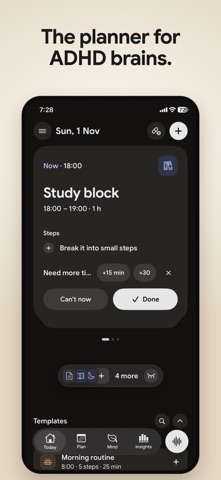


Description by Ravi Mishra Written by the developer, not by AppBrain. Click to read.
TODAY: ONE THING AT A TIME
• The Now card shows the task you're on, its time and its first small step. Swipe to see what's next.
• Break a task into small steps and tick them off as you go.
• Can't start? Tap "Can't now" to move it later today, to tomorrow, pick a smaller task, or clear the rest of a hard day in one tap.
• Everything else waits in a "Later today" pill until you want it.
A DAY THAT BENDS WHEN YOU RUN LATE
• Ran over? Tap +15 or +30. The tasks after it move for you and you see exactly what changes before anything moves.
• Meetings and appointments you mark as fixed never move.
• Every change can be undone.
PLAN YOUR DAY AND WEEK
• See your day as a simple list or a timeline with your free time shown.
• Swipe through the week or jump to any date in the month.
• Drag a task to another day, or drop it into a free gap.
• Not sure when? It waits in the Inbox.
• 100+ ready-made templates: morning routine, leaving the house, study session, pay the bills and more.
PLAN BY TALKING
• Say or type your plans the way you'd say them out loud: "Gym Tuesday and Thursday at 7, pay rent Friday, call mom tomorrow evening."
• Each task appears as a card with its day and time. Check it, change it by saying it again, then add it in one tap.
• Sign in to use the AI reading. Free plans include a few tries; Pro is unlimited.
FOCUS TIMER
• Start a task and a timer runs for its length, or use Pomodoro or an open timer.
• Rain, forest, ocean, café, fireplace, white and brown noise and calm music play while you work, even with the screen locked.
• The timer shows on your Lock Screen and Dynamic Island.
ROUTINES AND MEDICATION
• Step-by-step routines run one step at a time with a timer.
• Medication reminders at your dose times, with "Taken" right from the notification, gentle repeats until you take it, and a refill reminder.
CHECK-INS AND INSIGHTS
• Check in on mood, sleep and energy as often as you like, and add your own trackers (yes/no, numbers, sliders, choices).
• Your days become a simple journal with notes.
• Insights shows your trends over 7, 30 or 90 days, and Pro shows which habits go with your better days.
A REPORT FOR YOUR DOCTOR
• Pick what to include and a date range, and get a clean report of what you entered, ready for your next appointment.
WIDGETS AND SYNC
• Home Screen and Lock Screen widgets show what's now.
• Sign in to keep your plan safe and on any iPhone.
No streaks. No red. Nothing overdue. Missed a day? Start again.
Steadyline is a planning and self-tracking tool, not a medical device, and does not give medical advice.
SUBSCRIPTIONS
Steadyline is free to download and use. Steadyline Pro adds unlimited planning by talking and "What lifts your mood" insights.
• Pro Monthly: $5.99 per month
• Pro Yearly: $39.99 per year, with a 14-day free trial
• Pro Lifetime: $99.99, one-time purchase
Prices are in US dollars and may vary by country. Payment is charged to your Apple ID account at confirmation of purchase. Subscriptions renew automatically unless cancelled at least 24 hours before the end of the current period, and your account is charged for renewal within 24 hours before the period ends. Any unused part of a free trial is forfeited when you buy a subscription. You can manage and cancel subscriptions in your Apple ID account settings at any time.
Terms of Use (EULA): https://adhd.steadyline.app/terms
Privacy Policy: https://adhd.steadyline.app/privacy
Safety and technology
Found in the app by AppBrain- Price
- Free
- App size
- 58.9 MB
- Content rating
- Medium
Technologies used by ADHD Planner & To Do Organizer
Releases
Updates seen on the App Store- Version
- 1.0
- Launched
- November 2026
No changelog data
Alternatives
Similar apps and more from Ravi MishraMore from Ravi Mishra

Rankings
App Store top chartsApp Store Rankings for ADHD Planner & To Do Organizer
About the app and developer
About ADHD Planner & To Do Organizer
ADHD Planner & To Do Organizer is a productivity app developed by Ravi Mishra.
What is the rating of ADHD Planner & To Do Organizer?
ADHD Planner & To Do Organizer has no ratings yet.
Is ADHD Planner & To Do Organizer free?
ADHD Planner & To Do Organizer is free. The app size is 58.85 MB. The latest version available is 1.0. The last update was on November 7, 2026.
What are the requirements for ADHD Planner & To Do Organizer?
The app has a content rating of Medium Maturity. The app has been available on the App Store since November 2026.
Developer information for Ravi Mishra
Address: