

ADMIS Apex Mobile
ADMIS Apex Mobile is made and published by ADM Investor Services, Inc. AppBrain is an independent app data site and isn't affiliated with ADM Investor Services, Inc. The app name, icon, screenshots and description belong to ADM Investor Services, Inc. and are shown as published on the App Store.
AppBrain's verdict
Established- Rating on App Store
- 4.00
- 2 ratings
- Last updated
- August 24, 2026
It doesn't have enough ratings yet to judge what users think.
Rankings
App Store top chartsApp Store Rankings for ADMIS Apex Mobile
Competitors
Similar apps and more from ADM Investor Services, Inc.Alternatives to ADMIS Apex Mobile



More from ADM Investor Services, Inc.


Releases
Updates seen on the App Store- Version
- 6.2.9
- Launched
- November 2012
No changelog data
User feedback
Ratings and reviews on the App StoreComments on ADMIS Apex Mobile for iOS
We don't have enough comments to show example comments. Please check back later.
Technology
Found in the app by AppBrain- Price
- Free
- App size
- 39.7 MB
- Content rating
- Everyone
Technologies used by ADMIS Apex Mobile
About the app and developer
About ADMIS Apex Mobile
ADMIS Apex Mobile is a finance app developed by ADM Investor Services, Inc.
What is the rating of ADMIS Apex Mobile?
ADMIS Apex Mobile is rated 4.00 out of 5 stars, based on 2 ratings.
Is ADMIS Apex Mobile free?
ADMIS Apex Mobile is free. The app size is 39.73 MB. The latest version available is 6.2.9. The last update was on August 24, 2026.
What are the requirements for ADMIS Apex Mobile?
The app has a content rating of Everyone. The app has been available on the App Store since November 2012.
Developer information for ADM Investor Services, Inc.
Address:
Store listing
By ADM Investor Services, Inc., from the App Store


Description by ADM Investor Services, Inc. Written by the developer, not by AppBrain. Click to read.
Futures exchange coverage includes CME Group (CME, CBOT, NYMEX, COMEX), Intercontinental Exchange (ICE), EUREX, CBOE Futures Exchange (CFE) and the Minneapolis Grain Exchange (MGEX). Equity exchange coverage includes NYSE, NASDAQ and AMEX.
Quotes Monitor offers a highly customizable quote montage that provides detailed quote information organized into multiple pages with user-defined titles.
Advanced Symbol Search capabilities assist you in finding the correct symbol to compose any kind of contract in your Quotes Monitor. A Contract Details view will offer you complete info on any contract available in your Quotes Monitor.
Charts stream in real-time using HTML5 technology to offer a new level of user interactivity via a wide selection of tools, settings, programmable indicators and order entry.
Price Ladder offers a real-time market depth view that highlights your relevant portfolio data in an interactive fashion.
Options Chain can display all the options for any futures contract with the ability to trade individual options directly from the module.
Price Alarms can be set on any quote with various conditions and alerting modes.
Real-time News from Dow Jones and LaSalle Street comes with advanced search capabilities, related linkage and a context-based coloring scheme.
Block Trades module provides you real time trading information, perfect way to monitor contracts, quantities and prices traded by others.
If you want to solicit a Request For Quote (RFQ), that is also available from various modules of the application. You can also view existing RFQs in the market.
Strategy Builder will allow you to place User Defined Strategies (UDS) to the exchange, expanding your trading options.
While in application is in the background, all your important information will be available real time via the notification center.
Save your Settings at your office or at home and seamlessly continue working on the road, whether you are using Apex Desktop, Apex Lite or Apex Mobile.
This application offers you the perfect balance between trading with one tap and, at the same time, offers in-depth customizations for your trading actions. Visualizing your portfolio has never been easier with Orders & Positions. Applying filters and using simple gestures can show or hide details on any item in your portfolio.
Account Information provides details about margins, trade equity and balance of your trading account. Quick account switching offers you a flawless transition between the accounts that comprise your portfolio.
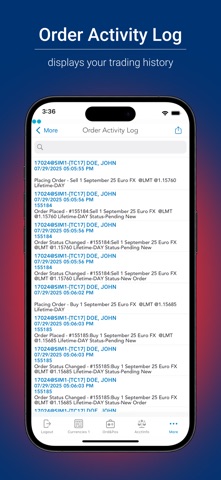
Real-time notifications provide instant feedback during your trading session. Should you need to review your trading history, changes to your orders and positions, the Order Activity Log is the perfect tool for that.