

Agender is made and published by Joi Yokouchi. AppBrain is an independent app data site and isn't affiliated with Joi Yokouchi. The app name, icon, screenshots and description belong to Joi Yokouchi and are shown as published on the App Store.
AppBrain's verdict
- Last updated
- April 12, 2026
Rankings
App Store top chartsApp Store Rankings for Agender
Competitors
Similar apps and more from Joi YokouchiMore from Joi Yokouchi


Releases
Updates seen on the App Store- Version
- 1.1.0
- Launched
- April 2026
No changelog data
User feedback
Ratings and reviews on the App StoreComments on Agender for iOS
We don't have enough comments to show example comments. Please check back later.
Technology
Found in the app by AppBrain- Price
- Free
- App size
- 1.35 MB
- Content rating
- Everyone
Technologies used by Agender
About the app and developer
About Agender
Agender is a business app developed by Joi Yokouchi.
User Ratings
The app has no ratings yet.
App Information
Agender is freely available from the App Store. The app size is 1.35 MB. The latest version available is 1.1.0. The last update was on April 12, 2026.
Technical Requirements
The app has a content rating of Everyone. The app has been available on the App Store since April 2026.
Developer information for Joi Yokouchi
Address:
Frequently asked questions about Agender
Is Agender free?
Yes. Agender is free on the App Store.
Is Agender still available?
Yes. Agender is on the App Store, and the last update we saw was on April 12, 2026.
How large is Agender?
Agender is 1.35 MB.
Is Agender suitable for children?
App Store rates the content of Agender as suitable for everyone.
Who made Agender?
Agender was developed by Joi Yokouchi. It is listed in the business category on the App Store.
Store listing
By Joi Yokouchi, from the App Store

Description by Joi Yokouchi Written by the developer, not by AppBrain. Click to read.
研究発表会、ピッチイベント、課題発表会...
複数人が次々と発表するイベントで、時間管理に追われていませんか?
Agenderは、運営者が進行に集中できる、シンプルで確実なタイムキーパーです。
______
プレゼン運営の「あるある」を解決
タイムキーパー役が時計とにらめっこで、進行に集中できない...
「あと1分」のタイミングを逃して、発表が押してしまう...
登壇者に「残り時間」を伝えるタイミングが難しい...
Agenderなら、全体の流れを把握しながら、確実に時間を守れます!
______
プレゼン運営に最適な機能
【全体を俯瞰しながら、今に集中】
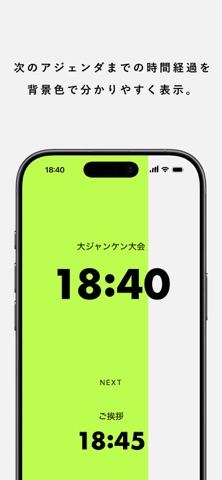
• 「今のセッション」と「次のセッション」を大画面表示
• プログレス表示で、進行状況が一目瞭然
【タイミングを逃さないアラート】
• 終了1分前に自動アラート(時間はカスタマイズ可)
• 画面点滅・バイブレーション・サウンドで確実に通知
• 発表者にプレッシャーを与えない、控えめな通知設計
【イベント直前でも焦らないセットアップ】
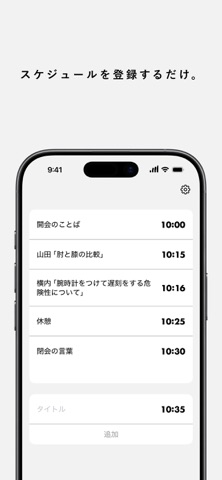
タイトルと時刻を入れていくだけで準備完了
【使いやすいデザイン】
• 縦・横どちらでも最適なレイアウト
• 画面タップで「終了」ボタン表示/非表示
• シンプルで気が散らないデザイン
_________
こんなイベントで活躍
LT会(Lightning Talks)
5分×10人でも、全員時間ぴったりに
社内プレゼン大会
「1人3分」を公平に守って、全員に発表機会を
学会・研究発表会
セッション単位でタイムテーブル管理
スタートアップピッチ
投資家の前で、プロフェッショナルな進行を
読書会・勉強会
「発表10分、質疑5分」を視覚的に管理
イベント・ワークショップ
開会→セッション1→休憩→セッション2...全体の流れをコントロール
______
使い方は簡単3ステップ
1. タイムテーブルを入力
発表者名と開始時刻を登録(編集・削除も簡単)
2. イベント開始時にスタート
あとは画面を見ているだけ
3. アラートで次の準備
終了1分前にアラート→次の発表者に準備を促す
______
細かい設定も可能
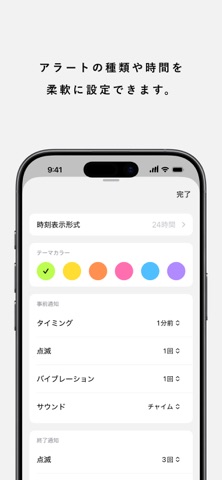
アラートのカスタマイズ
• 終了何秒前に通知するか(10秒〜5分前)
• 点滅・バイブレーション・サウンドの回数
• セッション開始時のアラートもON/OFF可能
見た目の調整
• アクセントカラー変更
• 12時間/24時間表示切り替え
______
無料・広告なし・シンプル
プレゼン運営に必要なのは、
発表者への気配りと、Agenderだけ。