Agito puts the AI coding agents running on your own machines in your pocket. Start Claude Code, Codex, or any other terminal agent at your desk, then check in, answer its questions, and review its work from your iPhone or iPad.
Your code never runs on your phone. Agito connects to your Mac, Linux workstation, or server over SSH or Mosh and takes you back to the herdr and tmux sessions already running there.
A REAL TERMINAL, BUILT FOR TOUCH
• SSH terminal with a shortcut bar for Esc, Ctrl, Tab, arrows and more
• Mosh keeps your session alive when Wi-Fi turns into cellular or your phone goes to sleep
• Attach to herdr workspaces and tmux sessions and pick up exactly where you left off
• Automatic reconnection that restores supported sessions
• Voice input that you review before it is sent, and photos you can hand to your agent
• Light and dark themes with readable monospaced fonts
MADE FOR AI CODING AGENTS
• Chat view presents the agent's conversation in a layout made for a phone, for supported agents running in herdr, and for Claude Code under tmux
• Answer permission prompts and questions from a card instead of typing key codes
• Inbox gathers the agents that are working, waiting, or finished across all your machines
• Push notifications tell you when an agent needs you
• The terminal works with any agent that runs in a shell
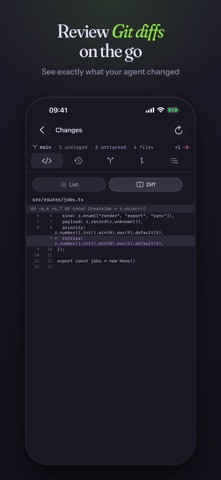
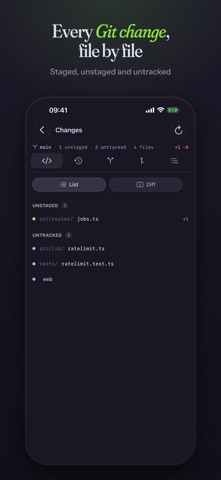
REVIEW THE WORK, NOT JUST THE OUTPUT
• Git: browse changes, read diffs, and look through recent history
• Files: browse your remote project over SFTP
• Port forwarding: open the dev server your agent just started, right on your phone
• Terminal, files, Git, and chat all travel over your own SSH connection
YOUR MACHINES, YOUR KEYS
• No account and no sign-up. Add a host with a password or an SSH key
• Host key verification on first connection
• Credentials are kept in the iOS Keychain; optional App Lock with Face ID, Touch ID, or your passcode
• Optional iCloud Sync keeps your host list the same on your iPhone and iPad
• No analytics or advertising SDKs
WHAT YOU NEED
• A Mac, Linux machine, or VPS that your phone can reach over SSH. A private VPN works well when you are away from home
• mosh-server on the host if you want to use Mosh
• For chat view, the inbox, and notifications: the free Agito Helper (agito-relay) running on the host. Agito can install it for you over SSH on macOS and Linux
• iOS 18 or later
HOW NOTIFICATIONS STAY PRIVATE
Notifications are optional. When you pair them, the Helper sends only event metadata to the Agito notification service: the agent name, its state, workspace and task names, and the identifiers needed to deliver the push. Terminal output, source code, and prompts are never part of a notification event. Everything else goes directly between your device and your machines.
QUESTIONS
Does my code or agent run on the phone?
No. Your repositories, tools, and agents stay on your own machine. Agito is the window into that environment.
Which agents work with Agito?
Any agent that runs in a terminal. Chat view currently reads the transcripts of Claude Code, Codex, Gemini, OpenCode, Qwen, Kimi, and several others when they run in herdr.
AGITO PRO
The terminal, SSH, Mosh, and herdr and tmux sessions are free. Agito Pro adds chat view, Git, Files, web previews of forwarded ports, push notifications, iCloud Sync, and themes. Choose a monthly or yearly subscription or a one-time lifetime purchase. Subscriptions renew automatically unless canceled at least 24 hours before the end of the current period. Manage or cancel them in your App Store account settings.
Terms of Use: https://getagito.dev/terms/
Privacy Policy: https://getagito.dev/privacy/
Documentation, guides, and privacy details: https://getagito.dev
Support: support@getagito.dev
Claude, Claude Code, Codex, Gemini, and other product names are trademarks of their respective owners. Agito is an independent app and is not affiliated with or endorsed by them.
Show more
Show less