

AI Image Translator
AI Image Translator is made and published by Ahmad Sattar. AppBrain is an independent app data site and isn't affiliated with Ahmad Sattar. The app name, icon, screenshots and description belong to Ahmad Sattar and are shown as published on the App Store.
AppBrain's verdict
- Rating on App Store
- 3.75
- 4 ratings
- Last updated
- March 30, 2026
It doesn't have enough ratings yet to judge what users think.
Rankings
App Store top chartsApp Store Rankings for AI Image Translator
Competitors
Similar apps and more from Ahmad SattarMore from Ahmad Sattar


Also available on Google Play

Releases
Updates seen on the App Store- Version
- 2.1.2
- Launched
- December 2024
No changelog data
User feedback
Ratings and reviews on the App StoreComments on AI Image Translator for iOS
We don't have enough comments to show example comments. Please check back later.
Technology
Found in the app by AppBrain- Price
- Free
- App size
- 82.9 MB
- Content rating
- Everyone
Technologies used by AI Image Translator
About the app and developer
About AI Image Translator
AI Image Translator is a productivity app developed by Ahmad Sattar.
What is the rating of AI Image Translator?
AI Image Translator is rated 3.75 out of 5 stars, based on 4 ratings.
Is AI Image Translator free?
AI Image Translator is free. The app size is 82.88 MB. The latest version available is 2.1.2. The last update was on March 30, 2026.
What are the requirements for AI Image Translator?
The app has a content rating of Everyone. The app has been available on the App Store since December 2024.
Developer information for Ahmad Sattar
Address:
Store listing
By Ahmad Sattar, from the App Store

Description by Ahmad Sattar Written by the developer, not by AppBrain. Click to read.
Whether traveling abroad, communicating with foreign clients, or translating images for multilingual websites, the picture translator app is the perfect solution.
How to Use the Photo Translator App?
Follow the below listed simple steps to translate photos using our free image translator;
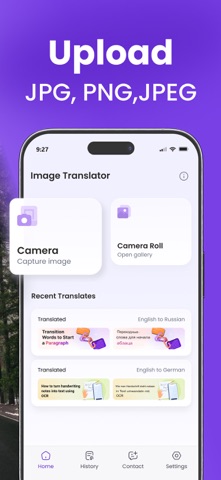
1. Download & Open the photo translator app. There you’ll see two options: “Camera” & Gallery.
2. Upload the image either from “Gallery” or capture the image using the “Camera” option.
3. Crop images to skip unnecessary parts of your image.
4. Pick the original language of the image and the language in which you want to translate it.
5. Click the “Translate” button and our picture translator app will quickly translate your photo.
6. Finally, you can “Copy” or “Download” the translated image.
Key Features of the Picture Translator
Below are the standout features of our free photo translator app;
* Advanced Technology
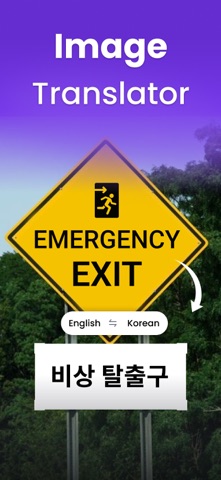
The photo translator app uses advanced and powerful technology to accurately recognize and translate text on images. You can confidentiality translate photos of product menus, billboards, posters, packaging, etc.
* Fast Translator
Whether it is a screenshot, scanned document, or image, our app can instantly translate it into your desired language.
* Clean & Simple UI
This translator app offers a sleek and easier-to-understand interface, for a smooth user experience. Everyone can effortlessly upload photos, select languages, and do translations.
* Image Crop
Our image translator app offers an “Image Crop” feature to let you remove unnecessary sections of the image. This way, you can achieve more precise and focused translation.
* High-Quality Translation
The app always does high-quality image translation. It maintains the original context, layout, and font of the text. Plus, it doesn’t change the image color or pixels.
*Wide Range of Languages
This image translator app supports a wide range of languages, allowing you to confidently translate images to and from multiple languages.
* History Option
Another key feature of the picture translator app is the “History” option. It allows you to revisit the previously translated images. It saves both original and translated images in the history.
Who Can Use Our Photo Translator App?
● Travelers can use our translator app to translate signs, menus, documents, etc. in foreign countries.
● The image translator app is helpful for business professionals to bridge language gaps in international meetings or deals.
● Students and educators can also use this image translator app to translate academic materials to access and understand important information.
● Social media users and marketers can use this app to translate messages and social media posts.
Our image translator app is designed to remove language barriers. Download and install the app and enjoy seamless photo translation for work, study, or travel purposes.
Note:
Your privacy is important to us. We never store, share, or use your personal data or uploaded images — the app is completely safe to use.
For any questions or issues, contact us anytime. Your feedback helps us improve the app.
Subscriptions:
Payment will be charged to your iTunes account upon purchase. Subscriptions auto-renew unless turned off at least 24 hours before renewal. Manage or cancel anytime in your App Store account settings.
Terms of Use: https://www.imagetotext.info/terms-of-services.php
Privacy Policy: https://www.imagetotext.info/image-translator/mobile-application/privacy-policy