

AI Label Maker is made and published by 新胜 吴. AppBrain is an independent app data site and isn't affiliated with 新胜 吴. The app name, icon, screenshots and description belong to 新胜 吴 and are shown as published on the App Store.
AppBrain's verdict
- Last updated
- May 8, 2026
Rankings
App Store top chartsApp Store Rankings for AI Label Maker
Competitors
Similar apps and more from 新胜 吴More from 新胜 吴



Releases
Updates seen on the App Store- Version
- 1.0
- Launched
- May 2026
No changelog data
User feedback
Ratings and reviews on the App StoreComments on AI Label Maker for iOS
We don't have enough comments to show example comments. Please check back later.
Technology
Found in the app by AppBrain- Price
- Free
- App size
- 22.4 MB
- Content rating
- Everyone
Technologies used by AI Label Maker
About the app and developer
About AI Label Maker
AI Label Maker is an utilities app developed by 新胜 吴.
User Ratings
The app has no ratings yet.
App Information
AI Label Maker is freely available from the App Store. The app size is 22.40 MB. The latest version available is 1.0. The last update was on May 8, 2026.
Technical Requirements
The app has a content rating of Everyone. The app has been available on the App Store since May 2026.
Developer information for 新胜 吴
Address:
Frequently asked questions about AI Label Maker
Is AI Label Maker free?
Yes. AI Label Maker is free on the App Store.
Is AI Label Maker still available?
Yes. AI Label Maker is on the App Store, and the last update we saw was on May 8, 2026.
How large is AI Label Maker?
AI Label Maker is 22.40 MB.
Is AI Label Maker suitable for children?
App Store rates the content of AI Label Maker as suitable for everyone.
Who made AI Label Maker?
AI Label Maker was developed by 新胜 吴. It is listed in the utilities category on the App Store.
Store listing
By 新胜 吴, from the App Store


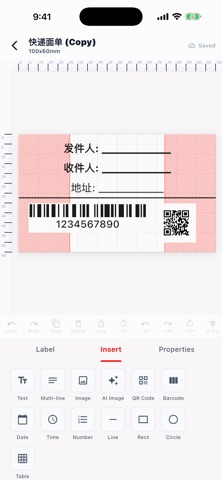
Description by 新胜 吴 Written by the developer, not by AppBrain. Click to read.
DESIGN WITH EASE
Create professional labels using a full-featured drag-and-drop editor. Add text, barcodes, QR codes, shapes, and images. Choose from dozens of built-in templates or start from scratch with any label size.
AI-POWERED ARTWORK
Describe what you want and let AI generate a custom illustration for your label — no design skills needed. Browse the community gallery for inspiration and use any image with a single tap.
BLUETOOTH THERMAL PRINTING
Connect to compatible Bluetooth thermal printers wirelessly. Configure print density, speed, paper type, and resolution directly in the app. Send labels to print in seconds.
SYNC ACROSS DEVICES
Sign in with your account to keep your labels, templates, and settings in sync across all your devices.
KEY FEATURES
• Drag-and-drop label editor
• AI image generation with community gallery
• Barcode & QR code support
• Built-in template library
• Bluetooth thermal printer connection
• Multiple label size presets (40×30 mm to 100×60 mm)
• Dark mode support
• Cloud sync