

AI Limits & Reset Tracker
AI Limits & Reset Tracker is made and published by Inovantis. AppBrain is an independent app data site and isn't affiliated with Inovantis. The app name, icon, screenshots and description belong to Inovantis and are shown as published on the App Store.
AppBrain's verdict
- Last updated
- October 23, 2026
Rankings
App Store top chartsApp Store Rankings for AI Limits & Reset Tracker
Releases
Updates seen on the App Store- Version
- 3.1.1
- Launched
- February 2026
No changelog data
User feedback
Ratings and reviews on the App StoreComments on AI Limits & Reset Tracker for iOS
We don't have enough comments to show example comments. Please check back later.
Technology
Found in the app by AppBrain- Price
- Free
- App size
- 8.76 MB
- Content rating
- Everyone
Technologies used by AI Limits & Reset Tracker
About the app and developer
About AI Limits & Reset Tracker
AI Limits & Reset Tracker is an utilities app developed by Inovantis.
User Ratings
The app has no ratings yet.
App Information
AI Limits & Reset Tracker is freely available from the App Store. The app size is 8.76 MB. The latest version available is 3.1.1. The last update was on October 23, 2026.
Technical Requirements
The app has a content rating of Everyone. The app has been available on the App Store since February 2026.
Developer information for Inovantis
Address:
Frequently asked questions about AI Limits & Reset Tracker
Is AI Limits & Reset Tracker free?
Yes. AI Limits & Reset Tracker is free on the App Store.
Is AI Limits & Reset Tracker still available?
Yes. AI Limits & Reset Tracker is on the App Store, and the last update we saw was on October 23, 2026.
How large is AI Limits & Reset Tracker?
AI Limits & Reset Tracker is 8.76 MB.
Is AI Limits & Reset Tracker suitable for children?
App Store rates the content of AI Limits & Reset Tracker as suitable for everyone.
Who made AI Limits & Reset Tracker?
AI Limits & Reset Tracker was developed by Inovantis. It is listed in the utilities category on the App Store.
Store listing
By Inovantis, from the App Store




Description by Inovantis Written by the developer, not by AppBrain. Click to read.
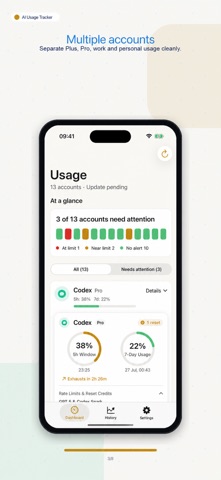
AI Limits & Reset Tracker helps you monitor usage across providers in one place, so you don’t get cut off mid-task, miss reset windows, or underuse the plans you pay for.
Most AI services use moving windows, weekly quotas, or credit-based limits. Tracking them manually is messy, especially across multiple providers and accounts. This app gives you one unified dashboard with reset countdowns, alerts, widgets, history, and usage pace predictions.
Built for iPhone, iPad, and Mac, with a native experience for tracking multiple providers and accounts.
WHY IT MATTERS
If you use AI regularly, you’ve seen the problem:
• Sliding windows that constantly move
• Weekly limits that quietly run out
• No clear visibility into the next reset
• No warning before hitting 70–95% usage
• Multiple provider dashboards to check
• Background tools consuming usage without you noticing
ONE PLACE FOR ALL YOUR AI SUBSCRIPTIONS
• Unified dashboard across supported providers
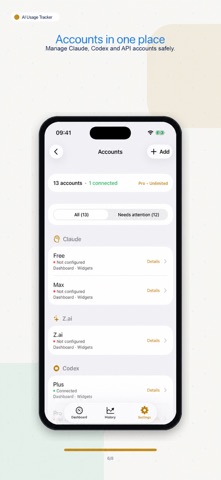
• Multi-account support per provider
• Near real-time usage and next reset countdowns
• Usage Pace to estimate when you’ll hit quota
• 3-way time display: relative, absolute, or mixed
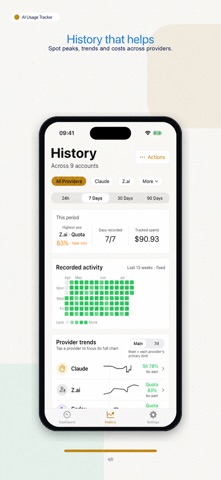
• Premium History charts for 24h / 7 / 30 / 90 days
• Activity Heatmap with 13 weeks of daily usage intensity
SMART ALERTS
• Custom thresholds such as 75%, 85%, and 95%
• Reset notifications when a window opens again
• Avoid getting cut off in the middle of work
WIDGETS & MENU BAR
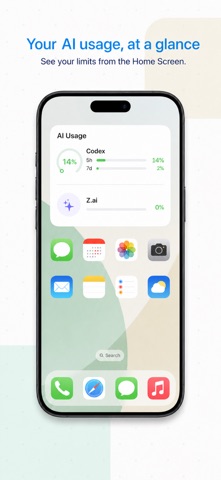
• Usage gauges on the Home Screen and Mac desktop
• Quick status on the Lock Screen and macOS menu bar
• Large widget with multi-provider overview, totals, and reset times
• Check your usage without opening the main app window
CURRENTLY SUPPORTED PROVIDERS
• Anthropic Claude (Pro, Max, Team)
• Anthropic API (token and cost tracking)
• ChatGPT / Codex
• OpenAI API (token and cost tracking)
• OpenRouter
• Cursor
• GitHub Copilot
• Z.ai
• Kimi Code
• MiniMax
PRIVACY & SECURITY
• No UsageTracker account required
• Credentials stored securely in Apple Keychain
• Optional iCloud sync for accounts and history across compatible devices
• Anonymous analytics with TelemetryDeck
FREE & PREMIUM
Start free with one provider. Upgrade to unlock:
• Multiple providers
• More accounts per provider
• Widgets
• Smart alerts and reset notifications
• Premium History charts
• Activity Heatmap
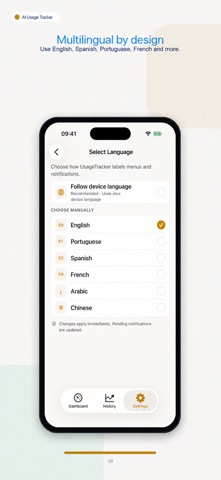
Available in English, Portuguese, Spanish, French, Arabic, and Chinese.
Terms of Use (EULA): https://www.apple.com/legal/internet-services/itunes/dev/stdeula/