

AI Message Generator
AI Message Generator is made and published by Junta Shoji. AppBrain is an independent app data site and isn't affiliated with Junta Shoji. The app name, icon, screenshots and description belong to Junta Shoji and are shown as published on the App Store.
AppBrain's verdict
- Rating on App Store
- 4.56
- 9 ratings
- Last updated
- January 7, 2024
It doesn't have enough ratings yet to judge what users think.
Rankings
App Store top chartsApp Store Rankings for AI Message Generator
Competitors
Similar apps and more from Junta Shoji










Releases
Updates seen on the App Store- Version
- 1.0.4
- Launched
- April 2023
No changelog data
User feedback
Ratings and reviews on the App StoreComments on AI Message Generator for iOS
We don't have enough comments to show example comments. Please check back later.
Technology
Found in the app by AppBrain- Price
- Free
- App size
- 46.9 MB
- Content rating
- Everyone
Technologies used by AI Message Generator
About the app and developer
About AI Message Generator
AI Message Generator is an utilities app developed by Junta Shoji.
User Ratings
AI Message Generator is rated 4.56 out of 5 stars. The rating is based on 9 ratings.
App Information
AI Message Generator is freely available from the App Store. The app size is 46.85 MB. The latest version available is 1.0.4. The last update was on January 7, 2024.
Technical Requirements
The app has a content rating of Everyone. The app has been available on the App Store since April 2023.
Developer information for Junta Shoji
Address:
Frequently asked questions about AI Message Generator
Is AI Message Generator free?
Yes. AI Message Generator is free on the App Store.
Is AI Message Generator still available?
Yes. AI Message Generator is on the App Store, and the last update we saw was on January 7, 2024.
How large is AI Message Generator?
AI Message Generator is 46.85 MB.
Is AI Message Generator suitable for children?
App Store rates the content of AI Message Generator as suitable for everyone.
How do people rate AI Message Generator?
AI Message Generator scores 4.56 out of 5 stars, from 9 ratings on the App Store.
Who made AI Message Generator?
AI Message Generator was developed by Junta Shoji. It is listed in the utilities category on the App Store.
What are the best alternatives to AI Message Generator?
People looking at AI Message Generator also look at these utilities apps: TextAI - AI Texting Assistant, AI Keyboard・ReplyAssistant, AI Email Writer - Auto Creator, AI Text & Content Generation, AI Detector & Writer.
Store listing
By Junta Shoji, from the App Store

Description by Junta Shoji Written by the developer, not by AppBrain. Click to read.
◢ Overview
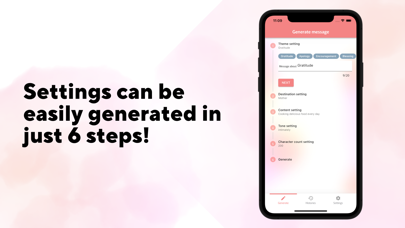
"AI Message Generator" is an application that AI proposes a message that matches the settings by setting the theme, destination, content, tone, and number of characters. For example, you can use it when you are worried about how to write a message such as a birthday message or a business email. It is also recommended for those who find it troublesome to write by themselves or who are not confident in their writing skills.
◢ Merit
• Since you can easily receive message suggestions, you can easily create messages.
• Since the message proposed by AI uses appropriate wording and grammar, you can create professional sentences without mistakes.
• By setting items, the type of message created changes, so you can create more appropriate sentences.
• Since AI automatically generates without relying on templates, you can create unique messages without creating messages similar to others.
• Save time by creating different types of messages simply by changing settings.
◢ Main function list
• Message creation function
Just by setting the theme, recipient, content, tone, and number of characters, a message created by AI will be created.
• Message sharing function
You can copy the message you created and share stylish message cards with several designs.
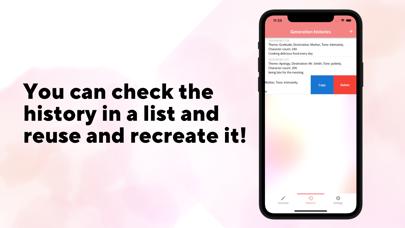
• History function
You can check the messages created in the past, and reuse them to recreate them.
◢ Pricing
It is available free of charge.
◢ How to Use
1. Download the app and install it.
2. Launch the app and set the theme, destination, content, tone, number of characters, etc.
3. When you click the "Generate" button, AI will suggest a message that matches your settings.
4. Review the suggested message and text copy or share an image if desired.
◢ Developer
Cinnamonista (https://cinnamonista.com/)
- Privacy policy(https://cinnamonista.com/privacy)