

AI PDF Scan Pro Document Maker
AI PDF Scan Pro Document Maker is made and published by Chintan Shah. AppBrain is an independent app data site and isn't affiliated with Chintan Shah. The app name, icon, screenshots and description belong to Chintan Shah and are shown as published on the App Store.
AppBrain's verdict
- Last updated
- July 6, 2026
Rankings
App Store top chartsApp Store Rankings for AI PDF Scan Pro Document Maker
Competitors
Similar apps and more from Chintan ShahAlternatives to AI PDF Scan Pro Document Maker




More from Chintan Shah

 Clumsy Bird - The Trump Jumping And Switch Color Notification Widget Game






Releases
Updates seen on the App Store- Version
- 1.1.12
- Launched
- January 2026
No changelog data
User feedback
Ratings and reviews on the App StoreComments on AI PDF Scan Pro Document Maker for iOS
We don't have enough comments to show example comments. Please check back later.
Technology
Found in the app by AppBrain- Price
- Free
- App size
- 111.0 MB
- Content rating
- Low
Technologies used by AI PDF Scan Pro Document Maker
About the app and developer
About AI PDF Scan Pro Document Maker
AI PDF Scan Pro Document Maker is an utilities app developed by Chintan Shah.
User Ratings
The app has no ratings yet.
App Information
AI PDF Scan Pro Document Maker is freely available from the App Store. The app size is 111.04 MB. The latest version available is 1.1.12. The last update was on July 6, 2026.
Technical Requirements
The app has a content rating of Low Maturity. The app has been available on the App Store since January 2026.
Developer information for Chintan Shah
Address:
Frequently asked questions about AI PDF Scan Pro Document Maker
Is AI PDF Scan Pro Document Maker free?
Yes. AI PDF Scan Pro Document Maker is free on the App Store.
Is AI PDF Scan Pro Document Maker still available?
Yes. AI PDF Scan Pro Document Maker is on the App Store, and the last update we saw was on July 6, 2026.
How large is AI PDF Scan Pro Document Maker?
AI PDF Scan Pro Document Maker is 111.04 MB.
Is AI PDF Scan Pro Document Maker suitable for children?
App Store gives AI PDF Scan Pro Document Maker a low maturity rating, so it is meant for older children and up.
Who made AI PDF Scan Pro Document Maker?
AI PDF Scan Pro Document Maker was developed by Chintan Shah. It is listed in the utilities category on the App Store.
What are the best alternatives to AI PDF Scan Pro Document Maker?
People looking at AI PDF Scan Pro Document Maker also look at these utilities apps: SOnIA, Swipe Photo Storage Cleaner, MyCar Service Logs, kite Mobility, MobileDisk.
Store listing
By Chintan Shah, from the App Store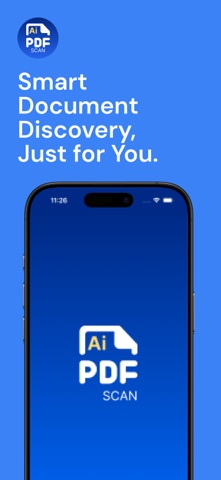
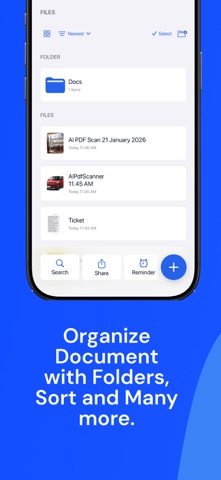

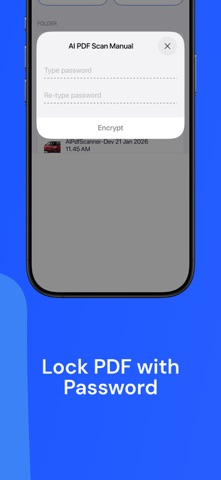


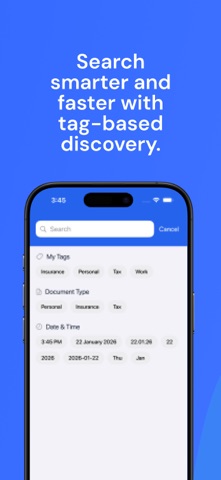


Description by Chintan Shah Written by the developer, not by AppBrain. Click to read.
Designed for students, professionals, freelancers, and businesses, AI PDF Scan helps you digitize paperwork, stay organized, and work smarter from anywhere.
Key Features
High-Quality Scans : Capture clear and sharp PDFs or JPGs with resolutions up to 200 DPI or higher, delivering results comparable to traditional desktop scanners.
Instant Camera Launch : Start the app directly with the camera, allowing you to scan documents immediately without navigating through menus.
Quick and Efficient Scanning : Automatic edge detection accurately identifies document borders for fast and precise scans every time.
Multi-Page Scanning : Scan single or multiple pages seamlessly and combine them into one organized PDF file.
Scan Optimization: Improve readability with advanced filters such as color, grayscale, and black-and-white modes.
Document Editing Tools : Easily crop, rotate, reorder, add, or remove pages to create clean and professional documents.
Add Notes to PDFs : Annotate documents by adding notes directly to your PDFs, ideal for reviews, reminders, and collaboration.
Signature and Drawing (Premium): Add handwritten signatures or drawings to documents for approvals and personalization.
Text Recognition – OCR (Premium) : Extract text from scanned documents to search, copy, edit, and reuse content efficiently.
Scan Anything Receipts, contracts, notebooks, whiteboards, business cards, IDs, handwritten notes, and more.
Home Screen Widgets : Access quick scan actions, recent documents, and shortcuts directly from your Home Screen.
Smart Organization : Automatically organize files using keyword-based or date-based naming for easy retrieval.
Clean and Intuitive Design : A simple, modern interface designed to minimize steps and maximize productivity.
Multilingual Support
AI PDF Scan supports 10 languages, allowing users around the world to scan, edit, and manage documents in their preferred language.
Ideal Use Cases
• Digitizing office documents and contracts • Scanning receipts for expense tracking • Creating PDFs from handwritten notes • Signing and sharing documents on the go • Organizing paperwork for school or business • Paperless document storage and management
Why Choose AI PDF Scan
• Professional-quality output • Fast and reliable performance • Advanced editing and annotation tools • Suitable for personal and professional use • Secure and offline-friendly scanning experience
Reliable and Flexible Workflows
AI PDF Scan is built to fit seamlessly into your daily workflow. Create PDFs in seconds, update documents anytime, and keep everything accessible when you need it. The app works reliably even without an internet connection, giving you full control over your documents. Whether you are working remotely, studying, traveling, or managing paperwork on the go, AI PDF Scan helps you stay productive and paperless with confidence.
Premium Features
Unlock advanced tools such as OCR text search, digital signatures, document encryption, reminders, and additional productivity features through in-app purchases. Full details are available inside the app.
Privacy First
Your privacy matters. Documents are never stored on our servers and are processed only on your device or with the cloud service you choose. AI PDF Scan does not sell or share personal data.
Terms of Service / EULA: https://brainvire-mobileapp.notion.site/Terms-of-Service-AI-PDF-Scan-2d39ba6d0bf880e9922cf01145e6f9ab
Privacy Policy: https://brainvire-mobileapp.notion.site/Privacy-Policy-AI-SwiftScan-2d39ba6d0bf880f38979c3e71755217e
Get Started Today Experience fast, secure, and efficient document scanning with AI PDF Scan.