

AI Poster Maker - DrawPost
AI Poster Maker - DrawPost is made and published by MadApps Technologies. AppBrain is an independent app data site and isn't affiliated with MadApps Technologies. The app name, icon, screenshots and description belong to MadApps Technologies and are shown as published on the App Store.
AppBrain's verdict
- Rating on App Store
- 4.43
- 40 ratings
- Last updated
- September 15, 2026
- Size
- 103.2 MB
It doesn't have enough ratings yet to judge what users think.
User feedback
Ratings and reviews on the App StoreComments on AI Poster Maker - DrawPost for iOS
We don't have enough comments to show example comments. Please check back later.
Store listing
By MadApps Technologies, from the App Store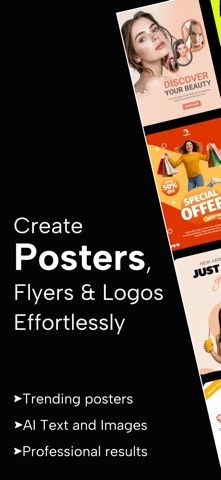

Description by MadApps Technologies Written by the developer, not by AppBrain. Click to read.
Gen Z creators, drop the struggle and embrace that warm, caring glow – this AI Poster maker is your chill creative buddy, making you look bright, smart, and casually pro while feeling super comfy sharing ideas with friends via fire posts. No cap, it's the Canva alternative that's professional yet easygoing, turning simple prompts into stunning posters, logos, and social media graphics in seconds. Powered by innovative AI that inspires creativity without the hassle, it's all about simplicity and accessibility – express your vibes on SM effortlessly, no design skills needed.
Why You'll Love This Graphic Design App (It's Like a Hug for Your Creativity):
• Trending & Upcoming Events Feed: Weekly dynamic templates inspired by viral moments, festivals, and global trends – ready-to-edit flyers that keep your content fresh and relevant, evoking that trusting, efficient inspo.
• AI Design Suggestions: Personalized logo maker and poster ideas based on your interests and past creations – innovative gens for text, images, and logos that learn your style, making creation feel warm and approachable.
• Brand Kit Flex: Upload your logos, fonts, and colors for one-tap consistency – update themes across designs casually, looking creative and bright every time.
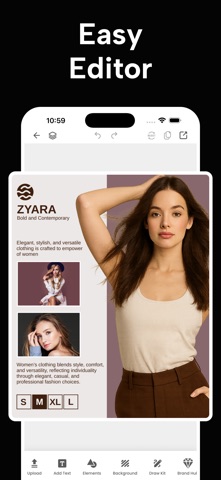
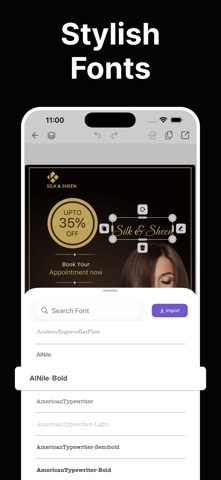
• Instant Text Styling & Unlimited Fonts: Over 500 families with AI-paired effects and colors in an easy editor – sleek, modern tweaks that remove complexity for that comfy flow.
• Background Remover & Layer Management: Zap backgrounds from uploads, reorder/lock/group elements like a pro – simple tools for seamless social media templates without the chaos.
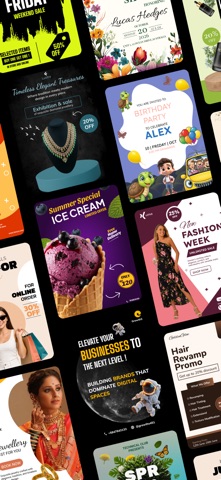
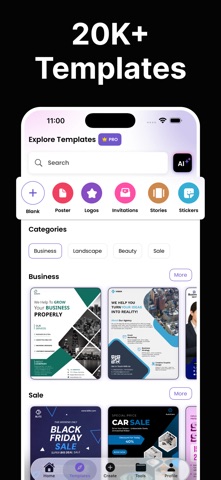
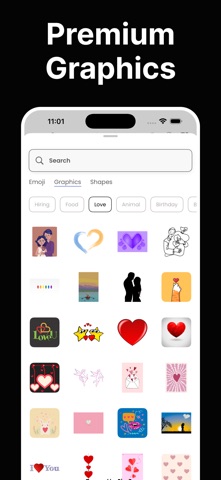
• Ready-Made Fire Templates: 1K+ for marketing banners, events, quotes, and SM visuals – customizable flyer maker that's grounded in aesthetic taste.
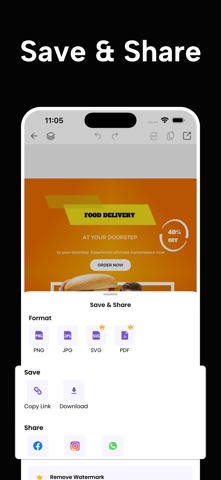
• Export & Share Supreme: PNG, JPG, PDF in HD; one-tap to Insta, WhatsApp, FB – optimized sizes for feeds, stories, print, no quality loss, sharing feels nice and easy.
• Cross-Platform Glow: Native iOS app + web version for syncing projects – tech-savvy accessibility everywhere.
Perfect For: Small businesses/startups hustling bright ideas, influencers dropping casual SM slays, marketers/event planners keeping it professional yet fun, teachers/students/content creators sharing comfy, inspiring posts.
You may check our ready to use colleciton: menu flyer maker, restaurant poster maker, church flyer maker, sale poster maker, school poster maker, fitness poster maker, beauty poster maker, poster layout maker, modern poster maker, professional flyer maker
Premium Access – Unlock Infinite Ease
Go unlimited with AI Poster Maker by Draw Post Premium: All AI tools, trending designs/event packs, HD exports no watermarks, ad-free vibes.
Plans: weekly, monthly, yearly – cancel anytime for that caring, no-lock-in feel.
Make Every Post Relevant. Stay Ahead of Trends. Design Smarter – Feel the Warmth.
Download this viral poster and logo maker today – your friendly creative assistant that's modern, sleek, and always inspiring trust and efficiency.
Your monthly subscription auto-renews unless off 24 hours before end. Payment to Apple ID on purchase. Manage/cancel in App Store Settings. Unused free trial forfeited on sub purchase. No contracts – cancel anytime.
For more detail on managing subscriptions, please visit: https://support.apple.com/en-us/118428
Terms-of-use: https://madapptechnologies.com/terms-of-use.html
Privacy-policy: https://madapptechnologies.com/privacy-policy.html
#AIPosterMaker #Drawpost #FreePoster #LogoMaker #GraphicDesignApp #CanvaAlternative #ViralPoster #FlyerMaker #SocialMediaTemplates
Safety and technology
Found in the app by AppBrain- Price
- Free
- App size
- 103.2 MB
- Content rating
- Everyone
Technologies used by AI Poster Maker - DrawPost
Releases
Updates seen on the App Store- Version
- 1.1.16
- Launched
- October 2025
No changelog data
Rankings
App Store top chartsApp Store Rankings for AI Poster Maker - DrawPost
About the app and developer
About AI Poster Maker - DrawPost
AI Poster Maker - DrawPost is a graphics & design app developed by MadApps Technologies.
User Ratings
AI Poster Maker - DrawPost is rated 4.43 out of 5 stars. The rating is based on 40 ratings.
App Information
AI Poster Maker - DrawPost is freely available from the App Store. The app size is 103.18 MB. The latest version available is 1.1.16. The last update was on September 15, 2026.
Technical Requirements
The app has a content rating of Everyone. The app has been available on the App Store since October 2025.
Developer information for MadApps Technologies
Address:
Frequently asked questions about AI Poster Maker - DrawPost
Is AI Poster Maker - DrawPost free?
Yes. AI Poster Maker - DrawPost is free on the App Store.
Is AI Poster Maker - DrawPost still available?
Yes. AI Poster Maker - DrawPost is on the App Store, and the last update we saw was on September 15, 2026.
How large is AI Poster Maker - DrawPost?
AI Poster Maker - DrawPost is 103.18 MB.
Is AI Poster Maker - DrawPost suitable for children?
App Store rates the content of AI Poster Maker - DrawPost as suitable for everyone.
How do people rate AI Poster Maker - DrawPost?
AI Poster Maker - DrawPost scores 4.43 out of 5 stars, from 40 ratings on the App Store.
Who made AI Poster Maker - DrawPost?
AI Poster Maker - DrawPost was developed by MadApps Technologies. It is listed in the graphics & design category on the App Store.