

AI Room Design - Re:Build
AI Room Design - Re:Build is made and published by Taras Manchuk. AppBrain is an independent app data site and isn't affiliated with Taras Manchuk. The app name, icon, screenshots and description belong to Taras Manchuk and are shown as published on the App Store.
AppBrain's verdict
- Last updated
- October 27, 2026
Rankings
App Store top chartsApp Store Rankings for AI Room Design - Re:Build
Competitors
Similar apps and more from Taras Manchuk


Releases
Updates seen on the App Store- Version
- 3.8
- Launched
- January 2026
No changelog data
User feedback
Ratings and reviews on the App StoreComments on AI Room Design - Re:Build for iOS
We don't have enough comments to show example comments. Please check back later.
Technology
Found in the app by AppBrain- Price
- Free
- App size
- 69.9 MB
- Content rating
- Everyone
Technologies used by AI Room Design - Re:Build
About the app and developer
About AI Room Design - Re:Build
AI Room Design - Re:Build is a productivity app developed by Taras Manchuk.
User Ratings
The app has no ratings yet.
App Information
AI Room Design - Re:Build is freely available from the App Store. The app size is 69.87 MB. The latest version available is 3.8. The last update was on October 27, 2026.
Technical Requirements
The app has a content rating of Everyone. The app has been available on the App Store since January 2026.
Developer information for Taras Manchuk
Address:
Store listing
By Taras Manchuk, from the App Store


Description by Taras Manchuk Written by the developer, not by AppBrain. Click to read.
Planning a home renovation or remodeling project? Stop guessing and start managing your project with clarity using Re:Build. This all-in-one renovation planner provides the essential tools needed to manage home improvement projects from budget planning to final completion.
Manage costs, track materials, and follow a structured step-by-step renovation plan for apartments and houses of any size.
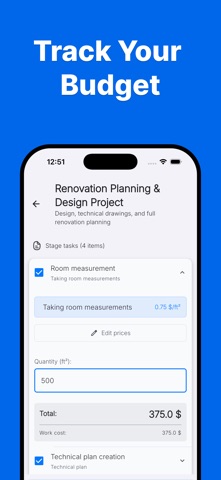
Comprehensive Budget & Cost Control
Forget messy spreadsheets. Re:Build helps you stay in control of your renovation budget and avoid unexpected expenses.
- Create detailed cost estimates for each renovation stage (demolition, framing, finishing, and more)
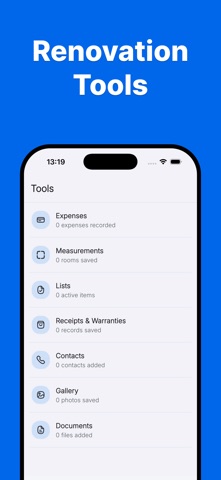
- Track real expenses and compare them with your planned budget
- View a clear financial summary of your total renovation cost
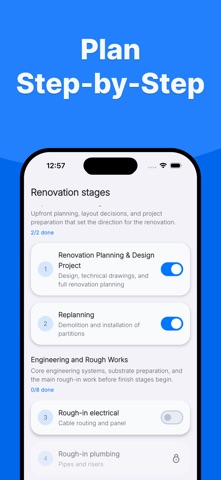
Step-by-Step Renovation Guide
Renovate in the correct sequence and reduce costly mistakes.
- Follow a structured renovation workflow (plumbing, electrical, tiling, finishing, etc.)
- Manage tasks for contractors or DIY projects
- Track overall progress and estimated completion timelines
Smart Material Calculation
Plan materials accurately and reduce waste.
- Automatically calculate required materials such as paint, flooring, drywall, tiles, and adhesives
- Room-based material planning for better accuracy
Why Choose Re:Build
- Turns complex renovation projects into clear, manageable steps
- Suitable for homeowners, DIY renovators, and contractor-managed projects
- Helps you stay organized, on budget, and in control throughout the renovation process
Re:Build helps you stop guessing and start building with confidence.
Terms of Use: https://re-build.app/en/terms-of-use.html