

AI Scanner : Image to Text
AI Scanner : Image to Text is made and published by Govarthani Rajesh. AppBrain is an independent app data site and isn't affiliated with Govarthani Rajesh. The app name, icon, screenshots and description belong to Govarthani Rajesh and are shown as published on the App Store.
AppBrain's verdict
EstablishedLoved by users- Rating on App Store
- 4.62
- 9,184 ratings
- Last updated
- October 11, 2026
Users love it: 4.6 stars from 9,184 ratings.
Rankings
App Store top chartsApp Store Rankings for AI Scanner : Image to Text
Competitors
Similar apps and more from Govarthani RajeshAlternatives to AI Scanner : Image to Text
 Text Capture: Image to Text





More from Govarthani Rajesh




Releases
Updates seen on the App Store- Version
- 2.3.6
- Launched
- April 2017
No changelog data
User feedback
Ratings and reviews on the App StoreComments on AI Scanner : Image to Text for iOS
We don't have enough comments to show example comments. Please check back later.
Technology
Found in the app by AppBrain- Price
- Free
- App size
- 131.3 MB
- Content rating
- Everyone
Technologies used by AI Scanner : Image to Text
About the app and developer
About AI Scanner : Image to Text
AI Scanner : Image to Text is a productivity app developed by Govarthani Rajesh.
What is the rating of AI Scanner : Image to Text?
AI Scanner : Image to Text is rated 4.62 out of 5 stars, based on 9.2 thousand ratings.
Is AI Scanner : Image to Text free?
AI Scanner : Image to Text is free. The app size is 131.35 MB. The latest version available is 2.3.6. The last update was on October 11, 2026.
What are the requirements for AI Scanner : Image to Text?
The app has a content rating of Everyone. The app has been available on the App Store since April 2017.
Developer information for Govarthani Rajesh
Address:
Frequently asked questions about AI Scanner : Image to Text
Is AI Scanner : Image to Text free?
Yes. AI Scanner : Image to Text is free on the App Store.
Is AI Scanner : Image to Text still available?
Yes. AI Scanner : Image to Text is on the App Store, and the last update we saw was on October 11, 2026.
How large is AI Scanner : Image to Text?
AI Scanner : Image to Text is 131.35 MB.
Is AI Scanner : Image to Text suitable for children?
App Store rates the content of AI Scanner : Image to Text as suitable for everyone.
How do people rate AI Scanner : Image to Text?
AI Scanner : Image to Text scores 4.62 out of 5 stars, from 9,184 ratings on the App Store.
Who made AI Scanner : Image to Text?
AI Scanner : Image to Text was developed by Govarthani Rajesh. It is listed in the productivity category on the App Store.
What are the best alternatives to AI Scanner : Image to Text?
People looking at AI Scanner : Image to Text also look at these productivity apps: Text Capture: Image to Text, Handwriting to Text PenToPrint, Text Scanner & Image to Text, TextGrabber scan and translate, Text Summary: TLDR Summarize.
Store listing
By Govarthani Rajesh, from the App Store



Description by Govarthani Rajesh Written by the developer, not by AppBrain. Click to read.
PDF Scanner - Scan physical documents and convert them into clean, professional PDFs using smart edge detection and auto-crop.
AI OCR - Attach an image or PDF and chat with AI to ask questions, summarize content, or translate text instantly.
Features:
• Extract text from images in the gallery or captured using the camera
• Image to text converter — get editable text to copy, share, or translate
• Scan documents and convert them into PDFs
• Attach images or PDFs and ask AI directly:
• Import PDFs and extract text from PDF files
• Handwriting to text conversion
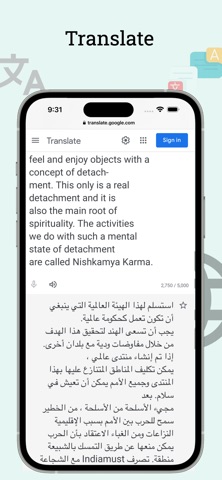
• Translate text into over 100 languages
• Copy text from any screen, website, or app by sharing a screenshot
• Extract text and detect phone numbers, emails, and URLs
• Select text in multiple columns from images
• Read extracted text aloud with text-to-speech
• Edit, copy, share, and translate recognized text
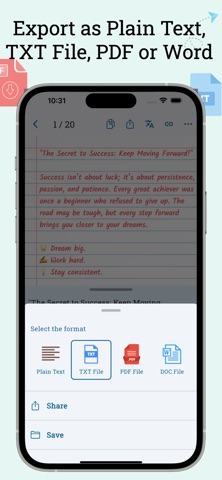
• Export extracted text as searchable PDFs (with text layer)
• Export extracted text as PDF or TXT files
• Convert extracted text to PDF or Word files
• Select multiple images and convert them into a single PDF
• Crop and rotate images before OCR
• Save scan history
• Organize scans in folders
• Sort scans by date
• Search text in saved scans
• Share images directly to extract text
• Quick access to camera, gallery, or PDF import via long-press on app icon
• Automatically copy extracted text or save it as a TXT file for faster workflow
Get Text Scanner today and start extracting text from documents and images with ease!
Optional Premium plans are available for unlimited scans and extra features.
Privacy Policy: https://appzys.com/ios/textscanner/privacypolicy
Terms of Service: https://appzys.com/ios/textscanner/termsofuse