




AppBrain's verdict
- Last updated
- November 25, 2026
- Size
- 4.04 MB
User feedback
Ratings and reviews on the App StoreComments on AI To Do List - SuperTime for iOS
We don't have enough comments to show example comments. Please check back later.
Store listing
By Kaan Yildiz, from the App StoreDescription by Kaan Yildiz Written by the developer, not by AppBrain. Click to read.
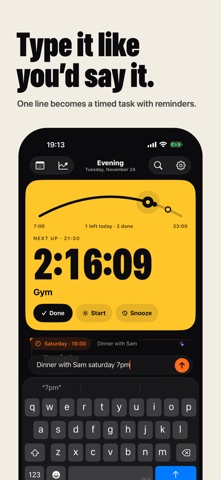
DEADLINES YOU TYPE LIKE YOU TALK
Write one line: “pay rent friday”, “call the bank tomorrow morning”, “gym every monday 7am”. SuperTime reads the time as you type, right on your device. Head full of loose ends? Paste the whole messy paragraph into a brain dump and SuperTime splits it into clean one-liners, each with its own deadline.
THE DAYBOW
See your day as a sun arc. Every deadline sits on it as a bead, and a live countdown shows how long until the next one. The whole screen heats up as it gets close: calm, then yellow, then orange inside the hour. Each task has a fuse that burns down to its deadline, so what’s urgent stands out at a glance. Miss one and it shows as slipped, ready to move to a fresh slot.
RECURRING DEADLINES
Say it once: “every month on the 1st”, “every weekday 9am”. SuperTime sets up the next one for you, so rent, standups and gym days keep coming back on time.
YOUR WEEK, YOUR STREAK
See the next seven days at a glance. Review shows what you finished, how much of it was on time and how many days in a row you met every deadline. Start a task to keep its countdown on your Lock Screen while you work. Turn on Calendar in Settings and today’s events appear on your day, so plans fit around them.
REMINDERS THAT ACT
Get a heads-up before each deadline. When it’s time, tap Mark done or +1 hour right on the notification, without opening the app. Changed your mind? Undo works for everything.
WIDGETS, SIRI AND CONTROL CENTER
Put the live countdown on your Home Screen or Lock Screen and tap Done right from the widget. Add SuperTime to Control Center. Say “Add a deadline in SuperTime” or “What’s next in SuperTime”, or use the same actions in Shortcuts.
AN ASSISTANT THAT STAYS ON YOUR DEVICE
Ask it to plan your day. Let it reflow slipped tasks into fresh slots. Change things by saying them: “push the dentist to friday”, “I paid rent”. Ask “what’s next?” and get a straight answer. It runs on Apple Intelligence on supported devices with iOS 26 or later, and on a built-in on-device engine everywhere else.
PRIVATE BY DESIGN
No account. No server. No tracking. Your deadlines stay on your device.
FREE, WITH MORE WHEN YOU WANT IT
Unlimited deadlines, reminders, widgets and brain dumps are free forever, and you get 5 free assistant runs. SuperTime Unlimited gives you unlimited assistant runs.
SuperTime Unlimited is an auto-renewing subscription, offered yearly (with a free trial for eligible new subscribers) or monthly. Payment is charged to your Apple Account at confirmation of purchase. The subscription renews automatically unless you cancel at least 24 hours before the end of the current period, and your account is charged for renewal within the 24 hours before the period ends. Cancel anytime in Settings > [your name] > Subscriptions. Any unused part of a free trial ends when you buy a subscription.
SuperTime works on iPhone and iPad with iOS 18 or later.
Terms of Use: https://www.apple.com/legal/internet-services/itunes/dev/stdeula/
Safety and technology
Found in the app by AppBrain- Price
- Free
- App size
- 4.04 MB
- Content rating
- Everyone
Technologies used by AI To Do List - SuperTime
Releases
Updates seen on the App Store- Version
- 1.0
- Launched
- November 2026
No changelog data
Alternatives
Similar apps and more from Kaan YildizMore from Kaan Yildiz





Rankings
App Store top chartsApp Store Rankings for AI To Do List - SuperTime
About the app and developer
About AI To Do List - SuperTime
AI To Do List - SuperTime is a productivity app developed by Kaan Yildiz.
What is the rating of AI To Do List - SuperTime?
AI To Do List - SuperTime has no ratings yet.
Is AI To Do List - SuperTime free?
AI To Do List - SuperTime is free. The app size is 4.04 MB. The latest version available is 1.0. The last update was on November 25, 2026.
What are the requirements for AI To Do List - SuperTime?
The app has a content rating of Everyone. The app has been available on the App Store since November 2026.
AI To Do List - SuperTime is made and published by Kaan Yildiz. AppBrain is an independent app data site and isn't affiliated with Kaan Yildiz. The app name, icon, screenshots and description belong to Kaan Yildiz and are shown as published on the App Store.
Developer information for Kaan Yildiz
Address:
Frequently asked questions about AI To Do List - SuperTime
Is AI To Do List - SuperTime free?
Yes. AI To Do List - SuperTime is free on the App Store.
Is AI To Do List - SuperTime still available?
Yes. AI To Do List - SuperTime is on the App Store, and the last update we saw was on November 25, 2026.
How large is AI To Do List - SuperTime?
AI To Do List - SuperTime is 4.04 MB.
Is AI To Do List - SuperTime suitable for children?
App Store rates the content of AI To Do List - SuperTime as suitable for everyone.
Who made AI To Do List - SuperTime?
AI To Do List - SuperTime was developed by Kaan Yildiz. It is listed in the productivity category on the App Store.