

AI Translator: Voice & Camera
AI Translator: Voice & Camera is made and published by Frame Sixty Labs, LLC. AppBrain is an independent app data site and isn't affiliated with Frame Sixty Labs, LLC. The app name, icon, screenshots and description belong to Frame Sixty Labs, LLC and are shown as published on the App Store.
AppBrain's verdict
Established- Rating on App Store
- 4.43
- 7 ratings
- Last updated
- September 7, 2026
It doesn't have enough ratings yet to judge what users think.
Rankings
App Store top chartsApp Store Rankings for AI Translator: Voice & Camera
Competitors
Similar apps and more from Frame Sixty Labs, LLCAlternatives to AI Translator: Voice & Camera






More from Frame Sixty Labs, LLC





Also available on Google Play

Releases
Updates seen on the App Store- Version
- 1.3
- Launched
- December 2017
No changelog data
User feedback
Ratings and reviews on the App StoreComments on AI Translator: Voice & Camera for iOS
We don't have enough comments to show example comments. Please check back later.
Technology
Found in the app by AppBrain- Price
- Free
- App size
- 156.1 MB
- Content rating
- Everyone
Technologies used by AI Translator: Voice & Camera
About the app and developer
About AI Translator: Voice & Camera
AI Translator: Voice & Camera is an utilities app developed by Frame Sixty Labs, LLC.
User Ratings
AI Translator: Voice & Camera is rated 4.43 out of 5 stars. The rating is based on 7 ratings.
App Information
AI Translator: Voice & Camera is freely available from the App Store. The app size is 156.10 MB. The latest version available is 1.3. The last update was on September 7, 2026.
Technical Requirements
The app has a content rating of Everyone. The app has been available on the App Store since December 2017.
Developer information for Frame Sixty Labs, LLC
Address:
Store listing
By Frame Sixty Labs, LLC, from the App Store




Description by Frame Sixty Labs, LLC Written by the developer, not by AppBrain. Click to read.
AI Translate is the ideal companion for traveling abroad, learning a new language, or simply understanding what's around you. Every translation can be spoken aloud with natural voices, making it a helpful tool for the visually impaired as well.
THREE WAYS TO TRANSLATE
SCAN: Aim at anything and see its name with the translation right beneath it. Recognizes over a thousand everyday objects and includes pronunciation hints for Korean, Chinese, Japanese, Cyrillic, and Greek.
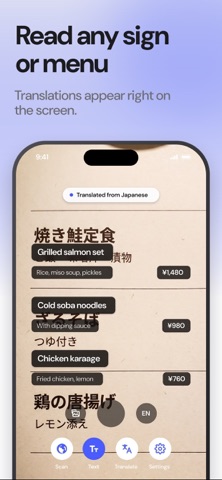
TEXT: Hold the camera over signs, menus, labels, or pages and the translation appears right on the screen. Tap to pause and read. You can also import a photo from your library.
TRANSLATE: Type or speak. Tap the microphone and watch the translation appear as you talk. The source language is detected automatically, and every result can be copied, shared, or read aloud.
WORKS OFFLINE
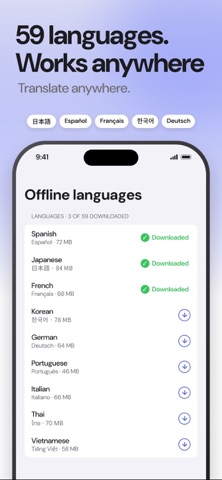
Download a language pack once and everything runs on your iPhone: object recognition, text recognition, and translation. No account, no data plan, no waiting on a server. It's also why your text, photos, and camera images never leave your device.
MORE
• 59 languages, all available offline
• Choose both languages on every screen with one tap
• Save words from Scan to your own list, with pronunciation in both languages
• Natural voices: uses the best Enhanced or Premium voice on your iPhone, with your own choice in Settings
• Translation history for quick reuse
• Fully localized in 11 languages, following your iPhone's language
HOW IT WORKS
1. Open AI Translate and pick the language to translate FROM and TO.
2. Choose Scan, Text, or Translate from the buttons at the bottom.
3. Point, type, or speak. The translation appears instantly.
FREE AND PREMIUM
The free version includes 15 translations per day and the language packs for your language pair. AI Translate Premium removes the daily limit and unlocks all 59 offline languages.
• Monthly: $1.99 per month
• Yearly: $12.99 per year
• Lifetime: $29.99, one-time purchase
Prices may vary by country. Payment is charged to your Apple ID account at confirmation of purchase. Subscriptions renew automatically unless auto-renew is turned off at least 24 hours before the end of the current period, and your account is charged for renewal within 24 hours before the period ends. Manage or cancel subscriptions in your device's Settings after purchase.
Terms of Use: https://framesixty.com/translate/terms
Privacy Policy: https://framesixty.com/translate/privacy