

AI Video Generator Cartoon Roy
AI Video Generator Cartoon Roy is made and published by Mustafa Utku Coskun. AppBrain is an independent app data site and isn't affiliated with Mustafa Utku Coskun. The app name, icon, screenshots and description belong to Mustafa Utku Coskun and are shown as published on the App Store.
AppBrain's verdict
- Rating on App Store
- 3.67
- 6 ratings
- Last updated
- August 25, 2026
It doesn't have enough ratings yet to judge what users think.
Rankings
App Store top chartsApp Store Rankings for AI Video Generator Cartoon Roy
Competitors
Similar apps and more from Mustafa Utku CoskunAlternatives to AI Video Generator Cartoon Roy


More from Mustafa Utku Coskun



Releases
Updates seen on the App Store- Version
- 6.85.2
- Launched
- October 2025
No changelog data
User feedback
Ratings and reviews on the App StoreComments on AI Video Generator Cartoon Roy for iOS
We don't have enough comments to show example comments. Please check back later.
Technology
Found in the app by AppBrain- Price
- Free
- App size
- 155.5 MB
- Content rating
- Everyone
Technologies used by AI Video Generator Cartoon Roy
About the app and developer
About AI Video Generator Cartoon Roy
AI Video Generator Cartoon Roy is a photo & video app developed by Mustafa Utku Coskun.
User Ratings
AI Video Generator Cartoon Roy is rated 3.67 out of 5 stars. The rating is based on 6 ratings.
App Information
AI Video Generator Cartoon Roy is freely available from the App Store. The app size is 155.45 MB. The latest version available is 6.85.2. The last update was on August 25, 2026.
Technical Requirements
The app has a content rating of Everyone. The app has been available on the App Store since October 2025.
Developer information for Mustafa Utku Coskun
Address:
Frequently asked questions about AI Video Generator Cartoon Roy
Is AI Video Generator Cartoon Roy free?
Yes. AI Video Generator Cartoon Roy is free on the App Store.
Is AI Video Generator Cartoon Roy still available?
Yes. AI Video Generator Cartoon Roy is on the App Store, and the last update we saw was on August 25, 2026.
How large is AI Video Generator Cartoon Roy?
AI Video Generator Cartoon Roy is 155.45 MB.
Is AI Video Generator Cartoon Roy suitable for children?
App Store rates the content of AI Video Generator Cartoon Roy as suitable for everyone.
How do people rate AI Video Generator Cartoon Roy?
AI Video Generator Cartoon Roy scores 3.67 out of 5 stars, from 6 ratings on the App Store.
Who made AI Video Generator Cartoon Roy?
AI Video Generator Cartoon Roy was developed by Mustafa Utku Coskun. It is listed in the photo & video category on the App Store.
What are the best alternatives to AI Video Generator Cartoon Roy?
People looking at AI Video Generator Cartoon Roy also look at these photo & video apps: AI Video Generator - AIVIDO, AI Cartoon Video Maker ToonVid, Free Cartoon App - CartosAI, AI Video Generator ・AI Video, Aesthetica AI.
Store listing
By Mustafa Utku Coskun, from the App Store




Description by Mustafa Utku Coskun Written by the developer, not by AppBrain. Click to read.
What you can make
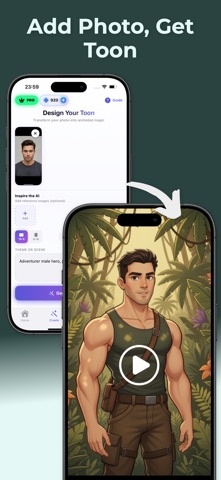
* Photo → Video: Animate a single photo with Face Swap, Lip Sync, and motion presets.
* Prompt → Video: Type your idea (e.g., “futuristic city chase, comic style”) and get a video clip with scene, camera moves, and toon effects.
* Edit like a pro: Trim, merge, add captions/subtitles, voiceover, music beat sync, filters, transitions, and stickers.
* Cartoon styles: One-tap Toon/Anime/Comic looks; mix with VFX/Glitch/Film filters.
* Export & share: 9:16, 1:1, 16:9; HD/4K export for Reels/Shorts/TikTok.
Key features
* Video Maker & Editor: timeline edit, speed (slow/velocity), keyframe basics.
* Face tools: Face Swap, talking avatars with Lip Sync and Dubbing.
* Text & audio: Auto Captions, subtitles, sound FX, and music beat sync.
* Green Screen / Chroma Key: remove backgrounds, place yourself in any scene.
* Templates: ready presets for trends; swap media and publish.
* Cartoon models: curated toon/anime/comic styles for characters and scenes.
How it works
1. Choose a mode: Photo-to-Video or Prompt-to-Video.
2. Select a style: Cartoon, Anime, or Comic model; add filters/effects.
3. Edit & enhance: Face Swap, Lip Sync/Dubbing, transitions, captions.
4. Export: Choose size and quality, then share to Reels/Shorts/TikTok.
Perfect for
Creators, brands, UGC editors, and anyone who needs fast video editing with a distinctive cartoon look—product promos, music clips, meme edits, tutorial intros, and more.
Why creators choose us
* Speed: Idea to publish in minutes.
* Quality: Clean edges, smooth motion, crisp captions.
* Control: Flexible edits + one-tap templates.Some features may require in-app purchase or a subscription.
Some features may require in-app purchase or a subscription.
Terms of Use - https://www.apple.com/legal/internet-services/itunes/dev/stdeula/
Privacy Policy - https://sites.google.com/view/cartoonroy/privacy-policy