

AI Voice Recorder Pro: Notes
AI Voice Recorder Pro: Notes is made and published by CloudEx Inc. AppBrain is an independent app data site and isn't affiliated with CloudEx Inc. The app name, icon, screenshots and description belong to CloudEx Inc. and are shown as published on the App Store.
AppBrain's verdict
- Rating on App Store
- 3.00
- 2 ratings
- Last updated
- September 30, 2026
It doesn't have enough ratings yet to judge what users think.
Rankings
App Store top chartsApp Store Rankings for AI Voice Recorder Pro: Notes
Competitors
Similar apps and more from CloudEx Inc.Alternatives to AI Voice Recorder Pro: Notes


More from CloudEx Inc.


Releases
Updates seen on the App Store- Version
- 2.3.2
- Launched
- July 2026
No changelog data
User feedback
Ratings and reviews on the App StoreComments on AI Voice Recorder Pro: Notes for iOS
We don't have enough comments to show example comments. Please check back later.
Technology
Found in the app by AppBrain- Price
- Free
- App size
- 33.0 MB
- Content rating
- Everyone
Technologies used by AI Voice Recorder Pro: Notes
About the app and developer
About AI Voice Recorder Pro: Notes
AI Voice Recorder Pro: Notes is an utilities app developed by CloudEx Inc.
User Ratings
AI Voice Recorder Pro: Notes is rated 3.00 out of 5 stars. The rating is based on 2 ratings.
App Information
AI Voice Recorder Pro: Notes is freely available from the App Store. The app size is 33.01 MB. The latest version available is 2.3.2. The last update was on September 30, 2026.
Technical Requirements
The app has a content rating of Everyone. The app has been available on the App Store since July 2026.
Developer information for CloudEx Inc.
Address:
Frequently asked questions about AI Voice Recorder Pro: Notes
Is AI Voice Recorder Pro: Notes free?
Yes. AI Voice Recorder Pro: Notes is free on the App Store.
Is AI Voice Recorder Pro: Notes still available?
Yes. AI Voice Recorder Pro: Notes is on the App Store, and the last update we saw was on September 30, 2026.
How large is AI Voice Recorder Pro: Notes?
AI Voice Recorder Pro: Notes is 33.01 MB.
Is AI Voice Recorder Pro: Notes suitable for children?
App Store rates the content of AI Voice Recorder Pro: Notes as suitable for everyone.
How do people rate AI Voice Recorder Pro: Notes?
AI Voice Recorder Pro: Notes scores 3.00 out of 5 stars, from 2 ratings on the App Store.
Who made AI Voice Recorder Pro: Notes?
AI Voice Recorder Pro: Notes was developed by CloudEx Inc. It is listed in the utilities category on the App Store.
What are the best alternatives to AI Voice Recorder Pro: Notes?
People looking at AI Voice Recorder Pro: Notes also look at these utilities apps: Nucleo LLM by Marte AI, QuickCast Pro, PlyTube: pure music player, MindAnchor-EasyCheck, BabelVoice - Speech to Text.
Store listing
By CloudEx Inc., from the App Store




Description by CloudEx Inc. Written by the developer, not by AppBrain. Click to read.
AI features run on your own free Google Gemini API key, so there are no monthly fees. No credit card is needed — and without one, charges simply cannot occur.
Voice Recorder Pro is a high-quality voice recorder (audio recording app) with AI transcription and AI summaries. Record a meeting, transcribe it, and turn it into minutes — all in one app. It also shines for lectures, interviews, and quick voice memos.
A refined, modern design paired with smooth, snappy performance. This is the definitive voice recorder that makes you think, "This is the only recording app I'll ever need."
◆ Perfect for
• Transcribing meetings and turning them into minutes
• Recording lectures, seminars, and interviews to review later
• Jotting down ideas as instant voice memos
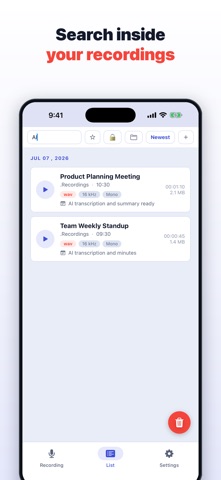
• Finding past recordings instantly with keyword search
◆ AI features (Google Gemini)
• AI transcription
Convert recordings to text with a single tap. Every segment is timestamped — tap a line to play from that exact moment.
• Automatic speaker identification
Detects who spoke and color-codes each speaker. Speaker names can be edited freely.
• AI summaries, meeting minutes & action items
Long recordings are distilled to their key points and formatted as minutes or a to-do list automatically.
• AI translation
Translate transcripts into many languages.
• AI title suggestions
Get titles that match what was recorded, cutting down on file-organizing chores.
* AI features require a Google Gemini API key, which is free to obtain.
◆ Why people choose us
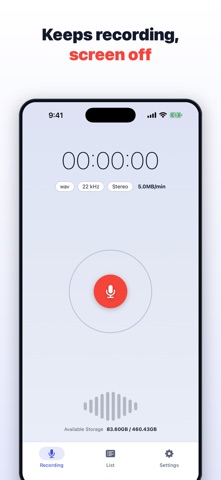
• Keeps recording even when the screen is off
Recording continues when your iPhone is locked or while you use other apps. Perfect for long meetings and lectures.
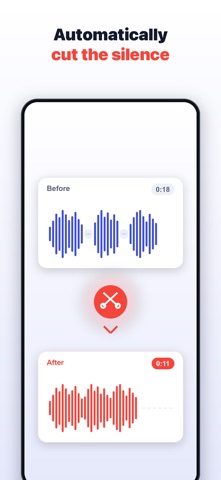
• Automatic silence cut
Silent stretches are removed automatically when you save, so a two-hour meeting becomes tight, easy-to-review audio.
• Automatic cloud backup
New recordings are uploaded to your own Dropbox automatically, so you never lose important audio.
• Built-in audio editor
Trim recordings, cut silence, and normalize the volume — right on your iPhone, no computer needed.
• App lock with Face ID
Protect the app with Face ID or a passcode, keeping your important recordings away from prying eyes.
◆ Key features
• High-quality recording / pause & resume
• Background recording with the screen off
• AI transcription (timestamps, speaker ID)
• AI summaries, meeting minutes & action items
• AI translation / AI title suggestions
• Full-text search across recordings, notes & transcripts
• Organize with folders, tags & bookmarks
• Import audio files
• Auto-naming from your calendar events
• Audio editing: trim, silence cut, volume normalize
• Adjustable playback speed
• Multi-select & bulk delete
• File sharing & export / add notes (text)
• Protect recordings (prevent accidental deletion) / favorites & hidden
• Automatic Dropbox backup
• Full backup & restore (iCloud Drive / Files)
• App lock (Face ID / passcode)
• Sample rate & recording channel settings (mono/stereo)
• Available in 38 languages
From recording to transcription to minutes — everything in one app. With Voice Recorder Pro, capture the audio that matters more easily and more reliably.
◆ Getting your free Gemini API key
1. Open Google AI Studio in your browser.
2. Sign in with your Google account.
3. Create one API key.
4. Copy it and paste it into Settings > Gemini API key in this app.
You are never asked for payment details. The key belongs to your own Google account, so you stay in control of how it is used.