

Aide Calendar: AI Planner
Aide Calendar: AI Planner is made and published by SUMMERCLOUDE PTE. LTD. AppBrain is an independent app data site and isn't affiliated with SUMMERCLOUDE PTE. LTD. The app name, icon, screenshots and description belong to SUMMERCLOUDE PTE. LTD. and are shown as published on the App Store.
AppBrain's verdict
- Last updated
- September 10, 2026
- Size
- 5.65 MB
User feedback
Ratings and reviews on the App StoreComments on Aide Calendar: AI Planner for iOS
We don't have enough comments to show example comments. Please check back later.
Store listing
By SUMMERCLOUDE PTE. LTD., from the App Store




Description by SUMMERCLOUDE PTE. LTD. Written by the developer, not by AppBrain. Click to read.
HOW IT WORKS
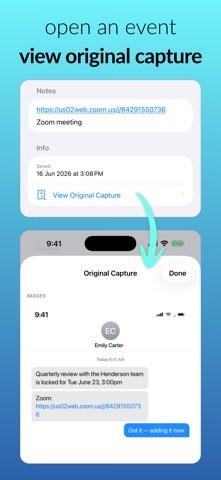
Capture a screenshot, text, photo, or voice note → Aide extracts the title, date, time, place, and contacts → review and save in a tap.
FEATURES
• AI capture from screenshots, text, photos, and voice
• Share straight into Aide from any app
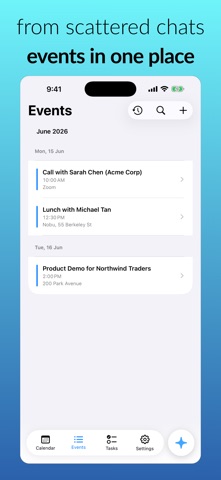
• Events and tasks in one clean calendar
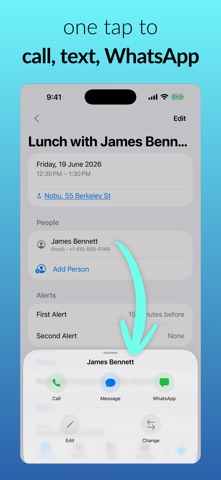
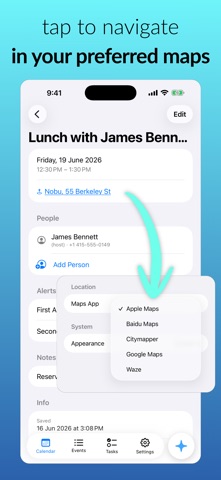
• Auto-detected times, places, and phone numbers — tap to call, message, or get directions
• People linked to your contacts, so you know who each event is with
• Smart alerts, repeating events, and prioritized tasks
• A morning briefing of your day, quiet on days with nothing on
• Home screen widget with what's coming up
• Import Apple Calendar & Reminders — read-only, never changes your other apps
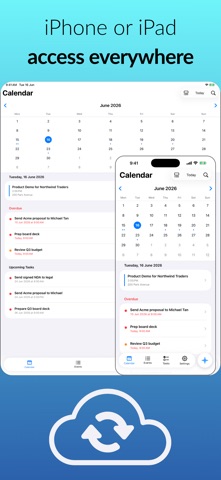
• Secure sync across iPhone and iPad
• Sign in with Apple, Google, or email
• Free to use, with 15 AI captures a month — Pro removes the limit
BUILT FOR BUSY PEOPLE
Client meetings, sales calls, or family plans — what took a minute of typing now takes seconds.
PRIVACY
Your content is used only to create your events and tasks. We never sell it or use it to train AI models.
AIDE PRO
Unlimited AI captures, monthly or annual. Fair-use limits apply — see our Terms. Payment is charged to your Apple ID at purchase and renews automatically unless turned off at least 24 hours before the period ends; manage or cancel anytime in your Apple ID settings.
Terms of Use: https://summercloude.com/terms
Privacy Policy: https://summercloude.com/aide-calendar/privacy-policy
Safety and technology
Found in the app by AppBrain- Price
- Free
- App size
- 5.65 MB
- Content rating
- High
Technologies used by Aide Calendar: AI Planner
Releases
Updates seen on the App Store- Version
- 1.3
- Launched
- July 2026
No changelog data
Alternatives
Similar apps and more from SUMMERCLOUDE PTE. LTD.Alternatives to Aide Calendar: AI Planner


More from SUMMERCLOUDE PTE. LTD.


Rankings
App Store top chartsApp Store Rankings for Aide Calendar: AI Planner
About the app and developer
About Aide Calendar: AI Planner
Aide Calendar: AI Planner is a productivity app developed by SUMMERCLOUDE PTE. LTD.
User Ratings
The app has no ratings yet.
App Information
Aide Calendar: AI Planner is freely available from the App Store. The app size is 5.65 MB. The latest version available is 1.3. The last update was on September 10, 2026.
Technical Requirements
The app has a content rating of High Maturity. The app has been available on the App Store since July 2026.
Developer information for SUMMERCLOUDE PTE. LTD.
Address:
Frequently asked questions about Aide Calendar: AI Planner
Is Aide Calendar: AI Planner free?
Yes. Aide Calendar: AI Planner is free on the App Store.
Is Aide Calendar: AI Planner still available?
Yes. Aide Calendar: AI Planner is on the App Store, and the last update we saw was on September 10, 2026.
How large is Aide Calendar: AI Planner?
Aide Calendar: AI Planner is 5.65 MB.
Is Aide Calendar: AI Planner suitable for children?
App Store gives Aide Calendar: AI Planner a high maturity rating. It is meant for adults.
Who made Aide Calendar: AI Planner?
Aide Calendar: AI Planner was developed by SUMMERCLOUDE PTE. LTD. It is listed in the productivity category on the App Store.
What are the best alternatives to Aide Calendar: AI Planner?
People looking at Aide Calendar: AI Planner also look at these productivity apps: Kanban Lens: Pomodoro & Focus, Familia: Family Planner, Call My Meeting, Calculator with History ⁺, SmartCalendar AI - Photo2Task.